

Run voice chat
Voice chat lets signed-in users open a room, invite others and talk. It is off until you choose how the audio travels. This guide covers that choice, the STUN and TURN servers or the media server each choice needs, and what to know about deployment, privacy and moderation. Every setting named here is described in the configuration reference.
Choose how the audio travels
Section titled “Choose how the audio travels”voice picks one method for the whole instance; every room uses it.
voice |
What carries the audio | Fits |
|---|---|---|
off |
Nothing. The voice chat API answers 404, the web client shows no voice chat, and the other voice_* settings are not checked at start. |
The default. |
p2p |
The participants’ browsers send audio straight to each other. The server relays only the messages that set up the connections. | Small rooms and the cheapest setup: no extra server except an optional STUN or TURN server. |
livekit |
A LiveKit server, self-hosted or LiveKit Cloud. | Larger rooms, and strict control over who can speak. |
sora |
A Sora server, self-hosted or Sora Cloud. | The same, if you already run Sora. |
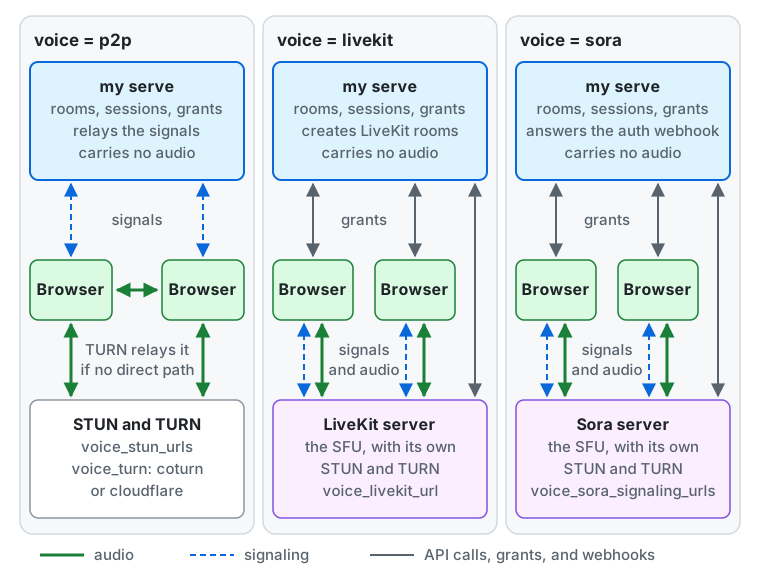
In every method the server (my serve) holds the rooms, who takes part in them and their sessions, and hands each
participant a grant: what the browser needs to connect. It never carries the audio. What differs is where the signaling
(the messages that set up a connection) and the audio go:
p2p. A browser sends its signals (offers, answers and ICE candidates) to the server, which passes them to the other browser over the room’s event stream; a signal waits in the key-value store for at most 30 seconds. The audio goes straight from browser to browser. The grant lists the STUN servers ofvoice_stun_urlsand the TURN server ofvoice_turn(coturnorcloudflare) with short-lived credentials. A browser learns its public address from STUN, and the TURN server relays the audio when the two browsers find no direct path.livekit. The grant holdsvoice_livekit_urland a 60-second access token. The browser sends its signals and its audio to the LiveKit server, which brings its own STUN and TURN and forwards the audio to the other participants (a selective forwarding unit, or SFU). The server creates the LiveKit rooms and changes who may speak through LiveKit’s API, and LiveKit reports joins and leaves to the server with webhooks.sora. The grant holdsvoice_sora_signaling_urlsand a signed join value. The browser sends its signals and its audio to the Sora server, which brings its own STUN and TURN. Sora asks the server’s auth webhook before every connection, the server controls the rooms through Sora’s API, and Sora reports connections with webhooks.
Notes on the choice:
- With
p2pthe audio never passes through this server (it passes through the TURN server when one is used). The server’s load is only the room messages, heartbeats and streams. - A small instance is best served by
p2p, or by the free Build plan of LiveKit Cloud (see LiveKit Cloud). - With
livekitorsora, the STUN and TURN settings and the ICE policy below are not used (the server warns at start if you set them), because the media server brings its own servers. Participants’ IP addresses are then visible only to the media server, not to the other participants. - Serve the instance over HTTPS: browsers allow microphone access only on secure pages.
The limits keep the cost of a paid media server bounded. 0 removes any of them except the last:
| Setting | Default | Meaning |
|---|---|---|
voice_max_room_duration |
4h |
The longest a room stays open. A room that reaches it is ended. |
voice_max_open_rooms |
10 |
How many rooms may be open at once on this server. A room opened for a scheduled time counts from its opening, while it waits for its first participant. |
voice_sfu_max_participants |
10 |
The room size for livekit and sora. |
voice_p2p_max_participants |
10 |
The room size for p2p, from 2 to 50. |
Who may open rooms is the instance setting voice_room_starters (instance settings): by default only holders of the permission start_voice_rooms (the built-in admin role has it); everyone lets every signed-in local user who is not suspended or limited open rooms.
Peer-to-peer rooms
Section titled “Peer-to-peer rooms”Try it with Docker Compose
Section titled “Try it with Docker Compose”To try the voice chat on your machine with the Docker Compose setup (deploy/docker/compose.yaml),
set MY_VOICE=p2p in .env and recreate the server.
cd deploy/dockerdocker compose up -d- Open the instance at
http://localhost:8080(theMY_WEB_ORIGINofexample.env). Browsers let a page use the microphone only onlocalhostor over HTTPS, so an address such ashttp://192.168.1.10:8080cannot speak. - Browsers on the same machine (two browser profiles, or a normal and a private window) connect to each other without a STUN or TURN
server. To reach browsers on other machines, put the instance behind HTTPS and set
MY_VOICE_STUN_URLSin.env. - Only the
adminrole may open rooms by default. Sign in as the administrator you created, or setvoice_room_starterstoeveryoneon the “Voice chat” page of the server settings to let every user open rooms.
Size and bandwidth
Section titled “Size and bandwidth”Two browsers connect to each other when at least one of them is speaking; two people who only listen do not connect.
A speaker therefore sends a separate copy of their audio to every other participant. Speech in Opus takes roughly 30 to 50 kbit/s with overhead, so a speaker in a room of 10 uploads about 9 copies, a few hundred kbit/s,
and a speaker in a room of 50 uploads 49 copies, around 2 Mbit/s, which a phone on mobile data or a home connection may not sustain. The number of connections in a room of N people is at most N(N-1)/2: 45 for 10 and 1,225 for 50.
That is why the default is 10. Raise voice_p2p_max_participants only when your users have the upload bandwidth; use livekit or sora for large rooms.
STUN and TURN
Section titled “STUN and TURN”A browser behind NAT needs a STUN server to learn its public address, and a TURN server to relay the audio when no direct path exists (strict NATs, corporate firewalls, some mobile networks).
voice_stun_urls: comma-separatedstun:orstuns:URLs. Any public STUN server works, and the coturn server below answers STUN too.voice_turn:none,coturnorcloudflare.
With neither, the server warns at start: only browsers on the same network connect. A public instance wants STUN, and TURN for the users who cannot connect directly.
The server hands each participant short-lived TURN credentials, never a shared password. voice_turn_credential_ttl (default 6h) sets how long they last. The web client asks for new credentials ten minutes before they expire and restarts ICE, so a call does not stop when they run out.
coturn
Section titled “coturn”Set voice_turn = coturn, voice_turn_coturn_urls and voice_turn_coturn_secret. The server computes the credentials itself (the username is the expiry time and the session ID, the password is an HMAC-SHA1 of it with the secret), so it makes no request to the TURN server.
Configure coturn to match, in turnserver.conf:
# Time-limited credentials signed with a shared secret.use-auth-secretstatic-auth-secret=<the same value as voice_turn_coturn_secret>realm=turn.example.org
listening-port=3478tls-listening-port=5349# If the host is behind NAT (most cloud VMs), tell coturn its public address.external-ip=203.0.113.10
# Do not let the relay reach your internal networks.no-multicast-peersdenied-peer-ip=0.0.0.0-0.255.255.255denied-peer-ip=10.0.0.0-10.255.255.255denied-peer-ip=100.64.0.0-100.127.255.255denied-peer-ip=127.0.0.0-127.255.255.255denied-peer-ip=169.254.0.0-169.254.255.255denied-peer-ip=172.16.0.0-172.31.255.255denied-peer-ip=192.168.0.0-192.168.255.255denied-peer-ipmatters. Without it, anyone with a credential can use the TURN server to reach hosts on its internal network (cloud metadata services, databases, other VMs). Deny every private, loopback and link-local range; allow an internal address (allowed-peer-ip) only if you really need to relay to it.- Open UDP and TCP 3478, TCP 5349 for
turns:, and coturn’s relay port range (min-port/max-port, by default 49152-65535). - List a
turns:URL or one with?transport=tcpinvoice_turn_coturn_urlsas well, so users on networks that block UDP can still connect. - coturn checks a credential’s expiry only when an allocation is first created. An allocation that already exists keeps working past it, and the new credentials take effect for the next allocation, which the web client creates by restarting ICE.
Cloudflare TURN
Section titled “Cloudflare TURN”Set voice_turn = cloudflare, voice_turn_cloudflare_key_id and voice_turn_cloudflare_api_token, from a TURN key created in Cloudflare’s dashboard. The server asks Cloudflare for each participant’s credentials when they open or join a room (if that fails, the request answers 503 and opens or joins nothing, so it can be tried again) and revokes them when the participant leaves or is removed.
- Credentials last at most 48 hours, so
voice_turn_credential_ttlmay not exceed48h(the server refuses to start otherwise). - Cloudflare disconnects a relay shortly after its credentials expire. The web client renews them before that, so keep
voice_turn_credential_ttlwell above ten minutes. - Pricing, as checked on 2026-10-26: the first 1,000 GB per month are free, then $0.05 per GB sent to clients. Check Cloudflare’s current pricing before relying on it.
Hiding IP addresses
Section titled “Hiding IP addresses”With voice_ice_transport_policy = all (the default) browsers connect directly when they can, so the participants of a room may learn each other’s IP addresses.
With relay, browsers use only the TURN server, so a participant sees the TURN server’s address and not the other participants’. The audio stays encrypted between the browsers. What relay does not hide: whoever runs the TURN server (you, or Cloudflare) sees every participant’s address, and this server sees the address of everyone who calls its API.
relay needs voice_turn to be coturn or cloudflare (the server refuses to start otherwise), and it sends every call through the TURN server, which is your bandwidth with coturn and your transfer bill with Cloudflare.
What P2P cannot enforce
Section titled “What P2P cannot enforce”Only some participants may speak in a room: the hosts and the listeners a host allows. In p2p this is enforced in two places: the server refuses to relay a connection offer that would send audio from someone who may not speak, and the other browsers do not play audio from a participant who is not a speaker.
That stops ordinary users and the official web client, but it is not a complete defense. Two participants with modified clients who work together can still exchange audio: a modified client of someone who may not speak can send it, and a modified client of a receiver can play it, and the server cannot see inside the encrypted media.
If you must guarantee who speaks, for example for moderated public events, use livekit or sora, where the media server itself drops the audio of anyone without permission.
Deployment notes
Section titled “Deployment notes”- Two streams per user: during a call a participant holds the room’s own event stream (Server-Sent Events) in addition to the stream the app always opens. Size connection limits for two long-lived requests per user in a call.
- Several processes: use a shared stream adapter (
streamset topostgres,valkey,snsorpubsub), as for the rest of the app. Withstream = huband aroleother thanall, the server warns at start that voice chat will not work across processes. - Cloud Run: a stream is a request, and CPU is allocated while it is open. When the request timeout cuts it, the client reconnects. Set the timeout as long as you can.
- Media servers need a VM: LiveKit and Sora take audio over UDP in a long-running process. Cloud Run accepts only HTTP requests, so it cannot host them. Run them (and coturn) on a VM, or use LiveKit Cloud, Sora Cloud or Cloudflare TURN.
LiveKit
Section titled “LiveKit”Set voice = livekit and:
| Setting | Value |
|---|---|
voice_livekit_url |
The wss: URL browsers connect to, for example wss://livekit.example.org. |
voice_livekit_api_url |
The https: URL this server calls, when it differs from the one above. By default it is the same host with https:. |
voice_livekit_api_key, voice_livekit_api_secret |
A key pair of the LiveKit server. The secret signs the participants’ access tokens and verifies the webhooks. |
The server creates each room on LiveKit, names it with the room ID, and gives each participant a 60-second access token. A listener’s token cannot publish; a speaker’s can publish a microphone only.
Self-hosted LiveKit
Section titled “Self-hosted LiveKit”In livekit.yaml:
keys: <api key>: <api secret>room: # Rooms are created only by this server. auto_create: false # Audio only. enabled_codecs: - mime: audio/opus - mime: audio/redwebhook: api_key: <api key> urls: - https://<your domain>/voice/webhooks/livekit- The LiveKit server must reach the webhook URL over HTTPS. The server verifies the signature of every webhook with the API secret.
- Webhooks only speed things up. Every minute the server compares the participants of each open room with what LiveKit reports and removes anyone who should not be there, so a webhook lost while the instance was cold is made up.
- To try it on your machine,
livekit-server --devstarts with a fixed development key pair. - A removed participant can rejoin for a short time. Self-hosted LiveKit cannot revoke a token: it keeps sending fresh tokens to connected clients, each valid for up to about 10 minutes. Someone who is removed can therefore rejoin with their latest token for up to about 10 minutes, until the server notices (the join webhook or the one-minute check) and cuts them, and they may be heard for a few seconds to a minute meanwhile. Use LiveKit Cloud if removal must be immediate: it revokes the token at once.
LiveKit Cloud
Section titled “LiveKit Cloud”Use the project’s WebSocket URL, API key and secret, and add https://<your domain>/voice/webhooks/livekit as a webhook endpoint in the project’s settings.
The free Build plan gives 5,000 minutes and 50 GB per month and 100 concurrent connections, as checked on 2026-10-26; check LiveKit’s pricing page for the current plans.
The Sora adapter is tested only against a simulated Sora that follows Sora’s documentation, not against a real Sora server. Try it on a staging instance with a real Sora before you depend on it.
Set voice = sora, voice_sora_signaling_urls (comma-separated wss: URLs browsers connect to), voice_sora_join_secret (at least 32 bytes, for example from openssl rand -base64 32; it signs the values with which participants join) and voice_sora_mode (self_hosted or cloud).
The instance must be served over HTTPS, because Sora calls back to https://<your domain>.
Webhooks
Section titled “Webhooks”Sora calls two endpoints of this server:
| Endpoint | Purpose |
|---|---|
/voice/webhooks/sora/auth |
The auth webhook. Sora calls it before every connection. The server allows it only for a participant who is in the room, not removed, allowed to speak if connecting as a speaker, and within the size limit, and it tells Sora to accept audio only. |
/voice/webhooks/sora/events |
The event and session webhooks (connections created and destroyed, sessions ended). |
The auth webhook must answer in time. Sora waits 5 seconds when self-hosted and 10 seconds on Sora Cloud. The server answers from its own data without calling anything else, but a cold start of the instance (Cloud Run scaling from zero) can exceed that, and the connection is then refused. Keep an instance warm while voice chat is in use.
When self-hosting, set default_duplicate_client_id = evict in sora.conf. A listener who becomes a speaker reconnects under the same identity (Sora cannot change a connection’s role), and evict makes Sora drop the old connection when the new one arrives.
With the default allow, the server cuts the old connection itself once it learns of the new one, so the two overlap for a moment.
Self-hosted Sora
Section titled “Self-hosted Sora”| Setting | Value |
|---|---|
voice_sora_mode |
self_hosted |
voice_sora_api_url |
The https: URL of a reverse proxy in front of Sora’s HTTP API. |
voice_sora_api_header_name, voice_sora_api_header_value |
The header with which the proxy authenticates this server, for example Authorization and Basic .... |
voice_sora_webhook_username, voice_sora_webhook_password |
The Basic credentials of the webhooks. Required. |
Sora’s own HTTP API has no authentication and is meant to listen on the loopback address only. Never expose it. Put a reverse proxy that requires a credential in front of it, and give that credential to this server through the two header settings.
Configure the webhook URLs in Sora with the same Basic credentials. The server accepts only an https: API URL (http: only for localhost) and does not start without the webhook credentials. mTLS is not supported, because Cloud Run and the load balancer in front of ECS end TLS before the server.
Sora Cloud
Section titled “Sora Cloud”Set voice_sora_mode = cloud, voice_sora_cloud_project_id and voice_sora_cloud_api_key. The server signs the access tokens with the key, calls the API with it, and verifies the webhook signatures with it; no Basic credentials are needed.
Behavior to expect
Section titled “Behavior to expect”- A listener who is allowed to speak reconnects automatically as a speaker, so there is a short gap while the new connection starts.
- A speaker whose right is taken away is silenced at once by a forwarding filter, then reconnected as a listener.
Licensing
Section titled “Licensing”Sora is a commercial product of Shiguredo. As checked on 2026-10-26: Sora Cloud has a base fee of ¥5,000 per month and no free period; self-hosting needs a package license, paid in advance for a number of concurrent connections and a period. The product page says it is not offered to companies, organizations or individuals outside Japan, so check that you may buy it before you plan around it. LiveKit is open source when self-hosted.
Ending rooms and records
Section titled “Ending rooms and records”- A moderator who holds
manage_reportscan end an open room for everyone, even while voice chat is off (moderation). - Who took part in a room (participations, speakers and listeners, raised hands, invitations and removals) is kept for
voice_participants_retention_daysdays after the room ends (default 90, at least 30), or as long as a report points at the room. The room’s name, description, hosts and how it ended are kept. The audio, the microphone state and reactions are never recorded. voice_public_summarycontrols whether visitors who cannot join alocalroom see its name and whether it is open, on its page and in its link preview (instance settings).
Notes for users
Section titled “Notes for users”- On an iPhone or iPad, sending audio may stop while the app is in the background, because iOS can suspend a web page that is not in front. Keep the app open on screen during a call.
- The browser asks for permission to use the microphone the first time. If you denied it, allow it again in the browser’s site settings.
- In a peer-to-peer room, other participants may be able to find out your IP address unless the instance routes calls through a relay. Ask the operator if this matters to you.
For LLMs and coding agents:this page as Markdown, llms.txt,llms-full.txt, llms-small.txt