

Plugins
A plugin is a separate program or service that you run, to which the server hands one narrow job over the network. The server only connects to an address: it does not start, stop, or watch the plugin. Run it as a sidecar, under systemd, or on another machine.
Nothing is delegated by default. A server without a plugin address opens no connection and starts no process.
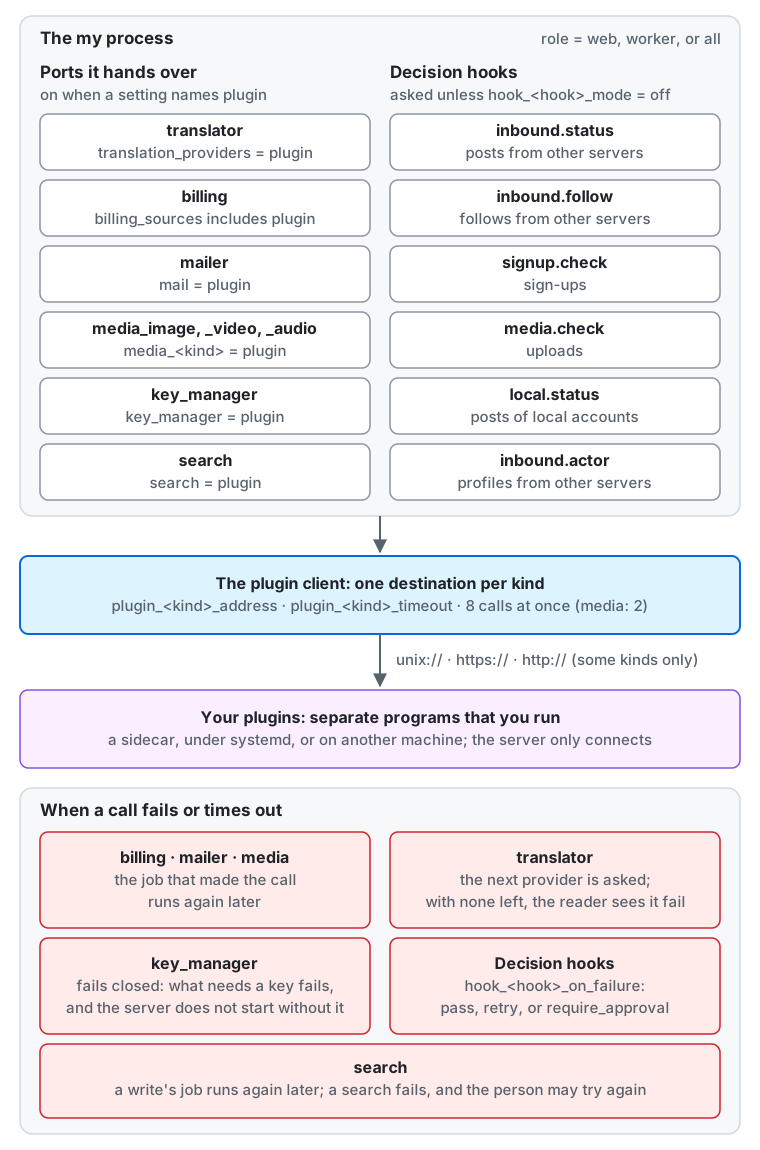
From the top of the diagram down:
- The my process, with any
role, makes two kinds of calls to a plugin.- Ports it hands over: a plugin does a job in place of a built-in part, and each is on only when a setting names
plugin:translator(the instance settingtranslation_providers = plugin),billing(billing_sourcesincludesplugin),mailer(mail = plugin),media_image,media_video, andmedia_audio(media_image = pluginand so on),key_manager(key_manager = plugin), andsearch(search = plugin). - Decision hooks: a plugin answers whether to accept something, and is asked unless the hook’s
mode
hook_<hook>_modeisoff:inbound.statusfor posts from other servers,inbound.followfor follows from other servers,signup.checkfor sign-ups,media.checkfor uploads,local.statusfor posts of local accounts,inbound.actorfor the profiles of accounts on other servers, andlocal.profilefor profile changes of local accounts.
- Ports it hands over: a plugin does a job in place of a built-in part, and each is on only when a setting names
- The plugin client makes every call. Each kind has one destination,
plugin_<kind>_address, and a deadline,plugin_<kind>_timeout, and runs at most 8 calls at once (2 for each media kind). It connects over a Unix socket,https://, or, for some kinds only,http://. - Your plugins are separate programs that you run, as a sidecar, under systemd, or on another machine. The server only connects to them.
- When a call fails or times out (details):
billing,mailer, and the media kinds: the job that made the call runs again later.translator: the server asks the next provider, and when none is left the reader sees that the translation failed.key_managerfails closed: whatever needs a key fails, and the server does not start without the plugin.search: the job of a write runs again later, and a search fails, so the person sees that the search is unavailable.- A decision hook does what
hook_<hook>_on_failuresays:pass,retry, or, for sign-ups,require_approval.
Each kind has its own destination, under the settings plugin_<kind>_*. A dot in the name of a kind becomes _ in the
key, so inbound.status has plugin_inbound_status_address.
| Kind | What it carries | Plain TCP (http://) |
Default protocol | Default deadline |
|---|---|---|---|---|
translator |
The text of a post that a reader asked to translate | Refused | json |
10 s |
search |
The text, author, visibility, and language of public and local posts, and the queries of signed-in people |
Refused | json |
10 s |
billing |
The costs of the instance | Allowed | json |
2 min |
mailer |
Addresses and secrets such as confirmation links | Refused | json |
30 s |
media_image |
Uploaded images, with their metadata, which may hold a location | Allowed | proto |
4 min |
media_video |
Uploaded videos, with their metadata, which may hold a location | Allowed | proto |
4 min |
media_audio |
Uploaded audio files, with their metadata | Allowed | proto |
4 min |
key_manager |
Data-encryption keys in plaintext | Refused | json |
5 s |
inbound.status |
The text of incoming posts | Refused | json |
3 s |
local.status |
The text of local posts | Refused | json |
1 s |
local.profile |
The public profile of local accounts, without images | Allowed | json |
1 s |
inbound.follow |
The two parties of a follow | Allowed | json |
3 s |
inbound.actor |
The public profiles of accounts on other servers | Allowed | json |
3 s |
signup.check |
Email addresses and IP addresses | Refused | json |
2 s |
media.check |
A small processed version of the media, never the original | Allowed | json |
10 s |
The settings that make the server use a destination belong to each feature: the last five kinds of the table are the decision hooks. This page covers what they share.
The server sends at most a kind’s fixed limit per message and reads at most another. A call over the limit fails, and the job that made it retries.
The destination
Section titled “The destination”The settings exist only in the configuration file and the environment (configuration reference). No instance setting, admin page, or API can show or change them, so a stolen administrator account cannot redirect posts or keys. A change takes effect on restart.
plugin_<kind>_address has one of three forms. The server checks the form at start without resolving the name, and
resolves the name for each connection.
unix:///run/my/mailer.sock: a Unix socket.https://mailer.internal:8443: TLS over TCP. The server always verifies the certificate, againstplugin_<kind>_tls_ca_fileor the system’s roots, and no setting turns that off.http://billing.internal:5000: plain TCP.
Authentication
Section titled “Authentication”Choose one:
- A Unix socket: the permissions of the socket’s file protect it.
- mTLS:
plugin_<kind>_tls_cert_fileandplugin_<kind>_tls_key_file, with anhttps://address. - A bearer token:
plugin_<kind>_token(orMY_PLUGIN_<KIND>_TOKEN_FILE), sent asAuthorization: Bearer, overhttps://or a Unix socket only. A token with anhttp://address is a configuration error.
An https:// address with neither a token nor a client certificate starts with a warning, since the plugin cannot tell
the server from anyone else who reaches it.
The server reads the files of plugin_<kind>_tls_ca_file, plugin_<kind>_tls_cert_file, and
plugin_<kind>_tls_key_file at start, where a missing or unreadable file stops it. After that it looks at them again
for a change at most every 5 seconds, when it opens a new connection, so a short-lived certificate or a CA that a
certificate manager such as Vault, cert-manager, or SPIFFE renews in place works with no restart. Connections already
open keep the certificate they started with until they close. While a renewal is half written, such as a new
certificate whose key is not in place yet, the server keeps the files it read last and tries again on the next
connection. The token is read at start only.
Plain TCP
Section titled “Plain TCP”mailer, key_manager, translator, search, inbound.status, local.status, and signup.check refuse http://: the server does not start. That holds on
loopback too (http://127.0.0.1), since a loopback address does not keep other processes on the host from reading the
traffic. Put such a sidecar on a Unix socket in a shared volume.
The other kinds accept http://, and the server logs a warning at start that names the kind and the address. Nothing
encrypts or authenticates that traffic, and no bearer token can be used over it. Keeping that network closed is your
responsibility: what the table above lists crosses it in the clear.
Protocols
Section titled “Protocols”plugin_<kind>_protocol says what the server sends, and it must be what the plugin accepts.
| Value | The server sends | For |
|---|---|---|
json |
Connect’s unary protocol with application/json, over HTTP/1.1 on plain connections |
A plugin built on a Connect library, or on an HTTP server and a JSON library alone |
proto |
Connect’s protocol with application/proto |
A plugin built on a Connect library |
grpc |
gRPC over HTTP/2 | A plugin that speaks only gRPC |
A plugin answers the wrong protocol with 415. The media kinds stream both ways, which needs HTTP/2, so they take proto
or grpc and json is a configuration error.
The protocol’s definitions are the .proto files under api/plugin/ of the repository. There is one package for each
kind of port, and they share no types; the decision hooks all share one package, my.plugin.hook.v1.
The plugin protocol has the reference of every package, generated from those files.
When a call fails
Section titled “When a call fails”A call waits for its turn among the calls of its kind that run at once, and the wait counts in its deadline and in the
metric my.plugin.slot_wait. A call that fails counts in the metric my.plugin.failures by kind and Connect code. The server drops the
message that a plugin puts in an error, so a plugin’s failures have their reasons in the plugin’s own log. The server
does not retry a call itself: the job that made it does, so a plugin must cope with the same call twice.
A plugin that is down when the server starts stops nothing, except key_manager: the server does not start without it, and
what stops without it is a part of its setup to read first.
A call has the deadline of plugin_<kind>_timeout, and a plugin receives it as Connect-Timeout-Ms (grpc-timeout on
gRPC). A plugin may ignore that header: the server stops waiting anyway. The deadline must stay below 30 seconds for the
kinds that a request can wait for (key_manager, translator, search, signup.check, media.check, local.status, inbound.actor, and local.profile), and
below 5 minutes, how long a job may run, for the others.
Test a plugin
Section titled “Test a plugin”my plugin test runs the contract of a kind against a running plugin and reports each case. It reads no configuration,
so all it needs is the my binary.
my plugin test --kind probe unix:///run/my/plugin.sockmy plugin test --kind probe --protocol grpc --tls-ca-file ca.pem --token-file token https://plugin.internal:8443PASS reachablePASS echoFAIL echo_empty: the outcome is OUTCOME_UNSPECIFIED, not OUTCOME_OK2 passed, 1 failed, 0 skippedThe exit code is 1 when a case fails. The flags mean what the settings mean: --protocol, --token-file, --tls-ca-file,
--tls-cert-file, --tls-key-file, and --timeout. It applies the same rules as the server, so --kind mailer refuses an
http:// address. The plugin under test can be a real one, so a case that does more than the call itself runs only when
a flag asks for it. A kind whose contract the version does not have yet reports reachable and a SKIP.
--kind billing checks only that the plugin refuses to spend anything when no billed request is allowed. --billed also
makes a real fetch of the current and the previous month, and checks the answer as an import does; it may cost money at
the providers behind the plugin. Importing cloud usage costs has the
contract of the kind.
--kind mailer makes no call of the RPC unless --mail-to names a recipient. With it, the command sends one real message there,
from --mail-from (default: the same address), and checks that the plugin refuses a request with no recipient.
Sending email has the contract of the kind.
--kind translator sends a few fixed English sentences, translating them to Japanese (--translate-from and --translate-to
choose another pair for a plugin that has only some). A service behind the plugin that bills per character bills these too,
about 200 characters. It checks the form of the answers, and that the plugin refuses the language qaa, a code that ISO 639
leaves for private use. It cannot judge the words, so read a translation of the plugin yourself.
Translating posts has the contract of the kind.
--kind search searches, and writes and removes only documents of its own: a few with IDs that no post has, of an
author that no account is, holding a word made for the run, which it removes at the end. It checks that a query with no
word finds nothing, that a query in the query language of an engine or in Japanese does not fail, that the plugin refuses a
cursor it did not issue, and that documents are found newest first, page by page, replaced, and removed by post and by
author. --clear-index also runs the cases that remove every document of a visibility and the whole index: use it only
against an index for testing. Searching posts has the contract of the kind.
--kind media_image, --kind media_video, and --kind media_audio send only small test files that they make themselves:
a photo, an emoji, and an animated GIF, an MP4 with a video and a sound track, or an MP3. Each one hides a location or a
title in its metadata, and a case fails when that comes back in an output. They check every output as the server does.
Converting media has the contract of the kinds.
--kind key_manager runs the checks the server runs at each start, and checks that the plugin refuses a changed value and a
KEK it does not hold. It sends only keys it makes up and throws away, so it is safe against a real key store, which may bill
the calls. It checks that the answers have the right form, not how the plugin keeps its KEK.
Managing the key has the contract of the kind.
probe is the smallest kind, and the server delegates nothing to it. Serve it first, to check the transport, the
protocol, and the authentication before you write the rest of the plugin.
Translating posts
Section titled “Translating posts”A plugin of the kind translator lets the server translate a post when a reader asks, through a service you choose
other than the built-in providers (LibreTranslate, DeepL, Google Cloud Translation, and Amazon
Translate). Without a server-side provider, the only translation is the one built into the reader’s browser, which exists
only in desktop Chrome, Edge, and Opera: readers on a phone, in Firefox, or in Safari get no translate button until you
enable one.
MY_PLUGIN_TRANSLATOR_ADDRESS=unix:///run/my/translator.sockMY_PLUGIN_TRANSLATOR_NAME="Our translator" # what readers see next to a translation- Set
plugin_translator_addressandplugin_translator_name, and restart. The name is required, since readers trust a translation according to where it comes from. The address never leaves the configuration. - Update your privacy policy, and name the service behind the plugin as a translation service: what the plugin passes on is what it receives.
- Enable it with the instance setting
translation_providers = plugin. A change takes effect at once.
Having an address enables nothing: until the setting names plugin, the server sends nothing and readers see no button.
The plugin is one provider like any other. translation_provider_visibilities decides what it may
receive, the monthly limits count what it is sent, and a translation it made stays in the server’s cache like another.
With translation_reports_to_server on, it also receives what moderators ask to translate in a report, by the same visibilities.
It can come before or after another provider in the order of translation_providers.
What the plugin receives
Section titled “What the plugin receives”The plugin receives the text of a post when a reader asks for a translation: its body, content warning, poll options, and image descriptions, and the language of the text and the language to translate into. It does not receive the post’s address, its author, the reader, mentions, hashtags, links, custom emoji, or code: numbered markers stand in for them.
By default that is public, local, and unlisted posts. private and direct posts reach the plugin only when you allow
them, with translation_provider_visibilities = plugin=public|local|unlisted|private|direct. Then the plugin, and any
service behind it, reads text that the author meant for few people, so allow them only if you control where the text goes,
and say so in your privacy policy. The server cannot recall text it has sent.
The server refuses http:// for this kind, also on loopback, because the text is the text of posts. Use a Unix socket or
https://.
An LLM behind a plugin
Section titled “An LLM behind a plugin”The server has no LLM provider and offers none, on purpose. Anyone can write a post, so the text to translate is a way to give an LLM instructions (a prompt injection), and readers take a translation for what the post says. Sanitizing protects the HTML of a page: it cannot stop a translation from saying something that the post does not say.
The server cannot see what a plugin calls. If your plugin uses an LLM, this risk and its consequences are your own responsibility.
The contract
Section titled “The contract”The RPC is Translate of my.plugin.translator.v1.TranslatorService:
POST /my.plugin.translator.v1.TranslatorService/TranslateContent-Type: application/json
{"fragments":["Good morning ⟦1⟧, this is ⟦2⟧important⟦/2⟧.","⟦3⟧"],"sourceLanguage":"en","targetLanguage":"ja"}
HTTP/1.1 200 OKContent-Type: application/json
{"outcome":"OUTCOME_OK","translations":["⟦1⟧さん、おはようございます。これは⟦2⟧重要⟦/2⟧です。","⟦3⟧"],"detectedLanguage":"en"}sourceLanguageis a BCP 47 tag, orundwhen the server does not know the language. The plugin then detects it and reports it indetectedLanguage, or answersOUTCOME_UNSUPPORTED_LANGUAGE.detectedLanguagemay be missing when the plugin has nothing to add, and the server ignores a value that is no language tag.translationshas one entry per fragment, in the order of the fragments, none of them empty. A fragment can be nothing but markers, and its translation is then those markers.⟦1⟧stands for one item or opens a pair that⟦/1⟧closes. Each marker of a fragment comes back exactly once in its translation, unchanged. Items may move as word order requires, but a pair stays open before it closes, and pairs nest.- A translation is plain text. The server escapes any markup in it, and sanitizes the result before it stores or shows it.
outcome |
Meaning | What the server does |
|---|---|---|
OUTCOME_OK |
The translations are in the response | Checks them, stores them, and answers the reader |
OUTCOME_TEMPORARY |
The service failed or did not answer | Tries the next provider |
OUTCOME_PROVIDER_LIMIT |
The service reports its own rate limit or quota | Tries the next provider |
OUTCOME_UNSUPPORTED_LANGUAGE |
The service does not have the source or target language, or cannot detect it | Tries the next provider, and tells the reader if none has it |
An answer that breaks these rules counts as OUTCOME_TEMPORARY and nothing of it is stored, like a missing or unknown
outcome and a failed call. When no provider answers, the reader sees that the translation failed and the post stays as it is, unless
translation_browser is on and the reader’s browser can translate the post: the web client then translates it there.
The characters of each call count against the monthly limits, also of a call that fails, since the service may have received them.
The server stops waiting after plugin_translator_timeout, and after 20 seconds whatever that setting says. All the
providers of one request get 45 seconds in all. It does not retry a
failed call, and the same fragments can come again for another reader.
Searching posts
Section titled “Searching posts”A plugin of the kind search keeps the index of the full-text search of posts in an engine that the server
has no built-in support for, such as Groonga or PGroonga, an index built with Sudachi, Typesense, Manticore, or a hosted
search service. To the server it is one more engine: the same posts go into the index, the same jobs keep it up to date,
and the server still decides what each person may see.
MY_SEARCH=pluginMY_PLUGIN_SEARCH_ADDRESS=unix:///run/my/search.sock- Run the plugin, and check it with
my plugin test --kind search. - Set
search = pluginandplugin_search_address, and follow Turning it on, as for any engine: the index fills from then on, andmy search rebuildadds the existing posts. - If the plugin sends the posts to a service of another company, name that service in your privacy documents.
The server opens no connection at start, so a plugin that is down stops nothing but the search. To move to or from the plugin, follow Switching off or changing the engine.
What the plugin receives
Section titled “What the plugin receives”- The posts of the index. For each post that the index holds, the plugin receives its text (the body, the content
warning, and the image descriptions, as plain text), its ID, the account ID of its author, its visibility, its language,
and when it was published. Those are
publicandlocalposts only, assearch_visibilitiessays, of authors who allow search.localposts are meant for the accounts of this server alone: the plugin, and any service behind it, reads them too.unlisted,private, anddirectposts never reach it. - The queries. When a signed-in person searches posts, the plugin receives what they typed, with the cursor of the page and the number of results. It does not receive who searched.
- The removals: of a post, of every post of an account, of every post of a visibility, and of the whole index.
The plugin returns post IDs only. The server reads each post again from its database and shows only what the person may see now, so a plugin cannot show a post to anyone who may not see it, and an index that lags behind only finds less. The server also never shows a plugin’s errors to anyone.
The server refuses http:// for this kind, also on loopback, because it carries the text of posts and what people search
for. Use a Unix socket or https://.
The contract
Section titled “The contract”The service is my.plugin.search.v1.SearchService, with one RPC per operation:
| RPC | What it does |
|---|---|
Replace |
Adds the document of a post, or replaces the document with the same statusId |
Remove |
Removes the document of a post |
RemoveByAuthor |
Removes every document of an account |
RemoveByVisibility |
Removes every document of a visibility, VISIBILITY_PUBLIC or VISIBILITY_LOCAL |
Clear |
Removes every document; the index takes documents again afterwards |
Search |
Returns one page of the IDs of the documents that a query finds, newest first |
POST /my.plugin.search.v1.SearchService/ReplaceContent-Type: application/json
{"document":{"statusId":"019a5f3e-8b2c-7d41-9a3e-2f6c1b8d4e07","authorId":"0199c2d4-1e5f-7a3b-8c9d-0e1f2a3b4c5d","visibility":"VISIBILITY_PUBLIC","language":"ja","publishedAt":"2026-11-07T05:12:30Z","text":"週末に図書館で全文検索の本を読んだ"}}
HTTP/1.1 200 OKContent-Type: application/json
{"outcome":"OUTCOME_OK"}POST /my.plugin.search.v1.SearchService/SearchContent-Type: application/json
{"text":"全文検索","limit":1}HTTP/1.1 200 OKContent-Type: application/json
{"outcome":"OUTCOME_OK","statusIds":["019a5f3e-8b2c-7d41-9a3e-2f6c1b8d4e07"],"nextCursor":"019a5f3e-8b2c-7d41-9a3e-2f6c1b8d4e07"}- A query is plain text. The plugin splits it into words and finds the documents with every word. It never reads the text as the query language of its engine: an operator, a wildcard, a quote, or a field name in it is just text. A query with no word finds nothing. How the plugin finds words in Japanese and other languages written without spaces is its own choice, and the reason to have one.
- A page is newest first.
statusIdsare in descending order, each at most once,limitof them at most, and each a status ID as the server sent it (36 lowercase characters). The IDs are UUIDv7, so their order as strings is the order of time. - The cursor is the plugin’s.
nextCursoris empty on the last page, and otherwise at most 256 bytes of printable ASCII with no space, such as the last ID of the page. The server sends it back unchanged for the next page, which goes on after that ID even when documents came and went. A page that is not the last may hold fewer thanlimitIDs. A cursor that the plugin did not issue getsOUTCOME_INVALID_CURSOR. - A write shows in the next search, and every call may come twice: removing what is not there succeeds. An engine that shows writes only after a refresh makes the plugin wait for it.
outcome |
Meaning | What the server does |
|---|---|---|
OUTCOME_OK |
The call did what it asks | Applies the view policy to the IDs of a page |
OUTCOME_FAILED |
The engine failed or did not answer | Retries a write with its job; fails a search, which the person may try again |
OUTCOME_INVALID_CURSOR |
Search only: the cursor is not one the plugin issued |
Tells the client that its cursor is wrong |
A missing or unknown outcome, a failed call, and a page that breaks these rules count as OUTCOME_FAILED, and nothing
of such a page is shown. A call lasts plugin_search_timeout (10 seconds by default) at most, and 10 seconds whatever that
setting says.
Converting media
Section titled “Converting media”A media plugin does the heavy part of processing uploads, so that it can run on another machine. There are three kinds, and you choose each one on its own:
media_imagere-encodes images into their variants.media_videoremuxes videos: files with a video track, with or without sound.media_audioremuxes audio-only files.
The server still does the rest itself. It detects the format of each upload, tells videos from audio files, checks each
upload against the limits when it arrives, and makes the previews of remote media. A kind whose setting stays native is
processed in the server.
# Only videos go to a plugin, on a machine of its own; images and audio stay in the server.MY_MEDIA_VIDEO=pluginMY_PLUGIN_MEDIA_VIDEO_ADDRESS=https://media.internal:9000Set media_<kind> = plugin and plugin_media_<kind>_address for each kind you hand over, and restart. One plugin may
take more than one kind: give it the same address for each. Each kind runs two calls at once at most, and each call lasts
plugin_media_<kind>_timeout (4 minutes by default) at most, so a slow video does not hold up the images.
- Removing metadata is the plugin’s job. The uploads reach the plugin as they were sent, with their EXIF data and
tags, which may hold where a photo was taken. The server checks the format and the size of every output, but it cannot
tell that every trace of metadata is gone.
my plugin test --kind media_imagechecks that the location of its test files does not come back; check the rest in the plugin. - Plain TCP sends the uploads unencrypted. The media kinds accept
http://, with a warning at start. Uploads, with their metadata, then cross the network in the clear, and nothing authenticates either end: anyone on that network can read them or answer for the plugin. Use a Unix socket orhttps://unless the network is yours alone. - The server does not trust the output. It detects the format of each output from its content, never from what the plugin declares, and serves it with the content type and file extension of that format. It decodes each output under the same limits as an upload, and checks that it fits its size. An output that is larger than declared or than those limits, of a format the plugin did not declare, or of a format the variant does not take, fails the upload as a file the server cannot process.
- A failure is a delay. When the plugin is down or fails, the job retries later, as with the built-in processor. An action that needs a custom emoji’s image at once, such as copying a remote emoji or accepting a request for one, fails while the plugin does.
The contract
Section titled “The contract”The service is my.plugin.media.v1.MediaService, with the RPCs Process for an image and Remux for a video or audio file.
Both stream both ways, so the plugin needs a Connect or gRPC library and HTTP/2: proto or grpc, over TLS with ALPN
h2, or over cleartext HTTP/2 (h2c) on a Unix socket or plain TCP.
A call is half-duplex:
- The server sends a
head: the limits, and for an image its purpose, the boxes of its three sizes, and its focal point. The file follows inchunkmessages of 1 MiB at most. The server then closes its side. - The plugin answers with a
headwhoseoutcomeis the result. WithOUTCOME_OK, the head ofProcessalso holds the dimensions of the image after its EXIF orientation and the blurhash of the small still output. - For each output, the plugin sends a
part, which names the output and declares its format, dimensions, and length, followed bychunkmessages of 1 MiB at most.
Process returns the small, medium, and large still outputs, and the three moving ones of an image of more than one
frame. The small and medium outputs are WebP; the large still one is a JPEG or a PNG (always a PNG for a custom emoji),
and the large moving one a GIF. Remux returns the file in its own container without metadata, and the cover picture it
embeds, if any. The server reads at most twice the image limit from Process, and from Remux the video limit for the
file and the image limit for its cover.
outcome |
Meaning | What the server does |
|---|---|---|
OUTCOME_OK |
The outputs follow | Checks them and stores them |
OUTCOME_TEMPORARY |
The plugin failed | Retries the job later |
OUTCOME_UNSUPPORTED_FORMAT, OUTCOME_UNSUPPORTED_CODEC, OUTCOME_TOO_LARGE, OUTCOME_DIMENSIONS, OUTCOME_CORRUPT, OUTCOME_TOO_LONG |
The file is not acceptable | Marks the upload as failed |
A missing or unknown outcome and a failed call count as OUTCOME_TEMPORARY.
A plugin with no library
Section titled “A plugin with no library”With json, a plugin needs an HTTP server and a JSON library alone. An RPC is a POST to
/<package>.<Service>/<Method> with Content-Type: application/json, and the plugin answers 200 with a JSON object:
POST /my.plugin.probe.v1.ProbeService/EchoContent-Type: application/jsonConnect-Protocol-Version: 1
{"payload":"AP8=","number":"9007199254740993"}
HTTP/1.1 200 OKContent-Type: application/json
{"outcome":"OUTCOME_OK","payload":"AP8=","number":"9007199254740993"}The JSON follows proto3’s standard mapping:
- An
int64is a decimal string,bytesare base64, and an enum is its name. - A field at its zero value may be missing, in both directions. A plugin must read a missing field as zero.
- The server ignores fields it does not know.
- A result is the
outcomeof the response. A missing or unknownoutcomeis a failure, never a success. - A plugin that fails answers an HTTP error, or Connect’s
{"code":"unavailable"}with the matching status. The job retries.
Connect-Timeout-Ms and Connect-Protocol-Version may be ignored.
For LLMs and coding agents:this page as Markdown, llms.txt,llms-full.txt, llms-small.txt