

Account and domain actions, and handling reports
How operators and moderators act on accounts and domains, decide appeals, handle reports, check what reached a remote server, and read the audit log.
Everything here except account management and checking deliveries (admin API only) can be done through the admin API (/api/v1/admin/..., scopes admin:read / admin:write) and the CLI (my admin account action / my admin domain / my admin report / my admin appeal).
The admin API requires role permissions: account management, actions and appeals need manage_accounts, domain actions need manage_domains, and reports need manage_reports.
The CLI connects to the DB directly with the same configuration as the server (-config or environment variables) and does not record which user operated it (issued_by_user_id and similar fields are NULL, and the actor in the audit log is cli).
From a report to an action and an appeal
Section titled “From a report to an action and an appeal”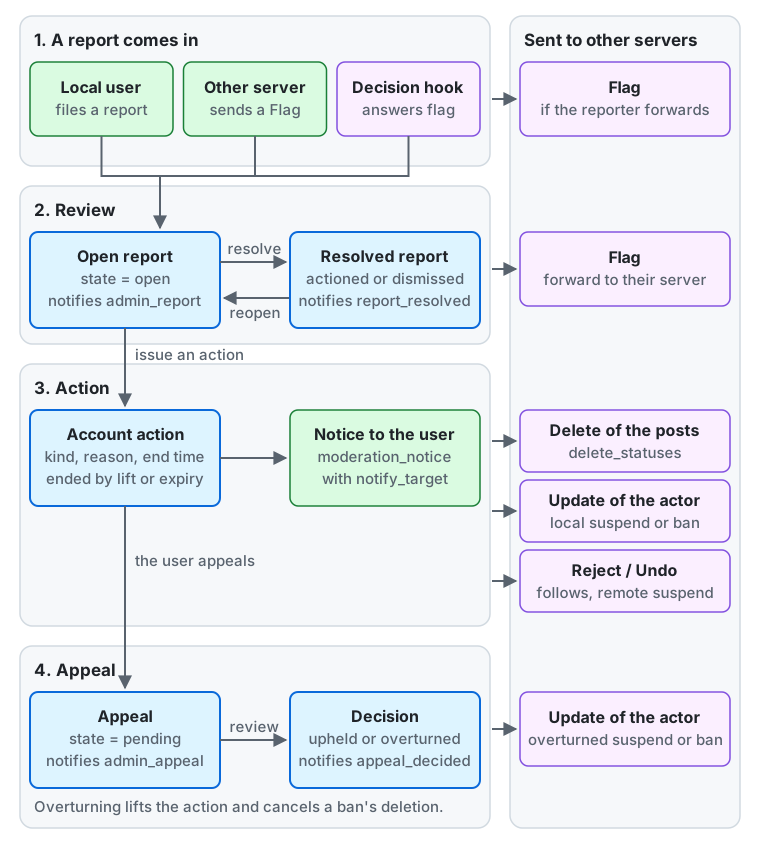
From the top of the diagram down:
- A report comes in. A local user files one, another server sends a
Flag(dropped when its domain hasreject_reports, see domain actions), or a decision hook answersflag(reports that an external review filed). A local user who reports an account on another server can choose to forward the report, which sends aFlagto that server at once. - Review. The report is
open, and the moderators get anadmin_reportnotification. Resolving it makes itresolvedwith the outcomeactionedordismissed, and a local reporter gets areport_resolvednotification. Reopening puts it back toopen. Forwarding a report about an account on another server sends aFlagto that server (reports). - Action. A moderator issues an account action from the report, which resolves the report as
actioned; an action can also be issued without a report. The action has a kind, a reason, and an end time, and ends when it is lifted or expires. Withnotify_target, the user gets amoderation_noticenotification (what the user sees). Other servers receive aDeleteof the posts fordelete_statuses, anUpdateof the actor when a local account’ssuspendorbanstarts or ends, and aReject/Undoof the follows that a remote account’ssuspendcuts. - Appeal. The local user appeals the action. The appeal is
pending, and the moderators get anadmin_appealnotification. The decision isupheldoroverturned, and the user gets anappeal_decidednotification. Overturning lifts the action and cancels the deletion of aban, so an overturnedsuspendorbanof a local account sends anUpdateof the actor (appeals).
Assignments, notes, notices, and appeals stay on this server; only the activities in the right column leave it.
Moderation and server administration in the web client
Section titled “Moderation and server administration in the web client”The web client splits the staff screens in two. The navigation shows “Moderation” and “Administration” only to people whose role has at least one permission of that group. Every screen shows only a reason to people without the permission, and the server rejects their requests too.
| Group | Permissions | Screens |
|---|---|---|
Moderation (/moderation) |
manage_reports, manage_accounts, manage_domains, manage_invites, view_audit |
Reports (/moderation/reports), Appeals (/moderation/appeals), Registrations (/moderation/registrations), Automated reviews (/moderation/hook-decisions), Accounts (/moderation/accounts), Sign-up blocks (/moderation/signup-blocks), Invites (/moderation/invites), Domain actions (/moderation/domain-actions), Remote servers (/moderation/instances), Audit log (/moderation/audit-log) |
Server administration (/admin) |
manage_settings, manage_rules, manage_roles, manage_jobs, manage_login_recovery, manage_custom_emojis, manage_webhooks, manage_announcements, manage_finance, manage_supporters, manage_oauth_apps, manage_service_closure, manage_errors, manage_login_providers |
Server settings (/admin/settings), Rules (/admin/rules), Terms and policies (/admin/documents), Link card domains (/admin/link-card-domains), the job queue and failed jobs (/admin/jobs), Errors (/admin/errors, manage_errors), UX measurements (/admin/ux-measurements, manage_errors), Custom emoji (/admin/custom-emojis), Announcements (/admin/announcements), Webhooks (/admin/webhooks), Costs and income (/admin/finance, manage_finance), Supporters (/admin/supporters, manage_supporters). manage_login_recovery (login recovery: removing two-factor authentication and issuing a password-reset link) and manage_roles (granting and revoking an account’s roles) appear as sections of an account’s Management page (/moderation/accounts/{id}/manage, which also needs manage_accounts) |
- The badge on “Moderation” is the total of open reports, registrations waiting for approval and appeals waiting for review (notifications for moderators and the pending counts). “Administration” shows no count.
- Each group opens on a list of its screens that your role’s permissions open, each with a line of what it holds and, for a queue, how many things wait there (Reports counts the open reports, Appeals those waiting for review, Registrations those waiting for approval, Custom emoji the requests waiting for review, Errors the open errors); a group none of whose screens is open to you says why. An address of a screen your role does not open says so, with a link to the group’s list.
- The built-in
moderatorhas onlymanage_reports,manage_accountsandview_audit, and does not see “Administration”. It also does not see the Domain actions and Remote servers screens (manage_domains), so to delegate those, create a role with that permission and grant it (granting and revoking roles). - The admin API paths stay
/api/v1/admin/...whatever the group, and the scopes are the same pairadmin:read/admin:write. The groups are separated by tags in the API reference (admin-moderation,admin-server). A service outside the server can call the operations of one permission with a permission scope instead (letting another service use the admin API). - There is a third group of permissions, “user features” (
view_finance,create_custom_emojis,start_voice_rooms,create_invites,keep_posts_longer,create_articles,create_events), which lives outside the staff screens. Someone who has only these permissions sees neither “Moderation” nor “Administration”, and for someone withview_financethe navigation shows “Finances” (/finance) after Settings. Its API is in the user namespace (GET /api/v1/finance/cost_totalsandGET /api/v1/finance/income_totals, scoperead:finance) and needs noadmin:*scope. What it shows is set byfinance_viewer_*in the instance settings.
Letting another service use the admin API
Section titled “Letting another service use the admin API”A service that you run beside the server, one that hands out invites or records costs, say, can call the admin API for one permission without a plugin.
- Sign up an account for the service, and grant it a role with only the permissions the service needs (for invites, a role with
manage_invites; granting and revoking roles). - Signed in as that account, register an app in Settings → Apps → Your apps whose scopes include the permission scope,
admin:and the permission:admin:manage_invites. - Issue a token to the account from the app, with that scope, and give the service the access token and the refresh token.
- The token reaches only the operations of the permissions its scopes name, and only while the account’s roles keep them; the audit log records what it does as the account’s actions.
- The access token lasts one hour. The service refreshes it with the refresh token and keeps the new refresh token each time: an old one used again revokes the token.
manage_roles,manage_oauth_apps,manage_login_recovery,manage_login_providersandmanage_service_closurehave no permission scope, and no app can ask a staff member for one on the consent screen.- To stop the service, revoke the app’s tokens or delete the app, take the role away, or disable the app in Administration → OAuth apps.
Account actions
Section titled “Account actions”An action is applied to the restriction projection (account_restrictions) in the transaction that records it, and takes effect from the next request.
| Kind | Effect on a local account |
|---|---|
warn |
No restriction (only informs the user) |
force_sensitive |
Shows all attachments as sensitive |
limit |
Treats posts (including past ones) as followers-only and keeps them off the public timelines |
restrict_posting |
Forbids posting, replying, boosting and editing |
restrict_interaction |
Forbids following, favoriting, boosting and replying |
disable_login |
Forbids use of the app and the API, and revokes active sessions and tokens (the sign-in page still lets the user see the action) |
suspend |
Applies all the restrictions above, and hides the profile and posts from everyone but the user |
ban |
Applies the same restrictions as suspend and deletes the account after 30 days. It cannot be lifted (it is canceled only when an appeal made during those 30 days is overturned) |
delete_statuses |
Deletes the given posts. They become invisible even to the user, and the server sends other servers the same Delete as when the user deletes them |
mark_statuses_sensitive |
Shows the attachments of the given posts as sensitive |
For a remote account you can issue only limit, suspend and force_sensitive (any other kind gives 422 in the admin API and fails in the CLI).
The effect is local to this server. The only things sent to the other server are the Reject / Undo of follows cut by suspend.
| Kind | Effect on a remote account |
|---|---|
force_sensitive |
Shows all attachments as sensitive |
limit |
Treats posts (including past ones) as followers-only, keeps them off the public timelines, and creates no notifications for users who do not follow the account |
suspend |
Drops everything received from the account and hides its profile and posts. Cuts follows between the account and local users in both directions (follow requests too), and sends the other server a Reject of the account’s follows and an Undo of the users’ follows. Lifting it brings back the display and the server receives from the account again (what was dropped and the follows that were cut during the suspension do not come back) |
notify_target(-no-notify) has no meaning for a remote account (no notification reaches it).- A local user who lost follows to a
suspendgets one notification (relationships_severed) that tells how many followers and follows were lost (severed follows). - Issuing and lifting are recorded in the audit log, as with actions on local accounts.
my admin account action issue -kind suspend -category spam -public-reason "spam" -duration 720h @alicemy admin account action issue -kind limit -report <report id> @bob@remote.examplemy admin account action issue -kind delete_statuses -status <status id> -status <status id> @alicemy admin account action issue -kind ban -category legal -public-reason "illegal content" @alicemy admin account action list -active @alicemy admin account action lift -reason "appealed" <action id>In the admin API: POST /api/v1/admin/accounts/{id}/actions (the body has kind, reason_category, public_reason, private_note, report_id, notify_target, expires_in in seconds and status_ids),
GET /api/v1/admin/accounts/{id}/actions (filter with active), GET /api/v1/admin/account_actions/{id}, and POST .../{id}/lift (the body {"reason": "..."} is optional).
- Name an account with
@username(local),@username@domain(remote) or the account ID in the CLI, and with the account ID in the admin API. - Several actions stack (the union of their restrictions). Lifting removes only that action’s restrictions, and an action with an end time ends by itself at that time (shown as
expiredin lists). An end time is at most ten years away (expires_inup to 315360000); a longer one is refused with422. - Sessions and tokens that
disable_login,suspendandbanrevoked do not come back when you lift the action. The user signs in again. - A
suspendorbanof a local account sends an ActorUpdatewith an emptied profile to the followers’ servers and to known servers to show the suspension (Mastodon shows it as “suspended”). Lifting and expiry send anUpdatewith the original profile. Expiry is sent by a job that runs every 5 minutes, so it can be up to 5 minutes late. delete_statusesandmark_statuses_sensitivetake 1 to 100 undeleted posts of the target account through-status(status_ids). They cannot have an end time. Liftingdelete_statusesdoes not bring back the deleted posts. Liftingmark_statuses_sensitiverestores the original display.- A
bancannot have an end time and cannot be lifted. It is canceled only when an appeal the user made during the 30 days before deletion is overturned (appeals). When in doubt, use asuspendwith an end time. Thirty days after the action, a job that runs every hour deletes the account (the account and posts disappear from view, and the server sends aDeleteto other servers). report_id(-report) can name only a report about the target account. An open report is resolved asactionedtogether with the action (the resolution is also in the audit log). A resolved report does not change.public_reasonis the reason shown to the user andprivate_noteis a note for moderators only.notify_target(true by default; false with-no-notifyin the CLI) decides whether the user is informed.
What the user sees
Section titled “What the user sees”- An action with
notify_targettrue reaches the user as a notification (moderation_notice). It carries the kind, the reason category,public_reason, the end time and the state. The kind and the category also come back as display names in the user’s UI language. - The user can check the actions against them with the first-party
GET /api/v1/moderation/actions(filter withactive), newest first. Actions withnotify_targetfalse and lifted or expired actions are listed too. private_note, the report, who took the action and the reason for lifting are never shown to the user.- A user can appeal each action once (appeals). The action list and the action in a notification include whether it can be appealed (
appealable), the deadline (appeal_deadline), and the appeal and its outcome (appeal). - A user under
disable_login,suspendorbancannot use the app or the API but can still sign in on the sign-in page (/auth/sign_in). There they see the kind, the reason and the end time of the action in effect (forban, the number of days until the account is deleted), and they can appeal from that page (appeals). The authorization endpoint (/oauth/authorize) answers with403and issues no token. A user underbancan sign in until the account is deleted, and the deletion revokes that session too. A user whose own deletion is scheduled, and an account that has been disabled, cannot sign in even on the sign-in page.
Accounts that their owners deactivated
Section titled “Accounts that their owners deactivated”A user can deactivate their own account from the account settings, after entering their password or a two-factor code again, or confirming with a passkey (a user with none of these signs in again at a linked login provider). The account is not a moderation action and moderators cannot deactivate anyone:
- The profile and posts are hidden from everyone but moderators, and other servers receive an
Updateof the actor markedsuspended, so they may show the account as suspended. Every session and token of the user ends. Where the server sends mail, one email states the date of the deletion; no other email is sent before it. - Nothing reaches the account: mentions and direct messages are dropped, no notifications, emails, or Web Push are made, and new followers are refused. Favourites and boosts are counted. Existing follows stay.
- The user signs in to a server page, which shows the date of the deletion and lets them reactivate or delete the account. Reactivating brings everything back. The next deactivation has to wait 24 hours.
- Thirty days after the deactivation, the hourly job deletes the account. A reactivation after that date is refused even if the job has not run yet. The username is not released.
Moderators see the state deactivated in the account list (state=deactivated), and can still read reports about
the account and act on it. A moderation action does not change the date of the deletion, except a ban, which
replaces it with its own: from then on the user cannot reactivate. A suspension sends nothing to other servers while the
account is deactivated, and it stays in effect after the user reactivates. A user cannot deactivate an account while
moderation keeps it from signing in, while its deletion is scheduled, after it moved, while its registration waits
for review, while a paid subscription is still running (including one set to end at the end of its period), or when
it is the only administrator who can sign in. A deactivated administrator does not count as one who can. If a
deactivated administrator’s date passes while no other administrator can sign in, the hourly job does not delete the
account and logs a warning. That administrator can no longer sign in either, so create another administrator with
my admin create; the next run then deletes the account.
Appeals
Section titled “Appeals”A local user can appeal an action against them.
A moderator reviews the appeal and either upholds it (uphold) or overturns it (overturn).
my admin appeal list -state pendingmy admin appeal uphold -reason "The posts were spam." <appeal id>my admin appeal overturn -reason "Sorry, our mistake." <appeal id>The user appeals with POST /api/v1/moderation/actions/{id}/appeal (scope write:accounts, body {"text": "..."}).
A user under disable_login, suspend or ban cannot get an access token and appeals through the per-action form on the sign-in page (POST /auth/appeal).
While sign-in is limited to login providers, such a user reaches the form only through a linked provider.
The page shows the form and the deadline for an action that can be appealed, the content and outcome for an action already appealed, and the reason for an action whose deadline has passed or that cannot be appealed. For a rejected appeal it shows the reason.
In the admin API: GET /api/v1/admin/appeals (filter with state), GET .../{id}, and POST .../{id}/uphold and POST .../{id}/overturn (the body {"public_reason": "..."} is optional). They need the manage_accounts permission.
In the web client, Moderation → Appeals (/moderation/appeals) lists the appeals waiting for review, or all of them; an appeal’s page (/moderation/appeals/{id}) shows what the user wrote and the action, with the reason to tell the user and “Uphold” and “Overturn”, each asked first.
- An action can be appealed once, and the text is 1 to 2,000 characters. The deadline is the number of days in the instance setting
appeal_window_daysafter the action (default 180 days, 20 to 365; see instance settings). An action past the deadline and a second appeal give422(/api/v1/problems/appeal-window-closedand/api/v1/problems/already-appealed). - A
bancan be appealed until the account is deleted (30 days after the action, or until theappeal_window_daysdeadline if that is shorter). Abanof a deleted account gives422(/api/v1/problems/not-appealable). A lifted or expired action can still be appealed within the deadline. - When a user appeals, people with
manage_accountsget a notification (admin_appeal). When it is reviewed, the user gets a notification (appeal_decided) and can see the outcome andpublic_reason. The reviewer is not shown. - Overturning lifts the action in the same transaction (the same effect as
lift, with an empty lift reason). Overturningdelete_statusesdoes not bring back the deleted posts. An action already lifted before the review stays as it is. - Overturning a
banalso cancels the scheduled account deletion in the same transaction (the audit log recordsaccount_deletion_canceled), ends the suspension, and sends the original profileUpdateto other servers. Revoked sessions and tokens do not come back, so the user signs in again. If the account was deleted before the review, it cannot be overturned (422,/api/v1/problems/not-appealable; upholding is still possible). - A review happens once. Reviewing again with the same outcome changes nothing, and the opposite outcome gives
409(/api/v1/problems/appeal-decided).
Account management
Section titled “Account management”Searching accounts, viewing their details and revealing IP addresses and email addresses are done through the admin API and need the manage_accounts permission.
In the web client, an account has three pages, with links between them under the page title:
- Review (
/moderation/accounts/{id}): the account’s state and restrictions, its registration and who invited it, the form for a new action (opened from a report with “Act on this account”, the form also offers the actions on the report’s posts, and the action resolves the report), the newest actions on it with their reasons, with “All actions” to its Actions page when there may be more, and its reports, newest first, the rest under “Show more”. - Actions (
/moderation/accounts/{id}/actions): every action on the account, or those in effect, a page at a time. Each action opens its own page (/moderation/accounts/{id}/actions/{action id}) with all its details and, while it is in effect, “Lift” with a reason for the moderators. A ban’s page has no “Lift”: only overturning its appeal undoes it. - Management (
/moderation/accounts/{id}/manage): for a local account, its roles (manage_roles), its email suppression, removing two-factor authentication and issuing a password reset link (manage_login_recovery), and its email and IP addresses, shown only after “Show”, with its sign-ins and the accounts that used the same IP addresses, each list newest first with the rest under “Show more” (each press reads a page, recorded in the audit log), and a link to those of the same email domain; for a remote account, fetching its posts again from its server (manage_domains). Each section appears only to people with its permission.
Staff act only on lower ranks: issuing or lifting an action, deciding an appeal, lifting an email suppression, revealing private data, issuing a password reset link, and removing two-factor authentication need the highest position among your roles to be above that of every role of the target.
A higher or equal rank, your own account included, returns 403 with the problem type /api/v1/problems/target-outranks-actor, so a moderator cannot ban an administrator and one administrator cannot ban another. The my admin commands have no such limit.
An action that keeps the only administrator who can sign in from signing in (disable_login, suspend, ban) is refused whoever issues it, and that administrator cannot delete their own account (409 with /api/v1/problems/last-administrator). See admin-cli.md for the roles.
GET /api/v1/admin/accountsreturns local and remote accounts, newest first (the instance Actor is excluded). You can filter by username prefix (username), domain (domain), local or remote (origin), state (state), and, for local accounts, email address (email), email domain (email_domain) and the IP address used to register or sign in (ip). You can give only one ofemail,email_domainandip. The list does not include IP addresses or email addresses.- The state is the first that applies from this list:
deleted,suspended(suspend,ban),disabled(disable_login),rejectedandpending(registration review),limited(limit),active. The state and the restrictions (restrictions) come only from actions against the account itself and do not include domain actions. GET /api/v1/admin/accounts/{id}returns the state and restrictions and, for a local account, the registration application and review, the email confirmation, the roles, and up to 20 actions and reports, newest first.GET /api/v1/admin/reports?target_account_id={id}pages through all the reports about an account.POST /api/v1/admin/accounts/{id}/revealreturns a local account’s email address, the IP addresses and User-Agents of registration and sign-ins (20 entries, newest first), and other accounts that used the same IP address (up to 20 per IP address).GET /api/v1/admin/accounts/{id}/sign_insandGET /api/v1/admin/accounts/{id}/same_ip_accounts?ip=page through all of them. Every call of these three recordsrevealed_private_datain the audit log, and the data is returned only if the record could be written. IP addresses are removed after the retention period (180 days by default), so sign-in origins older than that cannot be shown.two_factor_enabledinGET /api/v1/admin/accounts/{id}shows whether the user of a local account uses two-factor authentication (TOTP). A user who lost both the authenticator app and the recovery codes can sign in with the password alone once you remove two-factor authentication withPOST /api/v1/admin/accounts/{id}/two_factor/disable. Only users with the permissionmanage_login_recoverycan do this, and by default only the built-in administrator role has it (it belongs to server administration; the web client shows the section only to them). Removal recordstwo_factor_disabledin the audit log. Verify that the person is the account’s owner by another route, such as email, before you remove it. When an administrator with no other administrator lost it, the operator removes it with the CLI commandmy admin account disable-two-factor @alice(the audit log actor is the CLI).- On a server that sends mail, a user who forgot the password gets an emailed link for setting a new one from “Forgot your password?” on the sign-in page.
For a server that does not send mail (
mail = none), or a user the mail does not reach, an administrator issues the link and hands it over. In the admin screens, issue it with “Password reset” on the account’s Management page (/moderation/accounts/{id}/manage,POST /api/v1/admin/accounts/{id}/password_reset_link). Only users with the same permission as removing two-factor authentication,manage_login_recovery, can issue it, and by default only the built-in administrator role has it (whoever holds the link can get into the account, so a moderator’smanage_accountsis not enough). The issued link is shown once on the spot and can be copied. The server stores only a hash of the link, so you cannot see it later; issue it again if you need to. When no administrator is available or the admin screens are not, the operator issues it with the CLI commandmy admin account password-reset-link @alice(the audit log actor is the CLI). While sign-in is limited to login providers, both still issue the link and say that it does not work until the limit ends. The link works for 1 hour and once, and stops working if the password changes by another route afterwards. Either way of issuing recordspassword_reset_link_issuedin the audit log. Anyone who holds the link can set the password, so verify the person by another route such as email and give the link only to them. Setting the new password revokes all of the user’s sessions and app tokens. Passkeys and two-factor authentication stay. email_suppressioninGET /api/v1/admin/accounts/{id}shows that sending to the primary address of a local account is stopped. Ahard_bounce(the destination does not exist) stops all mail except the confirmation mail, and acomplaint(reported as spam) stops only notification and announcement mail. Password-reset mail stops too, so issue the link above and hand it over if needed. When the user asks for a confirmation mail and confirms the address again, the hard-bounce suppression is lifted. When you have verified that sending is fine, for example because the user fixed the mailbox, lift it withPOST /api/v1/admin/accounts/{id}/email_suppression/lift(permissionmanage_accounts). It recordsemail_suppression_liftedin the audit log.- A search reads up to 400 accounts to fill one page. When few accounts match, even a short or empty page can carry
next_cursor, so keep reading.
Domain actions
Section titled “Domain actions”| Kind | Effect |
|---|---|
suspend |
Stops all delivery, fetching and receiving (receiving gets 403 before the signature is verified). Existing accounts and posts are hidden from timelines and profiles. Cuts follows between local users and the domain’s accounts in both directions (nothing is sent to the other side) |
limit |
Keeps posts off the public timelines and search, and creates no notifications for users who do not follow the account |
reject_media |
Does not fetch media |
reject_reports |
Drops reports (Flag) from the domain |
force_sensitive |
Shows media as sensitive |
my admin domain issue -kind suspend -public-comment "spam" spam.examplemy admin domain issue -kind limit -duration 720h noisy.examplemy admin domain list -activemy admin domain lift <action id>In the admin API: POST /api/v1/admin/domain_actions (the body has domain, kind, public_comment, private_note, obfuscate and expires_in in seconds),
GET /api/v1/admin/domain_actions (filter with domain and active), GET .../{id}, POST .../{id}/lift,
and GET .../impact?domain=, which counts the follows that a suspend of the domain would end.
In the web client, open Moderation → Domain actions (/moderation/domain-actions). The list shows each action’s domain, public reason, kind, end and state, in effect or all, of every domain or of the one you search for;
“New action” opens the form (/moderation/domain-actions/new), and choosing a domain opens the action’s page with its reasons and dates, where “Lift” ends it.
A suspend asks first: the confirmation says how many follows between local users and the domain’s accounts it ends for good, and asks you to type the domain.
The “Domain actions” link on a remote server’s page lists only that domain’s actions, and “New action” there starts the form with the domain filled in.
- Domains are recorded normalized to the IDNA A-label (lower case, no trailing dot).
例え.jpandxn--r8jz45g.jpare the same domain. - An action also applies to subdomains (an action on
spam.exampleapplies toa.spam.exampletoo). - An action is applied to the restriction projection (
domain_restrictions) and to the timeline restrictions in the transaction that records it, and takes effect from the next delivery, fetch or receipt. - An action with an end time (
-duration/expires_in, at most ten years) ends by itself at that time. Expiry is not a “lift”, so lists show it asexpired. - Lifting removes only that action’s restrictions. Other actions on the same domain stay. Lifting an already lifted action changes nothing.
- Lists are newest first, and
-active(active=true) shows only the actions in effect.
Importing and exporting Mastodon CSV
Section titled “Importing and exporting Mastodon CSV”You can pass the list of domain actions to and from Mastodon in the CSV format of Mastodon’s domain blocks (#domain,#severity,#reject_media,#reject_reports,#public_comment,#obfuscate).
You can import a CSV that Mastodon exported, and Mastodon can import a CSV that this server exported.
my admin domain export > domain_blocks.csvmy admin domain import domain_blocks.csv # only shows what it would domy admin domain import -apply -only spam.example,bad.example domain_blocks.csvIn the admin API: GET /api/v1/admin/domain_actions/export (text/csv), POST .../import/preview (the body has csv), and POST .../import (the body has blocks, the chosen rows, and private_note).
A row for this server’s own domain is skipped (own_domain), and a domain action on it is refused.
In the web client, open Moderation → Domain actions and choose “Mastodon’s CSV” (/moderation/domain-actions/import): “Save as CSV” saves the file, and the import previews a chosen file before it imports the rows you keep; a suspend among them asks first.
| CSV row | Action on this server |
|---|---|
#severity is suspend (or empty) |
suspend |
#severity is silence |
limit |
#severity is noop |
None |
#reject_media / #reject_reports is true |
Adds reject_media / reject_reports respectively |
- An import has two steps. First check in the preview which actions each row would issue, choose the rows to keep, and then import (the CLI changes nothing until you add
-apply, and-onlychooses rows by domain). - A row whose domain or a parent domain already has an action of the same kind in effect does not issue that kind (if every kind is already there, it is “already applied”). A second row for the same domain, an invalid row and a row that would issue nothing (
nooponly) are skipped too. Importing the same CSV again does not add actions. - A CSV without a
#domainheader is read as a list with one domain per line, and every domain getssuspend(the same as Mastodon). One import takes up to 5,000 rows. - Imported actions last “until lifted” and carry the row’s public comment and obfuscation and the private note you gave. They appear in the audit log like actions issued one by one (the actor is the person for the API and
clifor the CLI). - An export writes one row per domain for the actions in effect. A domain with a
suspendgetssuspend, one with alimitgetssilence, and one with neither getsnoop. A domain with onlyforce_sensitive, which Mastodon’s domain blocks do not have, is not exported. Private notes and end times are not exported.
Subscribing to blocklists
Section titled “Subscribing to blocklists”Instead of importing a CSV by hand, you can subscribe to a domain blocklist that another server or person publishes at an
https URL. The server fetches the list right after you subscribe, every day after that, and when you ask for it, and turns
its rows into domain actions: as drafts that a moderator accepts or rejects (the draft mode, the default), or directly at
each fetch (the automatic mode).
my admin domain subscription add -format mastodon_csv -title "Shared blocklist" https://lists.example/blocklist.csvmy admin domain subscription listmy admin domain subscription drafts <subscription id>my admin domain subscription accept -keys issue:suspend:spam.example <subscription id>my admin domain subscription reject -all <subscription id>my admin domain subscription update -mode automatic <subscription id>my admin domain subscription fetch <subscription id> # fetch now and print the outcomemy admin domain subscription fetches <subscription id>my admin domain subscription remove [-lift-actions] <subscription id>In the admin API: GET and POST /api/v1/admin/domain_list_subscriptions, GET, PATCH and DELETE .../{id}
(lift_actions=true lifts the subscription’s actions), POST .../{id}/fetch, GET .../{id}/fetches, GET .../{id}/drafts,
and POST .../{id}/drafts/accept and .../drafts/reject (the body has keys, or nothing for every draft). All of them
need manage_domains.
In the web client, open Moderation → Domain actions and choose “Blocklist subscriptions”
(/moderation/domain-actions/subscriptions). The list shows each subscription’s mode and last fetch, with the failures in a
row; “Add subscription” opens the form of the name, the URL, the format and the settings below, and subscribing opens the
subscription’s page. That page has four sections: the drafts, which you accept or reject one by one or all together (accepting
drafts that suspend a domain asks first); the fetches, with “Fetch now” and the outcome of each fetch; the settings; and “Stop
subscribing”, which asks whether to lift the actions the subscription issued. The notification admin_domain_list_failing
links to the list.
| Format | What the list is |
|---|---|
mastodon_csv |
Mastodon’s domain block CSV, read as an import reads it |
mastodon_json |
The answer of GET /api/v1/instance/domain_blocks of a Mastodon server that publishes its domain blocks. Domains it obfuscates (with *) are skipped, and a server that does not publish the list (401, 403, 404) fails the fetch |
plain_text |
One domain per line, each a suspend |
What a row issues follows the same table as an import, changed by the subscription’s settings: suspend_as (suspend,
limit, or ignore; default suspend), silence_as (limit or ignore; default limit), whether the row’s
reject_media and reject_reports apply (both by default), and whether the actions copy the row’s public comment (not by
default).
- A fetch goes through the same guard as the fetches of other servers: a URL, or a redirect, that leads to a private address
fails. It reads at most 2 MiB and 5,000 rows; a larger list fails the fetch. The server sends the list’s
ETagandLast-Modifiedback, so an unchanged list costs little, and a list identical to the last one read changes nothing. - A fetch that fails changes no action. It is recorded with why it failed (
http_status,network,forbidden_destination,too_large,too_many_entries, ormalformed) and shown in the list of subscriptions and its fetches. After 3 failures in a row, the people whose role hasmanage_domainsget the notificationadmin_domain_list_failing. - A subscription never lifts nor replaces an action it did not issue. If an action of the same kind already covers the domain, on it or on a parent domain, whoever issued it, the subscription issues nothing there. When two subscriptions list the same domain, the action of the one that issued it first is in effect; if that one lifts it, the next one issues its own.
- When the list drops a domain, the automatic mode lifts the action the subscription issued on it at the next fetch. If one fetch would lift more than 10 actions and more than half of the subscription’s, the lifts wait as drafts instead, since a broken or empty list looks like that.
- A severity the server does not know (neither
suspend,silence, nornoop) always waits as a draft, as asuspendunder the subscription’s settings. - Drafts list what the list would add (
issue) and remove (lift), each with a key such asissue:suspend:spam.example. A rejected draft does not come back until the list changes the domain’s row (anissue) or the action ends (alift). - If a moderator lifts an action that a subscription issued, the subscription does not issue it again until the list changes the domain’s row.
- Changing the settings applies them at the fetch that the change starts. The URL and the format do not change; subscribe again to change them.
- Removing a subscription keeps the actions it issued, which then count as a moderator’s, unless you lift them with it.
- The audit log records subscribing, changing, removing, the drafts accepted and rejected, and the fetches asked for by hand.
The actions of the automatic mode are recorded like other domain actions with
systemas the actor, and are sent to the webhooks asdomain_moderation_action.createdand.lifted, whosedatahas thesubscription_id.
Severed follows
Section titled “Severed follows”A domain suspend and a remote account suspend cut follows between local users and the suspended accounts in both directions.
- For a domain
suspend, a job (moderation.sever_domain) that runs after the action is recorded cuts them one local user at a time. Until the job finishes, the follows still show in lists. Accounts on subdomains are cut too. - For a remote account
suspend, the follows are cut in the transaction that records the action. A secondsuspendof an account already suspended cuts nothing. - Each user who lost approved follows gets one notification (
relationships_severed) that tells how many followers and follows were lost. A user who lost only follow requests gets none. - Lifting the action does not bring back the cut follows. Users follow again.
- Processing the same action again (for example when a job re-runs) adds no more severed-relationship records or notifications.
Federating only with allowed servers
Section titled “Federating only with allowed servers”The instance setting federation_scope decides which servers this server federates with: open (the default) federates with every server that no domain action suspends,
and allowlist only with the domains on the allowlist and their subdomains, for an organization or a personal server that talks only with servers it knows.
While federation_scope is allowlist:
- A server without an allow is treated as a suspended domain: its deliveries get
403before their signatures are checked, nothing is delivered to it or fetched from it, and relays bring nothing in from it. - An allow covers its subdomains: allowing
friend.examplealso allowssocial.friend.example. - The domain actions still apply to the allowed servers: an allowed domain with a
suspendstays suspended, and one with alimitorreject_mediastays limited. - ActivityPub GETs need a signature from an allowed server, whatever
authorized_fetchsays, so that a server without an allow cannot read the public posts. Servers and crawlers that do not sign their GETs get401. - NodeInfo states
metadata.federationScope, so that other servers can tell.
While it is open, the allowlist changes nothing, and it is kept for the next time you switch.
my admin domain allow add -comment "partner" friend.examplemy admin domain allow listmy admin domain allow remove friend.examplemy admin federation scope # prints the settingmy admin federation scope allowlist # shows what the switch would end, and changes nothingmy admin federation scope -apply allowlist # switchesmy admin federation scope openIn the admin API: GET /api/v1/admin/domain_allows, POST /api/v1/admin/domain_allows (the body has domain and comment; a domain already allowed answers 200 and keeps its allow), and DELETE /api/v1/admin/domain_allows/{domain}, with the permission manage_domains.
GET /api/v1/admin/settings/federation_scope/impact counts what the switch would end, with the permission manage_settings, and PATCH /api/v1/admin/settings changes federation_scope like any other setting.
The allowlist holds at most 5,000 domains, and a comment, which is never published, at most 5,000 characters. This server’s own domain cannot be allowed.
Switching to allowlist, and removing an allow while it is on, ends follows for good:
- Before you switch, read how many approved follows between local users and the servers without an allow the switch would end, how many local users lose one, and the servers with the most of them (the impact above, or
my admin federation scope allowlistwithout-apply). - The switch cuts the follows with every server that the allowlist does not allow, in both directions and without telling those servers, as a domain
suspenddoes: a job (moderation.sever_allowlist) cuts them one local user at a time, and each user who lost approved follows gets one notification (relationships_severed) with the counts. - Removing an allow while
federation_scopeisallowlistcuts the follows with the accounts of that domain and of its subdomains that no other allow covers, in the same way. Removing the allow of a subdomain whose parent domain is allowed cuts nothing. - Switching back to
open, or allowing the domain again, does not bring back the cut follows. Users follow again. - Setting
allowlistwhen it is alreadyallowlistcuts nothing more.
In the web client, open Moderation → Domain actions and choose “Allowed domains” (/moderation/domain-actions/allowed) to read,
add and remove allows; removing one asks first, since it cuts the domain off while federation_scope is allowlist. The
setting itself is “Servers” on the Federation page of the server settings (/admin/settings/federation, with the
permission manage_settings): choosing “Allowed servers only” and saving shows the follows the switch would end, the local
accounts that lose one, and the servers with the most of them, and saves only once you confirm.
Adding and removing an allow are in the audit log (domain_allow_added and domain_allow_removed), and the switch is the setting_changed of federation_scope.
Publishing the domains you act on
Section titled “Publishing the domains you act on”You can publish the limit and suspend actions in effect through GET /api/v1/instance/domain_actions.
The instance setting domain_actions_visibility (off / signed_in / everyone, default off) decides who sees the list, and
domain_actions_rationale_visibility (the same values, default off) decides who sees the public comments (instance settings).
my instance set domain_actions_visibility signed_inmy instance set domain_actions_rationale_visibility signed_in- With
offthe API returns404, and withsigned_init returns401to a request without an access token. - There is one entry per action, newest first. An entry has the domain, the SHA-256 of the domain (hex) and the kind, and the public comment for people allowed to see it. Private notes are never returned.
- For an action with
-obfuscate(obfuscate), the middle half of the domain’s characters (other than dots) is replaced with*(bad.examplebecomesbad.*****le). Anyone can compare the SHA-256 of a domain they know to check whether it is an obfuscated one. reject_media,reject_reportsandforce_sensitiveactions, and lifted or expired actions, are not published.- The web client’s instance information page (
https://<host>/about) shows this list under the same settings. Withoffthe section is not shown, and withsigned_inpeople who are not signed in see a note that only signed-in users can see it.
Refetching remote posts
Section titled “Refetching remote posts”You can refetch stored remote posts from the other server. A refetch happens only when you ask for it through the admin API, the CLI or the web client, never periodically.
my admin refetch status <post ID or URI>my admin refetch account @bob@remote.examplemy admin refetch domain remote.exampleIn the admin API: POST /api/v1/admin/statuses/{id}/refetch, POST /api/v1/admin/accounts/{id}/refetch_statuses and POST /api/v1/admin/instances/{domain}/refetch_statuses. They need the manage_domains permission.
In the web client, use “Refetch posts” on the account’s Review page (/moderation/accounts/{id}, remote accounts) and the remote server screen (/moderation/instances/{domain}).
- A post is handled like a received
Update. If there is a newer version, the server adds a version; it updates poll vote counts; and it does nothing if nothing changed. A post for which the other server returns 410 Gone or aTombstoneis deleted. A post that cannot be fetched (404 included) is left as it is. - For an account, the server refetches up to 1,000 of its newest undeleted stored posts, 100 at a time, one minute apart.
- For a domain, the server refetches from the newest accounts of the domain, up to the 20 newest posts per account and up to 1,000 posts in all, 5 accounts at a time, one minute apart.
- It does not fetch from a domain with a
suspend, or from a domain that isunavailablebecause deliveries failed. A failed fetch of the same URI is remembered for 1 hour, and a refetch in that time does not fetch it. - Your request is recorded in the audit log as
status_refetch_queued,account_statuses_refetch_queuedordomain_statuses_refetch_queued.
Checking what reached a remote server
Section titled “Checking what reached a remote server”When a user asks whether a post, a follow, or an accept reached another server, list the deliveries to that server with the admin API.
It shows each delivery of an activity to an inbox of the server, newest first, with every attempt and what the server answered, the deliveries that succeeded included.
It needs the manage_domains permission.
In the web client, the Deliveries section of the remote server screen (/moderation/instances/{domain}) shows the same list, with its filters by Activity ID and Local account, and Show for each hidden field under Details of a masked delivery; the screen says which of them are recorded in the audit log before they run.
The Remote servers list shows only the servers that deliveries failed to reach. To open any other server, enter its domain, a handle on it, or a URL on it in Open a server above the list,
or use Open the account’s server on a remote account’s Review page or on a report about a remote account, or the domain in an audit log entry about a domain.
curl -H "Authorization: Bearer $TOKEN" \ "https://example.com/api/v1/admin/instances/misskey.io/deliveries"- Each delivery has the activity type (
Create,Follow,Acceptand so on), when the activity was recorded and when the inbox was added, and itsattempts, oldest first. Each attempt has itsoutcome(succeeded,retryable_failure,permanent_failure,skipped), thesignature_schemeandstatus_codeof the response, theerrorof a failure without a response or why nothing was sent, and the time. Asucceededattempt with202means the other server accepted the activity; whether it then shows it is up to that server. - Attempts are kept for 30 days, so the history goes back 30 days.
- To narrow the list, add
activity_uri=<the activity's ID>, oraccount_id=<a local account's ID>for the deliveries of one account. A query withaccount_idis recorded in the audit log asaccount_deliveries_viewed, with the account and the server; the other queries are not recorded. - The body of the activity is never shown.
Some deliveries are masked: their sender, activity URI, and inbox are left out, and mask says why.
mask |
The activity is about |
|---|---|
private, direct, local |
a post with that visibility |
approves_followers |
a follow, its undo, an accept, or a reject of a local account that approves its followers |
unknown |
a post or an account that is gone, so what it was is no longer known |
A shared inbox names no recipient and is always shown; a masked personal inbox in an attempt’s error reads [masked].
The type, the times, and every attempt of a masked delivery are shown, so you can still see whether it reached the server.
To see the masked fields of one delivery, use POST /api/v1/admin/instances/{domain}/deliveries/{id}/reveal; each call is recorded in the audit log as delivery_revealed before anything is shown.
Reports
Section titled “Reports”Reports (Flag) received from other servers enter the report list as open (open).
my admin report list -state openmy admin report show <report id>my admin report assign <report id> <username>my admin report unassign <report id>my admin report resolve -outcome dismissed <report id>my admin report note <report id> "Same person as an earlier report"my admin report reopen <report id>my admin report forward -comment "Spam account, see the linked posts" <report id>In the web client, Moderation → Reports (/moderation/reports) lists the open reports, the newest first, with who filed each, its category, when, and who handles it.
Its filters (state, category, and who handles it: you or nobody) and the order (the column Filed: the newest or the longest-waiting first) stay in the page’s address, and Previous and Next move through the pages.
A report’s page (/moderation/reports/{id}) shows its state, category, cited rules (a rule retired since says so), who filed it and who handles it, whether it went to the account’s server, and how many other reports and actions the account has;
then the account; the comment; the reported posts, a deleted one with when it was deleted; what happened in the voice chat room or the changes of the event; and the notes.
From wide the page of the list you came from stands beside it. Assign to me and Unassign, Resolve (Action taken or No action needed) and Reopen are under its title, Add note under the notes.
In the admin API: GET /api/v1/admin/reports (filter with state, category, and assignee: me, none, or a local account’s ID; order=oldest lists the longest-waiting report first instead of the newest), GET .../{id}, POST .../{id}/assign_to_self, POST .../{id}/unassign,
POST .../{id}/resolve (body {"outcome": "actioned" | "dismissed"}), POST .../{id}/notes (body {"body": "..."}), POST .../{id}/reopen and POST .../{id}/forward (body {"comment": "..."}, optional).
- An assignment (
assign) can go only to a local user whose role hasmanage_reports. In the admin API you assign yourself. - The outcome of a resolution (
resolve) isactioned(an action was taken against the target) ordismissed(no action was needed). Resolving a resolved report again does not change the outcome. - When you issue an action from a report (
report_id/-reportof the action), the report is resolved asactionedin the same operation. - A note (
note) is an internal note that only moderators see, up to 2,000 characters. It is shown neither to the target nor to the reporter. It cannot be edited or deleted. - Reopening (
reopen) puts a resolved report back toopen(the assignment stays). An open report cannot be reopened (409in the admin API). - Forwarding (
forward, Send to their server… at the end of the report’s page, which asks first) sends a report about an account on another server to that server, as aFlagof your instance actor with the account and the reported posts that still exist. The only text it carries is what you write for that server’s moderators when you forward it (-comment,commentin the admin API, or Text for their moderators on the report’s page; up to 1,000 characters, none by default). The reporter’s comment and the note of an external review never leave your server this way, and nothing of the reporter is sent. A report that its reporter chose to forward when filing it went out at once, with the reporter’s comment. Forwarding works on a report filed on this server, by a person or by an external review, open or resolved, that was not forwarded yet; a report received from another server or about a voice chat room or an event cannot be forwarded (409report-not-forwardablein the admin API, and the report details show no button). A report is sent once: forwarding it again, with any text, or forwarding one that its reporter had forwarded when filing it, changes nothing.forwardedin the admin API says whether it was sent,forwardablewhether you can send it now. - The report details (
show,GET .../{id}) return the notes, oldest first, with the number of other reports about the target and the number of actions against the target (lifted and expired ones included). The list does not return notes. - Assignments, resolutions, reopenings, notes and forwards are kept as events (
report_assignments,report_resolutions,report_reopenings,report_notes,report_forwards), andreport_statesholds the current state. - Moderators can translate the reported posts and the reporter’s comment on the report’s page, or with
POST .../{id}/statuses/{status_id}/translationandPOST .../{id}/comment/translation(body{"target_language": "en"}). The text goes to a translation provider only while the instance settingtranslation_reports_to_serveris on, and then only to a provider allowed the post’s visibility: a moderator’s access widens nothing, so a direct post goes only to a provider alloweddirect, and the comment counts asprivate. The comment’s translation is not kept, nor is that of a deleted post, and the characters count against the server’s monthly limit only. The browser’s built-in translation, whentranslation_browseris on, works on the reported posts whatevertranslation_reports_to_serversays; the comment, which names no language, is translated only by the server. - A reporter sees of the target only what they would see of the account otherwise: while it is suspended or blocks them, their report stays listed without the account. Moderators always see the whole target.
- A local reporter gets a notification (
report_resolved) at the first resolution. Reopening and resolving again adds no notification. A reporter can list their own reports withGET /api/v1/reportsand sees only whether each is open or resolved. The outcome, the action taken, the reason given to the target and the assignee are not shown.
Reports that an external review filed
Section titled “Reports that an external review filed”A decision hook that answers flag files a report with your instance actor as the reporter. The report
says so: hook_origin in the admin API and the report.created webhook, a line in the report details, and automated in
my admin report show. Its comment is the plugin’s note, and its category comes from the reason. It is not forwarded when it
is filed, and resolving it notifies nobody. When the target is on another server, you can forward it
yourself (forward): the plugin’s note stays on your server, and only the text you write goes out. Cancelling the decision
leaves the report as it is.
Voice chat rooms
Section titled “Voice chat rooms”- A local user can report an open voice chat room that they can see (
POST /api/v1/reportswithvoice_room_id, andaccount_idset to the room’s host). The report targets the host at that moment and points at the room’s settings (name and description) as they were then. It points at no posts and is never forwarded to another server. - The report details (
GET /api/v1/admin/reports/{id}) show the room (voice_room): every change of its settings, who took part and when they left, who was removed from it, and how it ended. The records of who took part are kept for 90 days after the room ends (voice_participants_retention_days) and as long as a report points at the room (record retention). There are no recordings and no text chat, so these records are the only evidence. - A holder of
manage_reportscan end an open room for every participant withPOST /api/v1/admin/voice_rooms/{id}/end(body{"reason": "..."}, optional, up to 500 characters). The reason is only for the moderators; the participants see only that the room ended. It works while the voice chat is off too, and the audit log recordsvoice_room_ended. In the web client, the report’s page of an open room has “End the room”, which asks first, with the reason.
Events
Section titled “Events”- A local user can report an event that they can see, a cancelled one included (
POST /api/v1/reportswithevent_id, andaccount_idset to the event’s organizer). The report targets the organizer and points at the event’s settings (title, description, and places) as the reporter saw them. An event still polling for a date can be reported and cancelled like any other. It points at no posts and is never forwarded to another server. - The report details (
GET /api/v1/admin/reports/{id}) show the event (event): its date, whether and how it was cancelled, and every change of its settings, oldest first, with all its places, also those that only the approved attendees saw.reported_revision_idis the version the reporter saw, so a title or an address changed after the report is still in front of you. - A holder of
manage_reportscan cancel an event withPOST /api/v1/admin/events/{id}/cancel(body{"reason": "..."}, optional, up to 500 characters). The reason is shown with the cancellation to everyone who sees the event. The users who answered going or maybe and the invited users are notified, as of the organizer’s own cancellation, and the audit log recordsevent_cancelled. An event cancelled already answers409event-closed. In the web client, the report’s page of an event has “Cancel the event”, which asks first, with the reason. - A post on the board of an event is reported, reviewed, and deleted like any other post (
status_ids, withaccount_idset to its writer). Its report is never forwarded, and its deletion never leaves the server. - Suspending or deleting the organizer cancels the organizer’s events that have not started yet, including those still polling for a date (
gathering.cancel_organized), and notifies their attendees. These cancellations name nobody as the one who cancelled them, and lifting the suspension does not restore them. Events that started already are not cancelled.
Notifications for moderators and the pending counts
Section titled “Notifications for moderators and the pending counts”New reports, registrations waiting for approval and appeals reach people with the permission as in-app notifications.
| Notification | When it arrives | Who gets it |
|---|---|---|
admin_report |
When the report’s target has no other open report (a second or later report about the same account does not notify) | People whose role has manage_reports, except the reporter and the report’s target |
admin_sign_up |
When a registration starts as waiting for approval (approval mode, or open on a setup that cannot send mail) |
People whose role has manage_accounts |
admin_appeal |
When an appeal is made against an action | People whose role has manage_accounts, except the person who appealed |
admin_custom_emoji_request |
When creating a custom emoji or replacing its image is requested | People whose role has manage_custom_emojis, except the requester |
admin_error_group |
When the server or the web client reports an error of a new kind, or an error group that was resolved happens again on another version of the server | People whose role has manage_errors |
admin_domain_list_failing |
When the fetch of a subscribed blocklist fails for the third time in a row | People whose role has manage_domains |
admin_error_grouparrives at most 10 times an hour for the whole server. The rest of the hour fold into one notification that says how many more error groups there were. A muted group never notifies. An error that the web client reports for a visitor who is not signed in notifies only once a signed-in user’s browser reports it too, and its recurrence notifies nobody. The error groups are read and resolved, muted, or unmuted throughGET /api/v1/admin/error_groupsandPOST /api/v1/admin/error_groups/{id}/resolve(/mute,/unmute), which needmanage_errors.- Who receives a notification is decided by their permission when the notification is created. A person who later loses the permission no longer sees that kind in their list and unread count. If the permission comes back, they see it again.
- Each kind of notification above also comes by email, on by default. Each person turns each kind on or off in the app and by
email on the Notifications page of the settings (
/settings/notificationsin the web client), which lists only the kinds their role receives. A kind turned off in the app is not created for them, so it is neither pushed nor emailed; the counts ofGET /api/v1/admin/countsdo not change, because they count the reports, registrations, and appeals themselves. With the open reports, the counts also return when the oldest open report was filed (oldest_open_report_filed_at). The server enqueues the email job in the transaction that records the notification, and the job sends the mail right after the commit, without waiting for the notification to be read. If the person has lost the permission or turned that kind’s email off by the time of sending, or their primary address is not confirmed or its emails are stopped, nothing is sent. The mail contains only the kind of notification and a link to the notifications screen, and none of the contents of the report or the account. Its unsubscribe link turns off the email of that kind only. Withmail = none, no mail is sent, andsends_emailinGET /api/v1/instanceisfalse.
GET /api/v1/admin/counts returns the number of open reports (open_reports, needs manage_reports), the number of registrations waiting for approval (pending_registrations) and the number of appeals waiting for review (pending_appeals) (both need manage_accounts), the number of custom emoji requests waiting for a decision (pending_custom_emoji_requests, needs manage_custom_emojis), and the number of open error groups, new, regressed or unmuted (open_error_groups, needs manage_errors).
Items you lack the permission for are not returned.
Audit log
Section titled “Audit log”Operations by moderators and administrators are recorded one row each in the audit log (audit_log_entries) in the same transaction as the operation.
Failed operations and operations that changed nothing are not recorded: lifting an already lifted action, resolving a resolved report, assigning to the same assignee, retiring an already retired rule, moving to the same position, granting a role the user already has, and revoking a role the user does not have.
| Target kind | Operations |
|---|---|
account |
account_action_issued and account_action_lifted (issuing and lifting an action against an account), account_deletion_canceled (the deletion canceled because an appeal against a ban was overturned), revealed_private_data (IP addresses and email addresses revealed), two_factor_disabled (two-factor authentication removed), password_reset_link_issued (a password-reset link issued), email_suppression_lifted (mail suppression lifted), account_moved (a restricted local account moved to a local account; restrictions are not carried to the destination, so you decide whether to apply them there), account_statuses_refetch_queued (refetch of a remote account’s posts), account_deliveries_viewed (the deliveries of a local account to a server listed; the target name is the handle and the server) |
status |
status_refetch_queued (refetch of a remote post; the target name is the post URI) |
domain |
domain_action_issued and domain_action_lifted (issuing and lifting a domain action), domain_statuses_refetch_queued (refetch of posts of the domain’s accounts), instance_marked_available (clearing the failures of a server), delivery_revealed (the masked sender, activity URI, and inbox of a delivery to the server shown) |
report |
report_assigned, report_unassigned, report_resolved, report_reopened, report_note_added, report_forwarded (assigning, unassigning, resolving and reopening a report, adding a note, and forwarding it) |
user |
registration_approved, registration_rejected (registration review) |
setting |
setting_changed (instance settings), text_changed (instance texts) |
rule |
rule_added, rule_revised, rule_moved, rule_retired (instance rules) |
role |
role_granted, role_revoked (granting and revoking a role for a user), role_created, role_updated, role_deleted (creating, changing and deleting a role) |
appeal |
appeal_upheld, appeal_overturned (appeal review; overturning also records account_action_lifted for the action, and account_deletion_canceled for a ban) |
signup_block |
signup_block_added, signup_block_lifted (adding and lifting a sign-up block) |
hook_decision |
hook_decision_applied (the server acted on an external review’s verdict and left state; the actor is the system), hook_decision_overridden (a moderator cancelled the decision, also by overturning its appeal), hook_appeal_upheld (a moderator upheld the appeal of a refused post, and the decision stays) |
custom_emoji |
custom_emoji_created, custom_emoji_image_replaced, custom_emoji_copied, custom_emoji_updated, custom_emoji_enabled, custom_emoji_disabled, custom_emoji_deleted (registering a custom emoji, replacing its image, copying an emoji from another server, changing, enabling, disabling and deleting it) |
webhook |
webhook_created, webhook_updated, webhook_deleted, webhook_enabled, webhook_disabled, webhook_secret_rotated (creating, changing, deleting, enabling and disabling a webhook, and regenerating its secret) |
announcement |
announcement_created, announcement_updated, announcement_published, announcement_withdrawn, announcement_deleted (creating, changing, publishing and withdrawing an announcement, and deleting a draft) |
invite |
invite_created, invite_revoked (creating and revoking an invite; the target name is the first 4 characters of the code) |
billing_source |
billing_import_queued (a billing import was started by hand; the target name is the provider’s name) |
cost_item |
cost_item_created, cost_item_relabeled, cost_item_price_revised, cost_item_end_changed, cost_item_deleted (registering a cost, changing its name and the like, revising its amount, changing its end date, and deleting it; the target name is the item’s name) |
supporter_program |
supporter_program_enabled, supporter_program_disabled (enabling and disabling billing; the target name is the payment provider’s name), and supporter_tips_enabled, supporter_tips_revised, supporter_tips_disabled (enabling the tips, changing their amounts, and disabling them; the target name is the currency and the amounts in minor units) |
supporter_plan |
supporter_plan_created, supporter_plan_revised, supporter_plan_retired (creating, changing and retiring a supporter plan; the target name is the plan’s name) |
supporter_subscription |
supporter_subscription_ended (an administrator ended a subscription at once; the target name is the plan’s name and the user’s handle) |
custom_emoji_request |
custom_emoji_request_submitted, custom_emoji_request_withdrawn, custom_emoji_request_approved, custom_emoji_request_rejected (submitting, withdrawing, approving and rejecting a custom emoji request; the target name is the :shortcode:) |
payment_provider |
payment_reconcile_queued (reconciliation with the payment provider was started by hand; the target name is the provider’s name) |
oauth_client |
oauth_client_disabled, oauth_client_enabled (disabling and enabling an OAuth client; disabling revokes all its tokens; the target name is the client’s name and client_id) |
oauth_client_host |
oauth_client_host_denied, oauth_client_host_allowed (denying and revoking the denial of a Client ID Metadata Document host; denying revokes the tokens of that host’s clients; the target name is the host) |
instance |
service_closure_announced, service_closure_withdrawn, service_closure_closed, service_closure_delivery_completed (announcing the closure of the service or changing the date, withdrawing the announcement, closing, and completing the delivery of the closure; the target name is service_closure) |
voice_room |
voice_room_ended (a moderator ended an open voice chat room; the target name is the room ID, since the name goes when the account that wrote it is erased; the report details show the name) |
event |
event_cancelled (a moderator cancelled an event; the target name is the event ID, since the title goes when the account that wrote it is erased; the report details show the title) |
domain_allow |
domain_allow_added, domain_allow_removed (adding a domain to the allowlist of federation and removing it; see federating only with allowed servers; the target name is the domain) |
link_card_domain |
link_card_domain_fetch_stopped, link_card_domain_images_stopped, link_card_domain_rule_removed (setting a rule of the link card crawler on a domain, and removing it; see link card domains) |
login_provider |
login_provider_created, login_provider_updated, login_provider_deleted, login_provider_enabled, login_provider_disabled, login_provider_secret_rotated (adding, changing, deleting, enabling and disabling an external login provider, and replacing its client secret; the target name is the provider’s display name) |
domain_list_subscription |
domain_list_subscription_created, domain_list_subscription_updated, domain_list_subscription_deleted (subscribing to a blocklist, changing its settings, and removing it), domain_list_draft_accepted and domain_list_draft_rejected (accepting a draft, which also records the domain action, and rejecting one), domain_list_fetch_queued (a fetch asked for by hand); the target name is the subscription’s title; see subscribing to blocklists |
The list shows whether the target still exists. Accounts, reports, appeals and sign-up blocks that disappeared after their retention period, removed allows, and deleted roles, custom emoji and webhooks, show only the name at the time of recording and no link to a screen.
my admin audit listmy admin audit list -actor alice -action domain_action_issuedmy admin audit list -target-kind domain -target-id spam.exampleIn the admin API: GET /api/v1/admin/audit_log (filter with actor_account_id, action, target_kind and target_id). It needs the view_audit permission.
In the web client, open Moderation → Audit log (/moderation/audit-log): each entry reads as a sentence of who did what to what, newest first, the person and the target linked to their screens.
Filter it by who did it (you, or the person of an entry’s “Their other operations”), by the kind of target and then of operation, and by one target (an entry’s “Other operations on this”).
- A row is the actor (the user for
user, orclifor the CLI), the operation, the target kind and ID, the target’s display name, the ID of the original record, and the time. The target ID is the ID of the account, report, appeal, user, rule, role or sign-up block; for a domain action it is the domain; for settings and texts it is the key. - The target’s display name (
@alice,@bob@example.com, a domain, a setting key, the text of a rule; for a text its key, for a role its key and the user’s handle, for a sign-up block its kind and value) is a copy taken at recording time, so it is still readable after the target is gone. Each API row also returns whether the target still exists (target_exists), which isfalsefor accounts, reports, appeals and sign-up blocks that are gone. The web audit log shows only the display name, without a link, for a target that is gone. - The text of reasons and notes is not copied. Look it up through the ID of the original record (the action, assignment, resolution, reopening, note, review, or the version of a setting or rule).
- The list is newest first with keyset paging (
-before <entry id>in the CLI). - There is no API or CLI to update or delete the audit log. Old rows are removed after the retention period.
Record retention and holds
Section titled “Record retention and holds”After the retention period for each kind of record, hourly jobs (moderation.purge_records, identity.purge_origins, voice.purge_records, and gathering.purge_records) remove moderation records.
You can change the periods in the instance settings, but not below the lower limit (instance settings). A changed period takes effect from the next run. A released retention hold, with its reason, is removed once the retention period for moderation actions has passed since its release.
| Record | Setting | Default | Lower limit | Starts from |
|---|---|---|---|---|
| Sign-in IP address and User-Agent | session_origins_retention_days |
180 days | 90 days | The sign-in |
| Registration IP address | registration_origins_retention_days |
180 days | 90 days | The registration |
| Reports (comment, target posts, notes, assignments, resolutions, reopenings) | reports_retention_days |
365 days | 180 days | The last resolution |
| Actions against accounts (reason, note, target posts, lifting) and appeals | moderation_actions_retention_days |
365 days | 180 days | The end of the action |
| Audit log | audit_log_retention_days |
730 days | 365 days | The record |
| Sign-up blocks | None (cannot be changed) | 30 days | n/a | The earlier of lifting and expiry |
| Who took part in a voice chat room (participations, speakers and listeners, raised hands, invitations, removals) | voice_participants_retention_days |
90 days | 30 days | The end of the room |
| The decisions of the decision hooks | hook_decisions_retention_days |
90 days | 30 days | The decision |
| The answers, approvals, invitations, votes on the candidate dates, and board posts of an event | event_records_retention_days |
90 days | 30 days | The earlier of the end of the event (for an event whose date was never fixed, the end of its last candidate date) and its cancellation |
- Open reports are never removed. A report that an action refers to (
report_idof the action) stays until that action is removed. - The end of an action is the earlier of lifting and expiry. For an action that was appealed, if the review comes later than that, the end is the time of the review, and the action is kept while the appeal waits for review.
warnanddelete_statuseshave no lasting effect, so the end is the time they were issued. An action without an end (aban, asuspendwithout an end time, and so on) is not removed until it is lifted. - A deleted post disappears from view at once, and the hourly job
content.purge_deleted_statusesremoves its text, media, and poll 7 days later, once itsDeletehas had time to reach the other servers; the record of its URI stays. Posts that a report or an action points to are not physically deleted, with their attached media, until that report or action is removed. Remote posts also stay beyond the retention period (including the instance settingremote_status_max_retention_days). - A sign-up block that has neither a lift nor an end time stays as long as it is in effect.
- The records of who took part in a voice chat room that a report points at stay until that report is removed. The room itself (its name, description, hosts, and how it ended) is never removed.
- The answers, votes, and invitations of an event that a report points at stay until that report is removed, and so do those that name an account under a hold. The event itself (its settings and places, its date and candidate dates, its co-organizers, and its cancellation) is never removed; once its answers are gone, it counts nobody as going.
- One job run removes only a capped number of rows per kind (100 at a time, 20 times, for actions, reports and sign-up blocks; 1,000 rows at a time, 20 times, for the audit log). The next run removes the rest.
While a court order forbids erasure (Japan’s Information Distribution Platform Act, Article 16) or a disclosure request is being handled, you can stop erasure per account.
my admin retention hold -reason "court order 2026-123" @alicemy admin retention list -account @alicemy admin retention release <hold id>- For an account under a hold, its actions and appeals, the reports about it and the reports it made, the audit logs of those, the sign-in and registration IP addresses, its posts, and the records of the voice chat rooms that it took part in or acted in are not removed after the retention period. A sign-up block created from that account’s ban is also kept past 30 days after lifting or expiry.
- You can place several holds on one account. When you release them all, records past their period are removed on the next run. Releasing an already released hold changes nothing.
- Holds and their release are done only with the CLI, and the actor in the record is the CLI.
- The data of a deleted account (one whose
banreached its date, one the user deleted, or a remote account that its server deleted) is erased 7 days after deletion by the hourly jobaccount.erase_deleted. A remote account’s posts go too, including those that local users bookmarked or replied to. A remote account that was marked deleted only because a fetch answered410 Gone, without its own signedDelete, is fetched once more first. A second410erases it. If its server serves it again, it comes back with its posts, and nothing is erased. Any other answer (404, or no answer) waits for a later run, and 30 days after the deletion the account is erased anyway. An account under a hold is not erased. Posts that a report or action points to stay until that record is removed. The account’s URI and username and the action records remain. The names and descriptions that the account gave its voice chat rooms are emptied; the rooms stay.
Exporting for disclosure requests
Section titled “Exporting for disclosure requests”For a disclosure request (GDPR Article 15, Japan’s Act on the Protection of Personal Information Article 33), respond by exporting all of an account’s moderation records as JSON.
my admin account export-moderation @alice > alice-moderation.json- The export contains the actions against the account (including private notes, lifting, appeals and reviews), the reports about the account (comment, target posts, rules cited, moderators’ notes, assignments, resolutions, reopenings), the reports the account made (only whether each is open or resolved), and the audit logs of those.
- The identity of reporters (the reporting account, and the URI and the origin server of a received report) is not exported. Before you hand the export over, check that a report’s comment does not say anything that identifies the reporter.
- A moderator is exported by user ID. Place a hold first so that records are not removed while you handle the request.
For LLMs and coding agents:this page as Markdown, llms.txt,llms-full.txt, llms-small.txt