

Backup and restore
What to back up, how to take each backup while the instance keeps running, how to restore an instance from them, and how to rehearse a restore before you need one. Upgrades take a backup too; Upgrading covers the steps around it.
What to back up
Section titled “What to back up”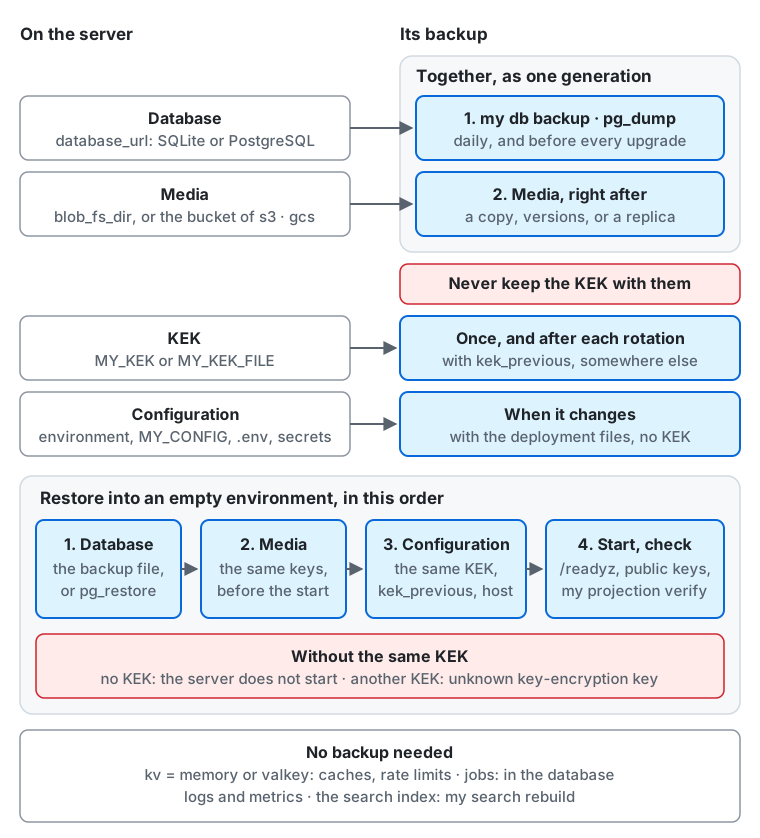
From the top of the diagram down:
- The database (
database_url: SQLite or PostgreSQL) is backed up first, withmy db backuporpg_dump, every day and before every upgrade. - The media (
blob_fs_dir, or the bucket of thes3orgcsblob store) is backed up right after it, as a copy, the bucket’s versions, or a replica. The two backups are one generation, kept together, away from the server and encrypted. - The KEK (
MY_KEKorMY_KEK_FILE) is backed up once and after each rotation, withkek_previous, and never in the same place as the database backups. Withkey_manager = gcpkmsorawskmsthe KEK stays in the KMS: keep the key ofkms_keyenabled for as long as you keep backups that need it (Retire an AWS KMS key). - The configuration (the environment,
MY_CONFIG,.env, and the secrets) is copied with the deployment files when it changes, without the KEK. - A restore goes into an empty environment, in this order: the database, then the media with the same keys before the server starts,
then the configuration with the same KEK,
kek_previous, andhost; then the server starts and you check/readyz,my projection verify, and the actors’ public keys (Restoring). Without the KEK the server does not start, and with another one reading a secret fails withunknown key-encryption key(Without the right KEK). - No backup is needed for the key-value store with
kv = memoryorvalkey(caches and rate limits), the jobs (they are in the database), logs and metrics, and the index of a search engine, whichmy search rebuildmakes again.
| What | Where it lives | Back up | Lost without a backup |
|---|---|---|---|
| The database | the SQLite file (database_url) or the PostgreSQL database |
SQLite or PostgreSQL | everything: accounts, posts, follows, settings |
| The media | the directory blob_fs_dir of the fs blob store, or the bucket blob_s3_bucket of the s3 blob store or blob_gcs_bucket of the gcs blob store |
Media or Media in a bucket | the uploaded images, videos, and audio files, and the cached remote files |
| The KEK | wherever you keep MY_KEK or the file of MY_KEK_FILE (secrets/kek with Compose; never in the database) |
The KEK, separately from the database | every actor’s private key and with it the actor’s identity in the fediverse, and the other secrets the database stores |
| The configuration | the environment variables, the configuration file (MY_CONFIG), the secrets (MY_VAPID_PRIVATE_KEY, mail and payment keys), .env with Compose |
copy them with your deployment files | nothing in the data, but the instance cannot start the same way; changing host breaks every federated URL |
What does not need a backup:
- The key-value store (
kv). Withkv = dbit is part of the database. Withkv = memoryorkv = valkeyit holds caches, rate-limit counters, and short-lived state such as a sign-in waiting for its second factor. After a restore with an empty Valkey, the caches fill again, the rate limits start over, and a sign-in or a voice call in progress has to start again. - The job queue (
queue). Withqueue = dbandqueue = cloudtasksthe jobs are part of the database and come back with it. The tasks of Cloud Tasks only carry a signal for a job of the database; after a restore, the server signals the jobs that are due again within a few minutes. - Logs and metrics, which the server does not read back.
- The index of a search engine, if you have one.
my search rebuildmakes it again from the database. If you do take snapshots of the engine, they hold the text of posts, including posts deleted after the snapshot, so treat them like database backups (Full-text search).
The VAPID key of Web Push is a secret of the configuration. A new key stops push notifications to every existing subscription (Web Push VAPID key), so keep it with the configuration.
How often and where
Section titled “How often and where”- Database: at least once a day, and before every upgrade. Keep several generations, for example 7 daily, 4 weekly, and 3 monthly backups, so that a mistake noticed late can still be undone. A managed PostgreSQL with point-in-time recovery covers the days its retention keeps.
- Media: together with the database, every time (see The order of the database and the media).
- KEK and configuration: when they change. A KEK rotation is a change: back up the new KEK before you use it, and keep the previous one
as long as
kek_previouslists it. - Where: away from the server and its disk, in another failure domain (another machine, another region, another provider or account). A backup on the server’s own disk does not survive the loss of that disk.
- Encryption: the database backup holds email addresses, password hashes, and direct messages; encrypt it at rest
(an encrypted bucket, or encrypt the file with
ageorgpgbefore upload). The secrets in it, such as the actors’ private keys, are encrypted with the KEK, so never keep the KEK in the same place as the database backups: whoever gets both can read every secret. - Retention: a backup keeps data that users deleted or that you erased on request. Delete old generations on a schedule that your privacy policy states.
Backing up
Section titled “Backing up”The server can keep running during a backup. To take one that matches a point in time exactly, for example before an upgrade,
switch to the maintenance mode first: in the maintenance mode my serve opens no database connection and writes nothing.
SQLite
Section titled “SQLite”my db backup <file> writes a consistent copy of the SQLite database to a new file while the server keeps running.
The copy holds every write committed before the command started, including those still in the -wal file, and none after.
It is a single file, smaller than the original because free pages are left out. The command refuses a file that already exists,
and works only with database = sqlite.
my db backup /backup/my-$(date +%Y%m%d%H%M).dbWith Docker Compose, run it in the server’s container. The copy is written inside the container, so write it to the data volume and move it out from there:
cd deploy/dockerdocker compose exec -T my my db backup /data/backup.dbdocker run --rm -v my_data:/data -v "$PWD":/backup busybox sh -c 'mv /data/backup.db /backup/my-$(date +%Y%m%d%H%M).db'Do not copy the database file with cp or tar while the server runs: the file alone misses the writes still in the -wal file,
and a copy taken in the middle of a write can be corrupt. A plain copy is fine when no process has the database open
(the server stopped, or in the maintenance mode); then copy the -wal and -shm files with it.
PostgreSQL
Section titled “PostgreSQL”Use pg_dump in the custom format, which pg_restore reads. It reads one snapshot, so the server can keep running.
pg_dump --format=custom --file=my-$(date +%Y%m%d%H%M).dump "postgres://my:...@db.example/my"With the Compose layer compose.postgres.yaml, run it in the database’s container (name the layer with -f or in COMPOSE_FILE):
cd deploy/dockerdocker compose exec -T postgres pg_dump --format=custom -U my my > my-$(date +%Y%m%d%H%M).dumpUse the pg_dump of the same major version as the server or a newer one.
A managed PostgreSQL has its own backups, which are the better choice for a large database:
- Cloud SQL and Amazon RDS take automated daily backups and, with point-in-time recovery turned on, restore to any second within the retention period. Turn both on, set the retention to cover the generations you want, and take an on-demand backup (a Cloud SQL on-demand backup, an RDS snapshot) before every upgrade.
- Their restore creates a new instance (or overwrites one): point
database_urlat it afterwards. - These backups stay inside the provider’s account. Export a
pg_dumpnow and then to somewhere outside it as well, so that losing the account does not lose the data.
The fs blob store keeps every file under blob_fs_dir (/data/blobs with Compose): the uploads in objects/, and files being written in tmp/.
Copy the directory, tmp/ excepted, with any tool that copies files (tar, rsync, a snapshot of the volume or the disk).
A file is written under tmp/ and then renamed into objects/ in one step, so a copy taken while the server runs never holds half a file in objects/.
docker run --rm -v my_data:/data -v "$PWD":/backup busybox \ tar czf /backup/blobs-$(date +%Y%m%d%H%M).tar.gz -C /data --exclude=blobs/tmp blobsrsync to the backup host keeps the copy small after the first time, since media files never change once written.
Media in a bucket
Section titled “Media in a bucket”The s3 and gcs blob stores keep every file as an object of the bucket blob_s3_bucket or blob_gcs_bucket, named by its key: the processed media under media/,
the uploads as received under uploads/, and the cached remote files under remote/. The bucket stays private: the server reads the
files and serves them under /media/. An object appears only once it is written whole, so a copy taken while the server runs never holds
half a file. Protect the bucket in three layers, from the cheapest to the safest.
Versioning. Turn on the bucket’s object versioning where the service offers it (Amazon S3, Google Cloud Storage, MinIO, and others). A deleted or overwritten object then stays as a noncurrent version, and the bucket can go back to the moment of a database backup.
aws s3api put-bucket-versioning --bucket my-media --versioning-configuration Status=EnabledWith the OpenTofu modules of Amazon S3 and Google Cloud Storage, set versioning = true: it turns versioning on and adds the rule for noncurrent versions
below, whose age is noncurrent_version_days (35 by default). Cloudflare R2 has no object versioning, and the module for another S3-compatible store
does not create the bucket, so for those two use a copy (below).
Lifecycle rules. With versioning, every deleted file keeps its storage cost until a rule removes it. Add a rule that deletes noncurrent versions after the age of your oldest database backup (35 days for the generations of How often and where without the monthly ones), so that every database backup you keep still finds its files and a file a user deleted does not stay longer than your privacy policy says. Add a rule that aborts incomplete multipart uploads after a day: the server aborts a failed upload of a large file itself, but a process that stops in the middle of one leaves its parts behind.
{ "Rules": [ { "ID": "noncurrent-versions", "Status": "Enabled", "Filter": {}, "NoncurrentVersionExpiration": { "NoncurrentDays": 35 }, "AbortIncompleteMultipartUpload": { "DaysAfterInitiation": 1 } } ]}aws s3api put-bucket-lifecycle-configuration --bucket my-media --lifecycle-configuration file://lifecycle.jsonA copy in another account or region. Versioning protects against a mistake, not against losing the bucket or the account that owns it, and the server’s own credentials can delete objects. Keep a copy that those credentials cannot reach:
-
Replication. Amazon S3 replicates a versioned bucket to a bucket in another region or another account (Cross-Region or Same-Region Replication, with the destination owned by the other account). Turn versioning on for the destination too, and do not replicate deletions (leave delete marker replication off), so that a deletion on the instance does not reach the copy. Other services have their own replication, such as the dual-region buckets of Cloud Storage and the bucket replication of MinIO.
-
A scheduled copy. Where there is no replication, or to copy to another provider, copy the bucket on the schedule of the database backup, right after it, with credentials that can only read the instance’s bucket and only write the backup bucket:
Terminal window rclone copy --checksum source:my-media backup:my-media-backuprclone copyandaws s3 syncwithout--deleteadd new objects and never remove one from the copy. Files never change once written, so after the first run each copy transfers only the new ones. Delete old objects from the copy on the schedule of your retention policy, or turn on versioning and a lifecycle rule there as well.
Credentials stay out of the copy: the bucket holds no secret, but the configuration names the key in blob_s3_access_key_id
and blob_s3_secret_access_key, which belong with the configuration. The gcs blob store keeps no key: it uses the service account
of the machine or of Cloud Run.
The order of the database and the media
Section titled “The order of the database and the media”Back up the database first, then the media, and keep the two together as one generation. For a bucket, the copy or the replication that runs after the database backup is the media backup; with versioning, the versions as of the time of the database backup are.
The database names the media files that it uses, and the media copy is taken a moment later. In that moment:
- New uploads can land in the media copy without a row in the database copy. They are files that nothing uses; they take space and do no harm.
- A file deleted after the database backup (a deleted post’s media, an upload that was never attached) is in the database copy but not in the media copy.
After a restore, that file answers
404, and the post that showed it shows a missing image.
The other order is worse: every file uploaded between the media backup and the database backup would be missing after a restore, including the media of new posts. Taking both in the maintenance mode avoids either gap.
On the OpenTofu targets
Section titled “On the OpenTofu targets”The modules keep no backup of their own beyond what the provider offers: the managed PostgreSQL of Cloud SQL and RDS has automated backups with a retention you set, while a database with only the provider’s history (Neon) can go back only as far as that history reaches. Schedule these yourself, with credentials that the instance does not hold:
- The database, every day. Run
pg_dumpagainst the instance’s PostgreSQL from a machine or a scheduled job outside the provider that hosts the database (see PostgreSQL), encrypt the dump, and write it to a bucket of another account or provider. Keep the generations of How often and where. The job needs thedatabase_urland nothing else; it must not hold the KEK. - The media, right after it. With
versioning = trueon the bucket module, the versions are the copy for the lastnoncurrent_version_days; for the loss of the account, also runrclone copyfrom the instance’s bucket to a bucket elsewhere, as in Media in a bucket, on the schedule of the database dump. - The KEK and the configuration are not part of the schedule: back them up when they change (The KEK and the configuration).
The KEK and the configuration
Section titled “The KEK and the configuration”The KEK is not in the database. Back it up once, separately from the database backups, as Managing the key-encryption key
describes, and again after every rotation. Keep a copy of the configuration (the environment, the configuration file, .env, and the secret files)
with your deployment files, without the KEK.
Restoring
Section titled “Restoring”A backup holds the host and account_domain of its instance. Start the restored database with the same values: with others, the server refuses to start.
Restore into an empty environment (a new machine, new volumes, or a new database), in this order: the database, the media (the directory or the bucket),
then the configuration with the same KEK (and the same kek_previous) that was in use when the backup was taken. Then start the server as usual.
SQLite
Section titled “SQLite”Stop the server, put the backup file in place of the database file, and remove the old -wal and -shm files if any are left.
With Docker Compose, into the volume my_data (an existing one, or a new one on another machine):
cd deploy/dockerdocker compose down # keeps the volume; on a new machine, `docker compose up --no-start` creates itdocker run --rm -v my_data:/data -v "$PWD":/backup busybox sh -c ' rm -rf /data/my.db /data/my.db-wal /data/my.db-shm /data/blobs && cp /backup/my-202601010000.db /data/my.db && tar xzf /backup/blobs-202601010000.tar.gz -C /data && chown -R 65532:65532 /data'docker compose up -dThe server image runs as the user 65532, which must own the files of the volume (the chown above).
PostgreSQL
Section titled “PostgreSQL”Restore into a new, empty database prepared as for a new instance, but without applying the schema: the dump contains it.
-
Create the role and the database.
-
Restore the dump. As a superuser, the restored tables keep their owner (the role must exist); as the database owner, add
--no-owner.Terminal window pg_restore --exit-on-error --dbname="postgres://postgres:...@db.example/my" my-202601010000.dump -
With a managed database’s own backup, restore it the provider’s way instead, and point
database_urlat the restored instance.
With the Compose layer compose.postgres.yaml, start only the database, on a new volume, and restore into it. The container has made the role and the database:
cd deploy/dockerdocker compose up -d --wait postgresdocker compose exec -T postgres pg_restore --exit-on-error --no-owner -U my -d my < my-202601010000.dumpdocker compose up -dTo restore over an existing database instead (rolling back an upgrade), use pg_restore --clean --if-exists, as Rolling back shows.
Extract the media copy into blob_fs_dir before the server starts, owned by the user the server runs as.
Media in a bucket
Section titled “Media in a bucket”Restore the objects into an empty bucket before the server starts, then set blob_s3_bucket (and the endpoint, region, and credentials) or blob_gcs_bucket to it.
The keys must stay the same: the database names each file by its key.
-
From a copy in another bucket, copy it back:
Terminal window rclone copy --checksum backup:my-media-backup target:my-media-restored -
From the versions of the instance’s own bucket, copy the objects as they were at the time of the database backup to a new bucket.
rclonereads the versions of that moment with--s3-version-at:Terminal window rclone copy --s3-version-at "2026-01-01 00:00:00" source:my-media target:my-media-restored -
From a replica, point
blob_s3_bucketorblob_gcs_bucketat the replica, or copy it back to a bucket in the original account.
The server’s credentials need to read, write, and delete objects of the restored bucket (s3:GetObject, s3:PutObject, s3:DeleteObject,
and s3:AbortMultipartUpload on Amazon S3; the role roles/storage.objectUser on the bucket on Google Cloud Storage).
Starting and checking
Section titled “Starting and checking”Start the server the usual way. With Docker Compose, docker compose up -d runs my db upgrade -check, the schema, and my db upgrade first;
on a backup of the same release they change nothing. Then check:
/readyzanswers200, and the server logs nounknown key-encryption keyerror.my projection verifyreports no difference (Checking and rebuilding projections).- You can sign in, and the latest posts and their media show.
- The actors’ keys have not changed: the
publicKey.publicKeyPemof an actor (curl -H 'Accept: application/activity+json' https://<host>/ap/actors/<id>) is the same as before the restore. Other servers verify the instance’s signatures with that key, so an unchanged key means federation continues where it stopped. - A post, follow, or unfollow reaches another server (a test account on another instance sees it).
Writes made after the backup are lost: posts, follows, and uploads since then are gone on this instance, while other servers may still have the activities they received. That cannot be repaired from here; restore from the newest backup you have.
With a search engine, run my search rebuild after the restore, without --keep, so that posts newer than the backup leave the index (Full-text search).
Without the right KEK
Section titled “Without the right KEK”- No KEK: the server does not start.
my serveand the othermycommands that read the configuration stop at it withThe required setting MY_KEK is not set.andkek: required when key_manager is local. - Another KEK: the server starts and answers
/readyz, but anything that reads a secret encrypted with the old KEK fails withunknown key-encryption keyand the key ID of the old KEK (local key manager: key "local:…" is not configured): deliveries to other servers and signed fetches (the actors’ private keys), sign-ins with two-factor authentication, webhook signatures, and the external login providers. Media proxy URLs issued before stop working too. Passwords and posts are not encrypted with the KEK, so sign-in with a password and reading posts still work, which can hide the problem at first: watch the log for the error. - Find the KEK whose key ID the error names, set it as
kek(or inkek_previous), and restart. There is no way to recover a secret without its KEK; if the KEK is lost for good, the actors’ keys must be regenerated, and other servers see each actor as a new key for the same account.
Recovery drill
Section titled “Recovery drill”A backup is only known to work once it has been restored. Rehearse a restore before the instance goes public, and again after a change to how backups are taken (at least every few months):
-
Take a backup of the live instance as above: the database, then the media.
-
On another machine or in another Compose project, restore it with the KEK and the configuration from where you keep them (not copied from the live server), and with
hostunchanged so the actors’ URLs match. -
Do not let the copy federate. Set
role = web, which runs no job worker: the jobs restored with the database include deliveries that were due when the backup was taken, and a copy that runs them signs them with the real actors’ keys and sends them again to other servers. Keeping the copy off the internet is not enough, since it is hard to guarantee. Switch on the maintenance mode once the checks below pass if you keep it running. -
Outside Compose, for example on a local machine against a cloud instance, give the copy these settings so that it touches nothing of the live instance:
Setting Value in the copy Why rolewebRuns no job, so nothing restored is delivered again queuedbJobs enqueued in the copy stay in its database instead of reaching the live queue streampostgresDoes not join the live event stream of the instance mailnoneSends no mail to real users the blob store a new bucket (or directory) holding the restored media Leaves the live bucket untouched database_urlthe restored database Never the live one the KEK ( MY_KEK, orkey_managerandkms_key)as live, from where you keep it Without it the copy does not start hostas live So that the actors’ URLs match -
Go through Starting and checking: sign in, posts and media, and the
publicKeyof a few actors compared with the live instance. -
Start it once without the KEK and once with a different one, and check that it fails as Without the right KEK describes.
-
Note how long each step took: that is how long a real restore keeps the instance down.
For LLMs and coding agents:this page as Markdown, llms.txt,llms-full.txt, llms-small.txt