

Closing the service
What to do, in order, when you stop running the server: let users take their data out, delete the accounts that remain on other servers,
then stop the server and switch to a static closure page.
Each command is described in more detail in administrators and roles.
In the web client, Administration > Server closure does the same for anyone with manage_service_closure: it announces the
closure, changes its dates or withdraws it; once the closing date has passed, Check and close shows what check shows
and closes the server after you type its domain; after that it shows the delivery progress that status shows.
The sequence
Section titled “The sequence”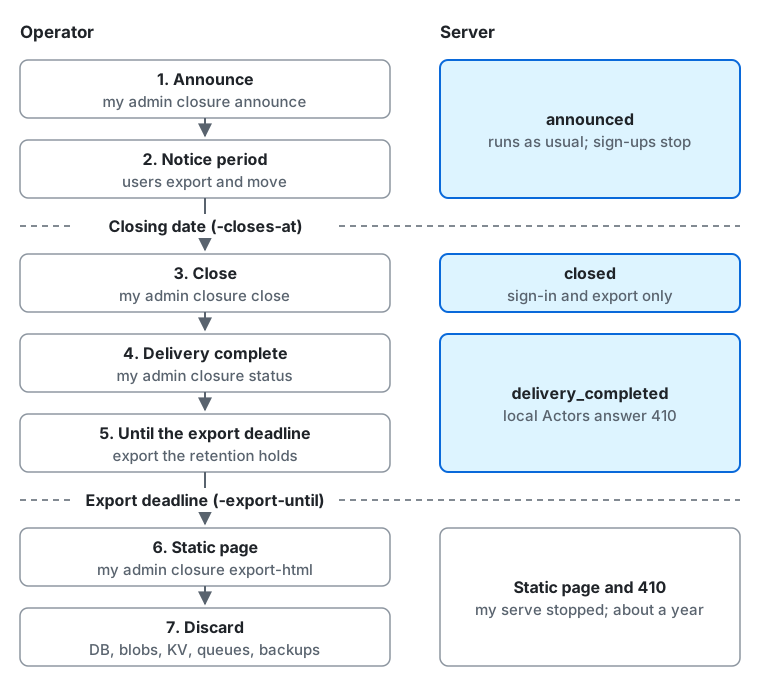
The table follows the diagram from the top down; the Server column starts with the state that my admin closure status shows.
The closing date (-closes-at) ends the notice period, and the export deadline (-export-until, 30 days after the closing date
unless set) ends stage 5.
| Stage | Server | What the operator does |
|---|---|---|
| 1. Announce | announced. Runs as usual. Sign-ups, invites and new supporter subscriptions stop |
my admin closure announce, post a notice on the status page |
| 2. Notice period | announced. Runs as usual. Users can export their data and move to another server |
Refund annual supporters, check migrations and retention holds |
| 3. Close (after the closing date) | closed. Users can only sign in and export. The server delivers a Delete for every account |
my admin closure check and close |
| 4. Delivery complete | Records delivery_completed; local Actors also return 410 |
Confirm with my admin closure status. Do not stop the workers |
| 5. Until the export deadline | delivery_completed. Stays closed and keeps offering the export |
Export the records under retention holds |
| 6. Static page | Stopped. The front end serves the static page, and 410 for federation |
my admin closure export-html, switch the front end, stop my serve |
| 7. Discard | None. Keep serving the static page and 410 for about a year |
Discard the DB, blobs and backups. Keep the domain for about a year |
You can combine any stage with maintenance mode (Maintenance). During maintenance, exports and the delivery of Delete activities stop.
1. Announce
Section titled “1. Announce”Decide the closing date (-closes-at) and the deadline for taking data out (-export-until, 30 days after the closing date if omitted), then announce them.
my admin closure announce -closes-at 2027-01-31T15:00:00Z -message "Thank you for being here."my admin closure status- There is no lower bound on the closing date, but a warning appears when the time from the announcement to the closing date is shorter than 30 days. Leave users time to export and move.
- To change the date, run
announceagain; to call it off, runmy admin closure withdraw. Either one sends every user aservice_closurenotification. - Once announced, the effective registration mode becomes
closed, pending applications are rejected, and every continuing supporter subscription is canceled at the end of its period (subscribers get a notification and an email). Withdrawing the announcement does not undo the rejections and cancellations. - Notifications are created by jobs, so do not stop the workers.
- On the status page (monitoring and the status page), post the closing date, the export deadline, and how to export and move. The status page outlives the server, so it also guides people who visit after the closure.
2. Notice period
Section titled “2. Notice period”- Users can export their data (the data export and the CSV files) and move to another server (
Move) from the settings screen. A banner on every screen and a notification show the closing date, the export deadline and the way to that screen. - Annual supporters: the announcement cancels subscriptions at the end of the period, but for a subscription whose period ends after the closing date, the time it cannot be used has already been paid for. The server does not refund, so refund each subscriber in the payment provider’s screen (in Stripe, the payments screen of the dashboard; in PAY.JP, the payments screen of the admin console) (supporter payments (Stripe), supporter payments (PAY.JP)).
- After the closing date passes, people with
manage_service_closureget anadmin_service_closure_duenotification. The server does not close by itself.
3. Close
Section titled “3. Close”Once the closing date has passed, run the checks before you close.
my admin closure check-
Unfinished migrations produce a warning. Wait for them to finish before you close, because after closing nobody can start a
Move. -
Retention holds (
retention_holds) on any account produce a warning. The duty behind a hold does not end when you close the server, so export the records under a hold and store them outside the server (list the holds withmy admin retention list).Terminal window my admin account export-moderation @alice > alice-moderation.json
When the checks are done, close. This cannot be undone. Confirm by typing y and the domain name (use -confirm-domain in automation).
my admin closure closeAfter closing, users can only sign in and export their data. The remaining supporter subscriptions are canceled immediately,
and a Delete (Actor) for every local account is delivered to other servers (even when federation_mode is off or inbound).
The inbox and GETs of posts and collections return 410 Gone.
4. Confirming that delivery is complete
Section titled “4. Confirming that delivery is complete”Do not stop my serve and the workers (processes whose role is all or worker; with a push-style queue, the Cloud Tasks queue) until the state is delivery_completed.
The workers deliver the Delete activities, and while they do, the server keeps returning the local Actor’s document and key so that receivers can verify the signature of the Delete.
If you stop early, the accounts remain on other servers.
my admin closure statusaccounts with a Deleteis the number of accounts for which aDeletewas recorded,fan-outs pendingis the fan-out work left, anddeliveries <state>is the number of deliveries per state.- Deliveries are retried by the usual policy (up to 9 times over about 4 days). When all have finished, the check that runs every 10 minutes records
delivery_completed(state: delivery_completed). From then on the local Actors and the instance Actor also return410. - A delivery that became
deadis not retried automatically. To retry it, usemy job retry.
5. Until the export deadline
Section titled “5. Until the export deadline”Even after delivery is complete, the server keeps running closed until export_until and keeps serving users’ exports.
The server never deletes data on its own, so it keeps running past the deadline until you stop it.
If you have not yet exported the records under retention holds (§3), do it now.
6. Switching to the static page
Section titled “6. Switching to the static page”After the export deadline, export the closure page. This reads the DB, so run it before you stop my serve and discard the DB.
my admin closure export-html -out ./closure # all locales; index.html starts from the instance's default localemy admin closure export-html -out ./closure -lang ja,en # set the locales and the order in index.html- What it writes:
<dir>/<locale>.html, and<dir>/index.html, which lists all locales in order. They use the same template and CSS as the maintenance page (my maintenance export) and show the server name (maintenance_server_name, else the instance name, else the host name), the closing date, the operator’s message from the announcement, and a link to the status page (status_page_url). The CSS is inline only, there are no scripts or external resources, and the CSP is in a<meta>tag. The color overrides of the published theme are baked in.- Front-end configuration examples
nginx.conf,Caddyfileandcloudfront-function.js. Each returns410with no body for the federation and discovery paths (/ap/*,/inbox,/.well-known/webfinger,/.well-known/host-meta,/.well-known/host-meta.json,/.well-known/nodeinfo,/nodeinfo/*) and for profiles (/@*), and for every other path returns the page of the first language inAccept-Language(orindex.htmlif there is none). A language reaches the page of the locale the app would show it in:zh,zh-SGandzh-Hansgetzh-CN.html, andzh-Hant,zh-HKandzh-MOgetzh-TW.html.
- The command refuses if the server has not closed (exit code 1). Before
delivery_completed, it warns that deliveries continue (and still writes the files).
Switch the front end. Put only the pages (*.html) in the public location, and adjust the host name, directory and certificate paths in the example to your environment.
| Front end | How to set it up |
|---|---|
| nginx | Put the pages in /srv/closure and include nginx.conf from the http block. The pages are also served with 410 |
| Caddy | Put the pages in /srv/closure and use the Caddyfile. Caddy obtains the certificate, and the pages are also served with 410 |
| CloudFront | Put the pages directly under an S3 bucket, make that bucket the origin of the default cache behavior, and associate cloudfront-function.js as a viewer-request CloudFront Function (cloudfront-js-2.0). Put Accept-Language in the cache key of the cache policy. The pages are served with 200 (a viewer-request function cannot change the status of the origin’s response) |
After switching, check that curl -i https://social.example/.well-known/webfinger?resource=acct:alice@social.example returns 410 and
that curl -i https://social.example/ returns the closure page. Then stop my serve and the workers.
For uptime monitoring, either stop the health-check monitors or point them at the closure page.
7. Discarding the DB, blobs and backups
Section titled “7. Discarding the DB, blobs and backups”After stopping, discard the DB, the blobs (media and export files), the KV store and the queues, together with their backups and snapshots. With a search engine, discard its index and snapshots too: they hold the text of posts. Before you discard anything, confirm once more that you exported and stored the records under retention holds. Discarding cannot be undone.
Keep the domain, and keep serving the static page and 410 for about a year. Other servers see the 410, stop fetching and delivering, and clear their caches.
Federated URIs use UUIDs, so there is little risk that an Actor with the same id is created again,
but if someone else takes the domain, the handle (acct:alice@social.example) and the profile URLs become theirs and can be used to impersonate your users.
Keep renewing the domain and certificate, and think again before you let go of the domain even after the year is over.
For LLMs and coding agents:this page as Markdown, llms.txt,llms-full.txt, llms-small.txt