

Managing the key-encryption key (KEK)
The server encrypts the secrets it keeps in the database with a key-encryption key (KEK) that it never stores there. This page covers how to generate, store, back up and rotate the KEK, how to keep it in a KMS instead, and what to do if it is lost or leaks. The configuration reference lists every setting.
How it works
Section titled “How it works”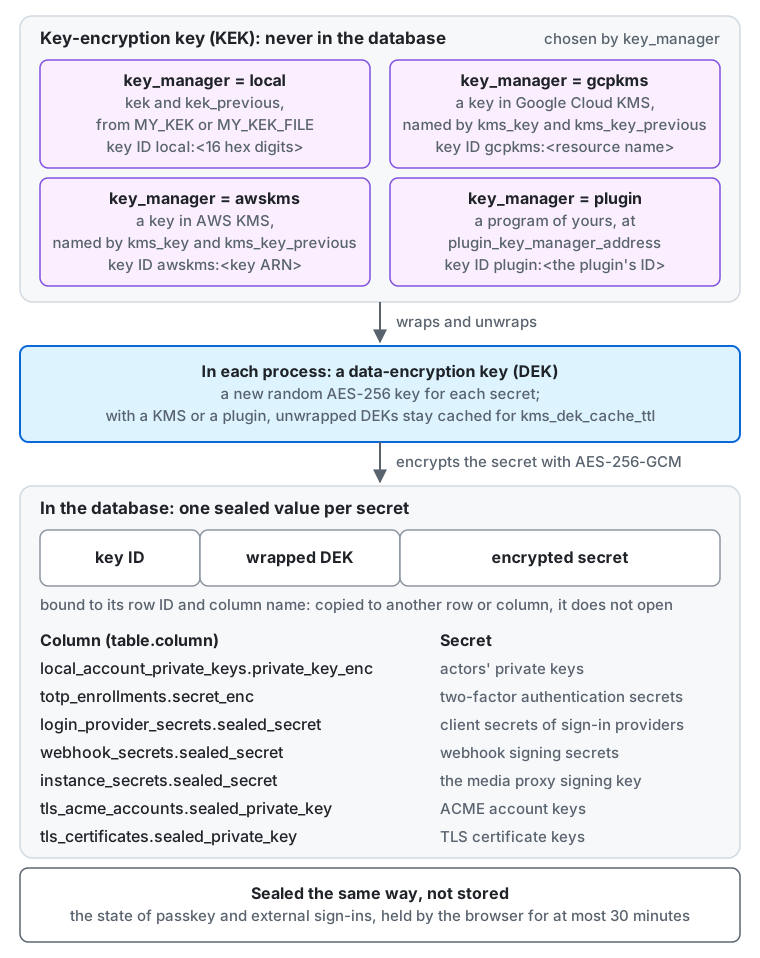
- Secrets stored in the database, such as actors’ private keys, are encrypted with AES-256-GCM using a data-encryption key (DEK) generated for each secret. The DEK is wrapped with a key-encryption key (KEK) and stored next to the ciphertext (envelope encryption).
- The KEK is not stored in the database, so a leaked database dump alone does not expose the secrets.
- Each ciphertext carries the key ID of the KEK that wrapped its DEK. With
key_manager = local, the key ID islocal:followed by 16 hexadecimal digits derived from the KEK, so the same KEK always gives the same ID. You never assign IDs. - A ciphertext is bound to the row ID and column name where it is stored. Copying it to another row or column makes it undecryptable.
- The sealed columns, named as
my kek statusprints them, arelocal_account_private_keys.private_key_enc(actors’ private keys),totp_enrollments.secret_enc(two-factor authentication secrets),login_provider_secrets.sealed_secret(client secrets of sign-in providers),webhook_secrets.sealed_secret(webhook signing secrets),instance_secrets.sealed_secret(the media proxy signing key and the key of the idempotency fingerprints),tls_acme_accounts.sealed_private_key(the keys of the ACME accounts when the server gets its own certificates), andtls_certificates.sealed_private_key(the keys of those certificates). - The state of a passkey sign-in or a sign-in through an external provider is sealed the same way but not stored: the browser holds it for at most 30 minutes.
- The signing key (HMAC-SHA256) for media proxy URLs is a random key that the server generates on its first start and stores in the database, encrypted like the other secrets.
It does not change when you rotate the KEK, so media proxy URLs keep working across rotations, and
my kek rewrapre-wraps it with the other secrets. key_managerislocal(the default: it uses thekeksetting),gcpkms(the KEK stays in Google Cloud KMS; see Google Cloud KMS),awskms(the KEK stays in AWS KMS; see AWS KMS), orplugin(the KEK stays with a program of yours; see A plugin).
What happens if you lose the KEK
Section titled “What happens if you lose the KEK”Without the KEK, restoring the database does not let you decrypt actors’ private keys. Once a private key is lost, other servers can no longer verify that actor’s signatures, and the actor’s identity in the fediverse is broken (followers’ relationships cannot be carried over). Treat the KEK with the same care as the database.
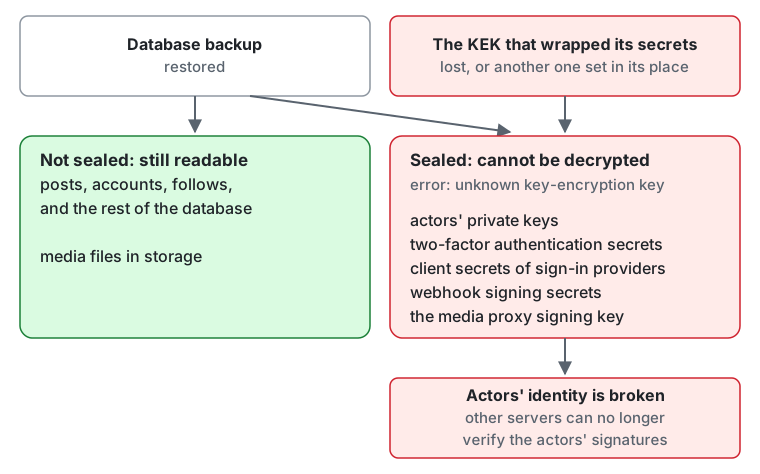
What is not sealed stays readable: posts, accounts, follows, and the rest of the database, and the media files in storage.
Every sealed value fails with an unknown key-encryption key error: the actors’ private keys, two-factor authentication secrets,
client secrets of sign-in providers, webhook signing secrets, the media proxy signing key, and the keys of the certificates the server got itself.
The same happens when another KEK is set in place of the one that wrapped the secrets, or when the KMS key or the plugin’s key that wrapped them is disabled or destroyed.
Generate a KEK
Section titled “Generate a KEK”Encode 32 random bytes with standard base64.
openssl rand -base64 32Where openssl is not available, head -c 32 /dev/urandom | base64 works too. Do not leave the generated value in your terminal history or in tickets.
Store and deliver it
Section titled “Store and deliver it”The KEK is a secret setting, so it can be passed only through the environment variable MY_KEK, or through MY_KEK_FILE, the path of a file holding the value. Putting it in the configuration file (TOML) prevents startup.
| Target | Example of how to deliver it |
|---|---|
| Self-hosted (binary / systemd) | Put it in a file only the owner can read (chmod 600) and point MY_KEK_FILE at it |
| Docker / Compose | Mount a Docker secret at /run/secrets/my_kek and set MY_KEK_FILE=/run/secrets/my_kek. The files of deploy/docker do this from secrets/kek (Docker Compose files): to rotate, replace that file and set MY_KEK_PREVIOUS in .env |
| Kubernetes / microk8s | Mount a Secret as a file and point MY_KEK_FILE at it |
| Cloud Run | Expose a Secret Manager secret as a file or an environment variable |
| AWS ECS | Pass it from Secrets Manager or SSM Parameter Store (SecureString) |
- Give every process, such as web and worker, the same KEK.
- The KEK never appears in logs or error messages (only the key ID does).
my config checkvalidates the KEK’s format (base64 of 32 bytes) and prints the value as(redacted). In theproductionprofile it also fails on a KEK that is not random, such as all zeros or a repeated byte, andmy servelogs a warning about one (see the production checklist).
Back it up
Section titled “Back it up”Back up the database and the KEK, separately.
- Keep the KEK somewhere other than where the database backups live (a password manager, offline media, a secret store in another account, and so on). If both are in one place, a leak of that place makes the database encryption pointless.
- During a rotation, include the
kek_previouskeys in the backup for as long as ciphertext wrapped with them remains in the database. - Include the KEK in your restore procedure, and test restores regularly (Backup and restore). After restoring a database, set the KEK (and
kek_previous) that was in use at backup time to the same values. With a different KEK, anything that reads a secret fails with anunknown key-encryption keyerror that names the key ID.
Rotate the KEK
Section titled “Rotate the KEK”A KEK in kek_previous is used only for decryption, and new secrets are always encrypted with kek.
So that a rolling deploy, where old and new processes run side by side, never produces ciphertext that some process cannot read, switch in two steps.
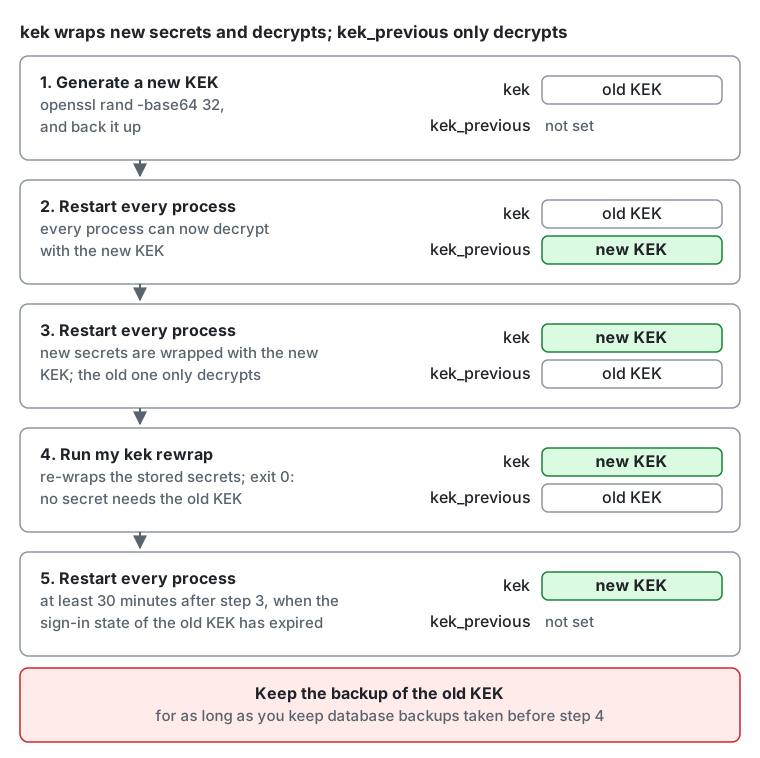
- Generate a new KEK and back it up.
- Restart every process with
MY_KEK=<old KEK>andMY_KEK_PREVIOUS=<new KEK>. Now every process can decrypt with the new KEK. - Restart every process with
MY_KEK=<new KEK>andMY_KEK_PREVIOUS=<old KEK>. From now on secrets are wrapped with the new KEK, and ciphertext of the old KEK is still readable. - Re-wrap the stored secrets with the new KEK: run
my kek rewraponce, with the same configuration as step 3 (see Re-wrap the stored secrets). When it exits with 0, no secret in the database needs the old KEK any more. - Wait at least 30 minutes after step 3, so that the short-lived sign-in tokens issued with the old KEK have expired, then restart every process with
MY_KEK=<new KEK>and nokek_previous. Keep the backup of the old KEK for as long as you keep database backups taken before step 4: restoring one of them needs it again.
kek_previous accepts several comma-separated keys. Listing the same key twice, or listing the same key as kek, prevents startup.
Re-wrap the stored secrets
Section titled “Re-wrap the stored secrets”my kek rewrap replaces only the wrapped data-encryption key of each secret and keeps its ciphertext; it never writes or prints a secret.
my kek status # count the stored secrets by the key ID of the KEK that wraps them; decrypts nothingmy kek rewrap # re-wrap every secret that a key of kek_previous wraps with kekmy kek statusprints one line per column and key ID, marks the key ID ofkekwith(current), and ends by telling whether any secret still needs a key ofkek_previous. A key ID that is neitherkeknor inkek_previousmeans a KEK is missing from the configuration.my kek rewrapreads the secrets in batches of 100 and writes each batch in one short transaction. It prints, per column, how many secrets it re-wrapped and how many were already wrapped withkek. It can run while the server is serving, and it is safe to stop or to run again at any time: it skips the secrets already wrapped withkek, and a secret that the server rewrote in the meantime is left as the server wrote it.- A secret that cannot be re-wrapped is left unchanged and reported with its row ID, and the command exits with 1. Either its KEK is not configured
(the message names the key ID: add that KEK to
kek_previousand run it again), or the stored value is damaged or was copied from another row. Do not remove a KEK fromkek_previouswhilemy kek statusstill counts secrets under it.
Google Cloud KMS
Section titled “Google Cloud KMS”With key_manager = gcpkms, a symmetric Cloud KMS key (a CryptoKey with the purpose ENCRYPT_DECRYPT) wraps the data-encryption keys, and the KEK never leaves Cloud KMS.
A leaked database dump and a leaked configuration together still do not expose the secrets: decrypting them needs the permission to use the key.
- Set
kms_keyto the resource name of the key, without a version:projects/{project}/locations/{location}/keyRings/{ring}/cryptoKeys/{key}. Names longer than 248 bytes are rejected at start. The key ID of the stored secrets isgcpkms:followed by this name. - The server authenticates with Application Default Credentials: on Cloud Run, the service account of the service; elsewhere,
GOOGLE_APPLICATION_CREDENTIALS. - Grant that service account
roles/cloudkms.cryptoKeyEncrypterDecrypteron the key (not on the project), for every process, such as web and worker, and for the commandsmy kek statusandmy kek rewrap. Without it, reading a secret fails with an error that names the role; a missing or disabled key version fails likewise, and those errors are not retried until the configuration is fixed. A quota error or an unavailable Cloud KMS is temporary, and the work that needed the secret is retried. - The server keeps a data-encryption key that Cloud KMS decrypted for
kms_dek_cache_ttl(default10m), so most reads of a secret do not call Cloud KMS.
Rotate the key in Cloud KMS
Section titled “Rotate the key in Cloud KMS”A rotation in Cloud KMS (by hand, or with a rotation period on the key) adds a new primary version and keeps the old versions enabled.
New secrets are wrapped with the new version, the server decrypts each secret with the version that wrapped it, and the key ID does not change, so a rotation needs no my kek rewrap.
Do not disable or destroy an old version while secrets still need it: a secret wrapped with a disabled or destroyed version can no longer be decrypted. Cloud KMS does not tell which secrets a version wrapped, so to retire key material, move the secrets to a new key first:
- Create a new key (it may be in the same key ring) and grant the service account the role on it.
- Restart every process with
kms_keyset to the new key andkms_key_previousset to the old one. The old key now only decrypts. - Run
my kek rewrap, with the same configuration. Whenmy kek statusno longer counts secrets under the old key’s ID, removekms_key_previousand restart. - Only then disable the old key’s versions, and keep them restorable for as long as you keep database backups taken before step 3: restoring one of them needs them again.
AWS KMS
Section titled “AWS KMS”With key_manager = awskms, a symmetric AWS KMS key (key spec SYMMETRIC_DEFAULT, key usage ENCRYPT_DECRYPT, customer managed) wraps the data-encryption keys, and the KEK never leaves AWS KMS.
A leaked database dump and a leaked configuration together still do not expose the secrets: decrypting them needs the permission to use the key.
-
Set
kms_keyto the key’s ARN (arn:aws:kms:{region}:{account}:key/{key-id}), an alias (alias/{name}or its ARN), or the key ID. At start the server resolves the name to the key’s ARN, and the key ID of the stored secrets isawskms:followed by that ARN. Pointing an alias at another key therefore changes nothing until the next start, and then only for new secrets: the secrets already stored keep naming the old key, so set it inkms_key_previous(see Retire an AWS KMS key). AWS managed keys (alias/aws/...) are rejected; only the AWS service that owns one can use it. -
The server authenticates with the AWS SDK’s default credential chain: on ECS, the role of the task; on EC2, the instance profile; elsewhere, the environment (
AWS_ACCESS_KEY_IDand the like) or the shared configuration files. The region is that of the key’s ARN; for an alias or a key ID, setAWS_REGION. -
Allow
kms:Encrypt,kms:Decrypt, andkms:DescribeKeyon the key, for every process, such as web and worker, and for the commandsmy kek statusandmy kek rewrap. A policy of the IAM role:{"Effect": "Allow","Action": ["kms:Encrypt", "kms:Decrypt", "kms:DescribeKey"],"Resource": "arn:aws:kms:us-east-1:111122223333:key/1234abcd-12ab-34cd-56ef-1234567890ab"}The resource is the key’s ARN even when
kms_keyis an alias. The key policy must also let the account’s IAM policies grant access (the default key policy does). -
The server fails to start when the key does not exist, is disabled or pending deletion, or is not a symmetric encryption key. Later, a missing permission or a disabled key fails the reading of a secret with an error that names the cause, and those errors are not retried until the configuration is fixed. Throttling (
ThrottlingException) or an unavailable AWS KMS is temporary, and the work that needed the secret is retried. -
The encryption context of each call holds the row ID and the column name of the secret (
{"my-aad": ...}, in base64url). CloudTrail logs it in plain text; it contains no secret. -
Cost: AWS charges a monthly fee for each customer managed key (USD 1 at the time of writing, plus the same for each of the first two rotations of its key material) and a fee per request beyond a monthly free tier (see AWS KMS pricing). The server keeps a data-encryption key that AWS KMS decrypted for
kms_dek_cache_ttl(default10m), so a server with ten actors that deliver all the time makes about 43,000 requests a month per process, a few cents beyond the free tier.
Retire an AWS KMS key
Section titled “Retire an AWS KMS key”Automatic key rotation in AWS KMS keeps the key’s ARN and its earlier key material, so the key ID does not change and a rotation needs no my kek rewrap.
To stop using a key, or to point an alias at another key, move the secrets to the new key first. Do not disable the old key or schedule its deletion while secrets still need it: a secret wrapped with it can no longer be decrypted.
- Create the new key and allow the role to use it.
- Restart every process with
kms_keyset to the new key andkms_key_previousset to the old one (its ARN, not the alias). The old key now only decrypts. - Run
my kek rewrap, with the same configuration. Whenmy kek statusno longer counts secrets under the old key’s ID, removekms_key_previousand restart. - Only then disable the old key, and keep it for as long as you keep database backups taken before step 3: restoring one of them needs it again.
A plugin
Section titled “A plugin”With key_manager = plugin, a plugin of yours keeps the KEK, in Vault, in an HSM, or wherever it chooses, and wraps the data-encryption keys for the server.
The plugin sits in the same trust boundary as the KEK. It sees every data-encryption key in plaintext, so whoever controls it, or the host it runs on, can read every secret of the server, including the actors’ private keys. Give it the protection you give the KEK. That is also why no setting but the configuration file and the environment can change its address.
MY_KEY_MANAGER=pluginMY_PLUGIN_KEY_MANAGER_ADDRESS=unix:///run/my/key_manager.sock- The address is
unix://orhttps://. The server refuseshttp://, on loopback too, since the keys would cross in plaintext. The other settings of the destination are in Plugins. - Run
my plugin test --kind key_manager <address>before you point the server at a plugin (Test a plugin). It wraps only keys that it makes up and throws away. - The key ID of the stored secrets is
plugin:followed by the plugin’s ID for its KEK, which is 1 to 248 bytes of visible ASCII. - Keep every KEK that a stored secret still names. A rotation in the plugin shows as a new ID in the next wrap. The secrets wrapped before keep naming the old ID, and the plugin must still open them.
my kek rewrapmoves them to the current ID, andmy kek statuscounts the ones that remain. - A plugin and a KMS never serve together:
kms_keyandkms_key_previousare refused with a plugin, and so isplugin_key_manager_addresswithkey_manager = gcpkmsorawskms.
When the server starts
Section titled “When the server starts”Every process, and every my command that opens the database, such as my kek status, does this before anything else. It is the one kind of plugin whose failure stops a start.
- It asks the plugin for the ID of its current KEK.
- It runs a self-test with a random key that it throws away: a wrap and an unwrap must give the key back, an unwrap with different authenticated data must answer
OUTCOME_DECRYPT, two wraps of the key must differ, and the wrapped value must not hold the key.
A plugin that does not answer, or answers 503, is tried again for up to 30 seconds, for a sidecar that comes up after the server. After that the process exits with an error. A wrong answer, and any other failure such as a refused token, stops it at once: the self-test exists to stop a plugin that ignores the authenticated data or passes keys through, and waiting does not mend one.
When the plugin is unreachable
Section titled “When the plugin is unreachable”The server fails closed. Whatever goes wrong, a refused or timed-out call, or an answer that is empty, unknown, or malformed, the operation that needed the key fails with an error. It never stores a secret in plaintext, never switches to the local KEK or another key, and never treats a failure as a result. A job that fails this way retries later, and a request fails for the person who made it. Each failed call counts in my.plugin.failures by kind and Connect code, and the log holds no key, authenticated data, or wrapped value, nor anything the plugin said.
Wrapping is never cached, and a value sealed a moment ago has nothing in the cache, so these stop at once:
- Creating an account, which generates the actor’s keys.
- Setting up two-factor authentication, and registering a passkey or signing in with one, whose ceremonies keep their state sealed.
- Signing in through an external provider, and saving a provider’s client secret.
- Registering a webhook, and
my kek rewrap.
Reading a stored secret works only while the process holds its data-encryption key from an earlier read, for at most kms_dek_cache_ttl (default 10m). After that, or for a secret it has not read yet, these stop too:
- Federation delivery and signed fetches, which need the actors’ private keys. Delivery catches up through the retries of its jobs, once the plugin is back.
- Checking a two-factor code at sign-in.
- Webhook delivery.
A restart stops as described above, so do not restart the server to mend an outage of the plugin: a server that is up keeps serving what its cache covers, and one that restarts serves nothing until the plugin answers. What needs no secret, such as reading timelines and posting, goes on. The media proxy’s signing key is read at start and stays in memory. A renewed client certificate or CA file needs no restart either: the server reads the files again once they change (Plugins).
The contract
Section titled “The contract”The RPCs are those of my.plugin.key_manager.v1.KeyManagerService, with a default deadline of 5 seconds and messages of at most 128 KiB each way.
POST /my.plugin.key_manager.v1.KeyManagerService/Describe{}{"outcome":"OUTCOME_OK","keyId":"transit/my-kek-3"}
POST /my.plugin.key_manager.v1.KeyManagerService/WrapKey{"dek":"<base64>","aad":"<base64>"}{"outcome":"OUTCOME_OK","keyId":"transit/my-kek-3","wrapped":"<base64>"}
POST /my.plugin.key_manager.v1.KeyManagerService/UnwrapKey{"keyId":"transit/my-kek-3","wrapped":"<base64>","aad":"<base64>"}{"outcome":"OUTCOME_OK","dek":"<base64>"}keyIdis the plugin’s own ID, withoutplugin:.UnwrapKeymay name an ID older than the current one.wrappedis 1 to 65,535 bytes and must not hold the key. Two wraps of a key differ.aadis authenticated data that holds row IDs and column names, andUnwrapKeymust fail unless it is whatWrapKeygot. That is what stops a secret from being copied to another row.- Never log
dek,aad, orwrapped.
outcome |
Meaning |
|---|---|
OUTCOME_OK |
The call succeeded |
OUTCOME_UNKNOWN_KEY |
UnwrapKey: the plugin does not hold the KEK of keyId |
OUTCOME_DECRYPT |
UnwrapKey: wrapped or aad does not authenticate |
Answer an HTTP or Connect error when you cannot answer, such as when the key store is out of reach. Do not answer OUTCOME_DECRYPT or OUTCOME_UNKNOWN_KEY then: to the server, they say that the value itself is bad. The server does not retry a call itself, so a plugin can get the same call again from a job.
Move between the local KEK and a KMS
Section titled “Move between the local KEK and a KMS”A key ID starts with the kind of key manager that wrapped it (local:, gcpkms:, awskms:, plugin:). The server wraps new secrets with the current key_manager
and unwraps each stored secret with the key manager its key ID names, so a move between the local KEK and a KMS is a rotation across kinds.
- With a KMS,
kekandkek_previousonly decrypt: they open the secrets still wrapped with the local KEK, and every new secret is wrapped withkms_key.kms_key_previouslists earlier keys of the same KMS, which only decrypt too. - With
key_manager = local,kms_keyandkms_key_previous, when set, only decrypt: they open the secrets still wrapped with the KMS. - From the local KEK to a KMS:
- Create the key and grant the permissions as in Google Cloud KMS or AWS KMS.
- Restart every process with
key_manager = gcpkmsorawskms,kms_keyset to the key, and the current KEK moved fromkektokek_previous. Secrets are now wrapped with the KMS, and the ones wrapped with the local KEK still open. - Run
my kek rewrapwith the same configuration. - When
my kek statusno longer counts secrets under alocal:key ID, removekek_previousand restart. Keep the backup of the KEK for as long as you keep database backups taken before step 3.
- From a KMS back to the local KEK, do the same the other way round: set
key_manager = localand a newkek, and keepkms_keyset, which now only decrypts, untilmy kek rewraphas moved every secret andmy kek statusno longer counts secrets under agcpkms:orawskms:key ID. The keys inkms_keyandkms_key_previousmust then all belong to the same KMS. - To move from one cloud’s KMS to another’s, move to the local KEK first and then to the other KMS; there is no direct move.
- A plugin moves the same way, through the local KEK alone:
- To it, restart every process with
key_manager = plugin,plugin_key_manager_address, and the current KEK moved fromkektokek_previous, then runmy kek rewrap. Whenmy kek statusno longer counts secrets under alocal:key ID, removekek_previousand restart. - From it, restart every process with
key_manager = local, a newkek, andplugin_key_manager_addresskept, which now only decrypts, then runmy kek rewrap. Whenmy kek statusno longer counts secrets under aplugin:key ID, remove the address and restart. Until then the plugin must still pass the checks at start, which include a wrap.
- To it, restart every process with
- The server keeps a data-encryption key that the KMS or plugin decrypted for
kms_dek_cache_ttl(default10m, at mostkms_dek_cache_entries, default1024), so a secret in use reaches it about once per period and process.0in either setting disables the cache.
If the KEK leaks
Section titled “If the KEK leaks”If only the KEK leaked, rotate it as above. If both the KEK and the database may have leaked, rotation does not protect you: the actors’ private keys in the database are already readable, so the actor keys themselves must be regenerated.
Web Push VAPID key
Section titled “Web Push VAPID key”Web Push is signed with the server’s VAPID key (P-256, RFC 8292). It is a secret separate from the KEK and is not stored in the database.
- Create a key pair with
my config vapid-key, and give every process the private key (the value ofvapid_private_key = ...) throughMY_VAPID_PRIVATE_KEYorMY_VAPID_PRIVATE_KEY_FILE. The server derives the public key from the private key and hands it to clients, so you do not configure it. - If you do not set it, Web Push is disabled and clients do not offer it. In the
productionprofile,my config checkand the start ofmy servewarn about that. - Browsers bind a subscription to the public key, so changing the key stops delivery to existing subscriptions. When a user turns push notifications on again in settings, the client subscribes again with the new key. Do not change the key unless it leaked; if it leaks, switch to a new key and ask users to turn notifications on again.
For LLMs and coding agents:this page as Markdown, llms.txt,llms-full.txt, llms-small.txt