

Maintenance
How to take the server down for work on the database, the KV, or the queue, and what to show while it is down.
There are two tools:
- The maintenance mode (
maintenance = true,MY_MAINTENANCE=true, ormy serve -maintenance).my servestarts without opening any adapter and answers every request with a503, aRetry-After, and a response each client understands. Use it whenevermy serveitself can run. - The exported page (
my maintenance export). Static HTML from the same template, for a load balancer, CDN, or reverse proxy to serve whenmy servecannot run at all (an image being replaced, a revision that does not start). See Exporting the maintenance page.
What the maintenance mode answers
Section titled “What the maintenance mode answers”The process reads only the listen address, host, account_domain, web_origin, the proxies (trusted_proxies, trusted_proxy_header),
the origin check (origin_secret, origin_secret_previous, origin_secret_header), status_page_url, and the maintenance_* settings (configuration reference).
The settings of the database, the queue, the blob store, the KV, mail, and the stream are not read or checked, so they may be wrong or unreachable meanwhile.
Whatever the role, it serves HTTP only: no jobs, no periodic jobs, no stream broker. It also serves plain HTTP whatever tls says,
on listen or its default :8080 (serving HTTPS from the server).
my config check -maintenance checks exactly what the maintenance mode reads.
With origin_secret set, a request that needs the header and lacks it gets the 403 of that check instead of the table below.
| Request | Status | Body |
|---|---|---|
GET /healthz, GET /readyz, GET /health/live, GET /health/ready |
200 |
{"status":"maintenance"} |
GET /api/v1/instance/health |
503 |
{"status":"maintenance"} |
The rest of the client API (/api/*) and the OAuth endpoints that answer JSON |
503 |
application/problem+json of type /api/v1/problems/maintenance, with message, until, and status_page_url when set |
ActivityPub (by path, Accept, or Content-Type), WebFinger, host-meta, NodeInfo, the payment webhooks, the Cloud Tasks and Cloud Scheduler calls (/_internal/*) |
503 |
{"error":"maintenance"} |
| Anything else (pages, the web client, its assets, form posts) | 503 |
The maintenance page, or the problem when Accept asks for JSON |
Every response has Retry-After and Cache-Control: no-store. Retry-After counts the seconds to maintenance_until while it is ahead
(at most 86,400), and is maintenance_retry_after (a Go duration, default 10m) otherwise.
The page and the problem show:
| Setting | Shown as |
|---|---|
maintenance_server_name |
The server’s name. The host name when unset (the instance’s own name is in the database) |
maintenance_message |
A notice in plain text, at most 2,000 characters, the same in every locale |
maintenance_until |
When the work is expected to end (RFC 3339). The page shows it in UTC; the web client in the user’s time zone |
status_page_url |
A link to the status page (Monitoring) |
The maintenance_* settings may stay set during normal operation: they are used only while maintenance is true.
The words of the page follow Accept-Language (English otherwise).
The web client shows a full-screen maintenance notice when the API answers with the maintenance problem,
keeps the user signed in, and retries after Retry-After.
How long
Section titled “How long”Keep a maintenance within a few hours. Other servers retry their deliveries on 503, but none of them reads Retry-After,
and when their retries run out the activities sent meanwhile are lost for this server.
The shortest retry window among the major implementations is about a day (Akkoma about 1 day, Misskey about 1.5 days, Mastodon about 2–3 days, Pleroma about 7 days,
from their retry schedules).
Search engines treat a short 503 as a temporary outage, but Google advises against serving 503 for robots.txt for more than a day or two.
A stop longer than a day or two is not a maintenance: close the service instead (Closing the service).
- Announce it. Post the window on the status page (
status_page_url) and as an announcement (Administration → Announcements) a while ahead. Setmaintenance_messageandmaintenance_untilin the deployment’s configuration, and refresh the exported pages (my maintenance export) if the front end serves them. - Stop the push queue (Cloud Tasks) — see below. Otherwise every delivery during the window
is a
503that uses up one of the task’s attempts. - Switch to the maintenance mode: redeploy with
MY_MAINTENANCE=true(per target below). Every replica restarts in the maintenance mode; the load balancer keeps them because/readyzanswers200. - Do the work.
- Switch back: redeploy without
MY_MAINTENANCE(or withfalse), check that/health/readyand/api/v1/instance/healthanswer{"status":"ok"}, then resume the push queue and close the announcement.
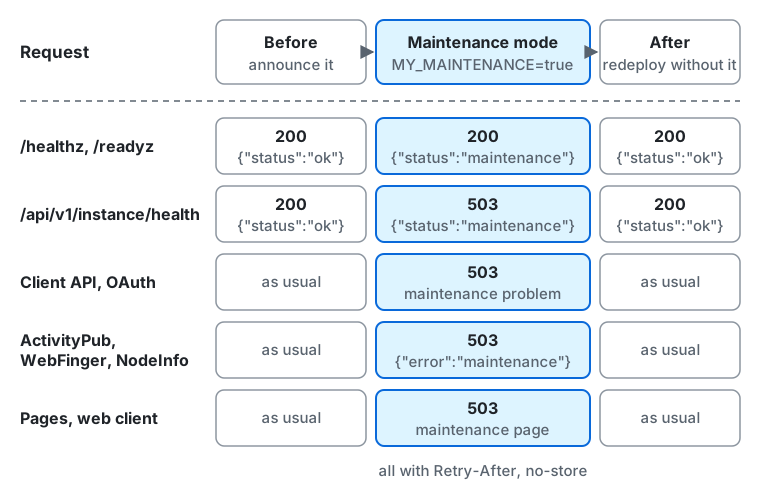
From left to right:
- Before, while you announce the maintenance, every request is answered as usual:
/healthz,/readyz, and/api/v1/instance/healthanswer200with{"status":"ok"}. - In the maintenance mode (
MY_MAINTENANCE=true):/healthz,/readyz,/health/live, and/health/readyanswer200with{"status":"maintenance"}./api/v1/instance/healthanswers503with{"status":"maintenance"}.- The rest of the client API and the OAuth endpoints that answer JSON get
503with the maintenance problem. - ActivityPub, WebFinger, and NodeInfo answer
503with{"error":"maintenance"}. - Pages and the web client get
503with the maintenance page. - Every response has
Retry-AfterandCache-Control: no-store.
- After you redeploy without
MY_MAINTENANCE, every request is answered as usual again.
Push queues
Section titled “Push queues”-
Cloud Tasks: pause the queue, which keeps accepting new tasks but stops delivering them, and resume it after the work. How many attempts a task has is the queue’s
retryConfig.maxAttempts.Terminal window gcloud tasks queues pause my-jobs --location=asia-northeast1gcloud tasks queues resume my-jobs --location=asia-northeast1Pause the Cloud Scheduler job of
/_internal/ticktoo (gcloud scheduler jobs pause/resume), or let its calls fail with503meanwhile. The jobs themselves are in the database: a task that used up its attempts loses only its signal, and the first tick after the work signals every job that is due again.
Per target
Section titled “Per target”The front ends’ error pages below answer the server’s errors with the exported page. Match only the errors of a server that is not running
(502 and 504, and the load balancer’s own 503 where it has no healthy backend), or turn the rule on only while my serve cannot run:
a rule on every 503 would also replace the maintenance mode’s own answers, such as the problem the client API and the web client read.
Cloud Run
Section titled “Cloud Run”Deploy a new revision with the variable, and remove it afterwards:
gcloud run services update my --region=asia-northeast1 \ --update-env-vars=MY_MAINTENANCE=true,MY_MAINTENANCE_UNTIL=2026-10-24T03:00:00Zgcloud run services update my --region=asia-northeast1 --remove-env-vars=MY_MAINTENANCE,MY_MAINTENANCE_UNTILWith the OpenTofu module, set it in the block instead, as settings = { maintenance = "true" }, and apply, since the next apply puts back
what the block says: Deploying on Cloud Run has it around an upgrade.
When Cloud Run is exposed directly, without a load balancer, there is nothing in front of it, so the maintenance mode is the only tool.
When my serve cannot run behind a global external Application Load Balancer: upload the exported index.html to a Cloud Storage bucket
added as a backend bucket, and add a custom error response policy that answers the backend’s 502 and 504 with it and overrideResponseCode: 503.
Only the global external Application Load Balancer has custom error responses (not the regional or classic ones), and the policy applies only
to responses from the backend, not to those Google Front End makes itself. This path cannot send Retry-After: the custom headers of the error source are not added.
# Part of the URL map (gcloud compute url-maps import).defaultCustomErrorResponsePolicy: errorService: https://www.googleapis.com/compute/v1/projects/<project>/global/backendBuckets/my-maintenance errorResponseRules: - matchResponseCodes: ["502", "504"] path: /index.html overrideResponseCode: 503AWS ECS
Section titled “AWS ECS”Register a revision of the service’s task definition with MY_MAINTENANCE=true in the container’s environment, update the service to it,
and do the same without the variable afterwards. With the OpenTofu module, set it in the block instead, as settings = { maintenance = "true" },
and apply, since the next apply puts back what the block says: around an upgrade, apply the mode, then the new release, then the block without it,
as Deploying on Cloud Run does.
When my serve cannot run behind CloudFront: upload the exported index.html to an S3 bucket that is a second origin
(the error page cannot come from the failing origin), and add custom error responses for 502 and 504 (and 503 only while my serve cannot run)
with ResponsePagePath: /maintenance/index.html and ResponseCode: 503.
CloudFront can add Retry-After through a response headers policy with a custom header, but the policy applies to every response of the cache behavior,
so attach it only for the maintenance and detach it afterwards.
An Application Load Balancer’s fixed response cannot carry the exported page: its body is at most 1,024 characters and it sets no headers such as Retry-After.
Use it only for a short text and the status:
{ "Type": "fixed-response", "FixedResponseConfig": { "StatusCode": "503", "ContentType": "text/plain", "MessageBody": "This server is under maintenance. Please try again later. / メンテナンス中です。しばらくしてからお試しください。" }}Without Retry-After, other servers retry on their own schedule, which the window above already allows for.
Docker Compose
Section titled “Docker Compose”deploy/docker/compose.yaml passes the settings of .env to the server, and takes MY_MAINTENANCE, MY_MAINTENANCE_MESSAGE, and MY_MAINTENANCE_UNTIL from the shell as well.
Set them and recreate the my service, then unset MY_MAINTENANCE and recreate it again after the work.
--no-deps keeps the one-off database services (upgrade-check, schema, upgrade) from running; an upgrade runs them (Upgrading):
MY_MAINTENANCE=true MY_MAINTENANCE_UNTIL=2026-10-24T03:00:00Z docker compose up -d --no-deps --force-recreate mydocker compose up -d --no-deps --force-recreate myWhen my serve cannot run behind nginx: serve the exported pages from a directory, pick one by Accept-Language,
and answer nginx’s own 502 and 504 (the server is down or does not answer) with it as a 503.
The maintenance mode’s own 503s pass through unchanged, since proxy_intercept_errors stays off.
map $http_accept_language $maintenance_page {    default  en.html;    ~*^ja    ja.html;}
server {    # ...    location / {        proxy_pass http://my:8080;        error_page 502 504 =503 /maintenance/$maintenance_page;    }    location /maintenance/ {        internal;        alias /srv/maintenance/;   # the -out directory of my maintenance export        add_header Retry-After 600 always;        add_header Cache-Control no-store always;    }}
microk8s (Kubernetes)
Section titled “microk8s (Kubernetes)”Set the variable on the Deployment, which rolls the pods out, and remove it afterwards:
microk8s kubectl set env deployment/my MY_MAINTENANCE=true MY_MAINTENANCE_UNTIL=2026-10-24T03:00:00Zmicrok8s kubectl rollout status deployment/mymicrok8s kubectl set env deployment/my MY_MAINTENANCE- MY_MAINTENANCE_UNTIL-The readiness probe on /readyz keeps passing in the maintenance mode, so the rollout completes and the Service keeps routing to the pods.
When my serve cannot run behind the NGINX Ingress Controller (the microk8s ingress add-on): serve the exported pages from a small
nginx Deployment (for example from a ConfigMap of index.html, en.html, and ja.html) and make it the custom default backend,
with the controller answering the server’s 502 and 504 from it (add 503 only while my serve cannot run):
metadata: annotations: nginx.ingress.kubernetes.io/custom-http-errors: "502,504" nginx.ingress.kubernetes.io/default-backend: my-maintenance # a Service in the same namespaceMonitoring during the maintenance
Section titled “Monitoring during the maintenance”/healthz,/readyz,/health/live, and/health/readystay200with{"status":"maintenance"}: load balancers and Kubernetes keep the instances./api/v1/instance/healthanswers503with{"status":"maintenance"}(Monitoring). Uptime monitors see the server as down unless they match the body or have a maintenance window; pause them or set the window.
For LLMs and coding agents:this page as Markdown, llms.txt,llms-full.txt, llms-small.txt