

Supporters (paid plans)
Only when an administrator enables it, local users can subscribe to a paid plan on the web and hold the role tied to the plan for as long as they keep paying. The program is off by default, and no plan or subscription entry point appears anywhere until it is enabled.
The deployment key payments is described in the configuration reference.
mycroblog does not guarantee compliance with any law, including Japan’s Act on Specified Commercial Transactions. Operators must check the content of the disclosure, the final confirmation screen, and the handling of consumption tax and invoices against the laws of their own country (see “What operators must check” below).
How a subscription works
Section titled “How a subscription works”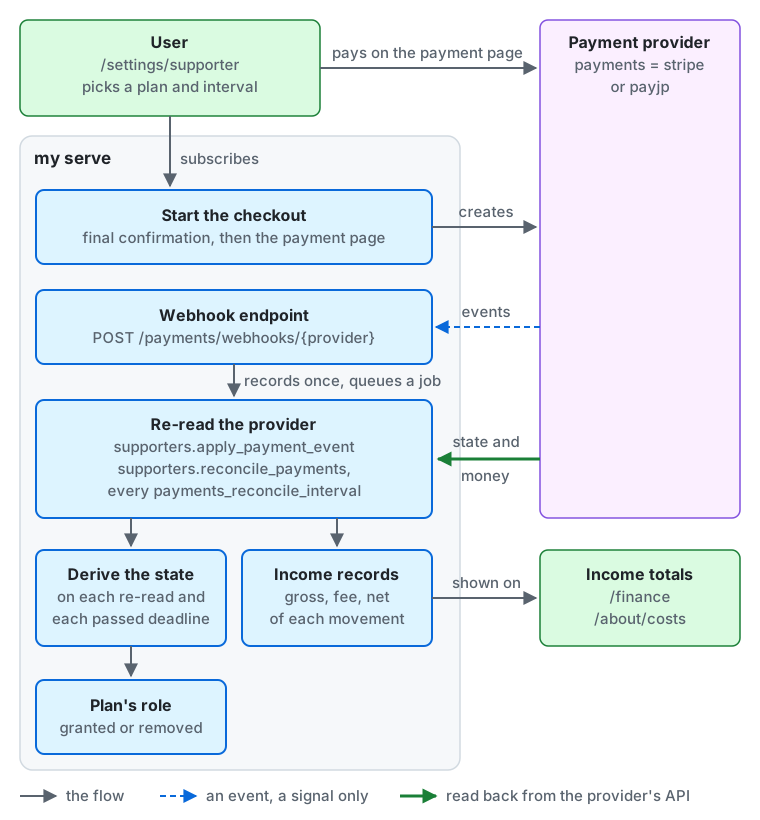
From the top of the diagram down:
- Subscribing. The user picks a plan and an interval (month or year) at
/settings/supporter. After the final confirmation, the server (my serve) creates the payment page at the provider set bypayments(stripeorpayjp), and the user pays on that page. - Events. The provider sends its events to the webhook endpoint
POST /payments/webhooks/{provider}, which records each event once and queues a job. An event is only a signal: the server never takes the state from its contents. - Reading back. The job
supporters.apply_payment_event, and the reconciliationsupporters.reconcile_paymentseverypayments_reconcile_interval, read the subscription and the money movements back from the provider’s API. The reconciliation repairs any event that did not arrive. - The state and the role. The server derives the state of the subscription from what it read and from each deadline that has passed (the 7-day grace period, for example), and grants or removes the plan’s role with it.
- Income. The money movements become the income records (gross amount, fee, and net of each payment, refund, chargeback, and fee). Their totals are shown on the finance screen (
/finance, to people withview_finance) and, as far asincome_visibilityallows, on/about/costs(see instance-settings.md).
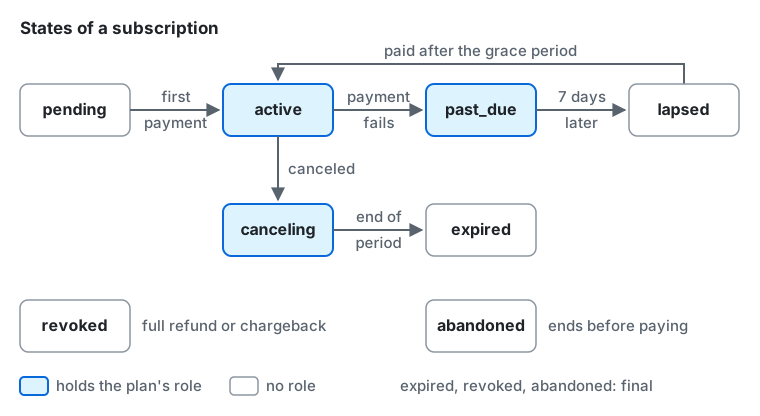
The states of a subscription, as the administration and my admin supporters subscriptions show them:
pending: started, not paid yet. No role. The first payment makes itactive, and a subscription that ends before its first payment becomesabandoned.active: paid. It holds the plan’s role, which each renewal keeps.past_due: a payment failed. It keeps the role for 7 days from the failure; a payment in that time makes itactiveagain.lapsed: 7 days passed after the failure. The role is removed. A payment after that makes itactiveagain, and the role comes back.canceling: canceled at the end of the period. It keeps the role until then, and becomesexpired.expired,revoked(a full refund or a chargeback), andabandonedare final and hold no role.
Enabling the program
Section titled “Enabling the program”- Set the deployment key
paymentsto your payment provider and pass the provider’s keys and webhook secret. Provider-specific steps are in payments-stripe.md and payments-payjp.md. The program cannot be enabled while the key isnone. - Configure the server to send email (
mailother thannone). Only users with a confirmed email address can subscribe, so a server that sends no email cannot enable the program. - On the “Commerce disclosure” page of “Terms and policies” in the administration (
/admin/documents/commerce-disclosure), write the commerce disclosure (for Japan, the notice required by the Act on Specified Commercial Transactions), the instance textcommerce_disclosure, in Markdown. It is published at/about/commerce, and you can register that URL in the provider’s dashboard. The program can be enabled with the text empty, but the administration shows a warning. - In “Roles” in the administration, create the role to tie to the plan. It must have no holders, only member permissions (group
member), and apositionlower than that of every staff role,moderatorincluded. The member permissions are the benefits a plan can give:create_custom_emojis(requesting custom emoji),view_finance(reading the server’s finances),start_voice_rooms(opening voice chat rooms while only permitted users may),create_invites(inviting people while only permitted users may, within the limits of member invites),keep_posts_longer(keeping posts past the maximum of the automatic deletion, and turning the automatic deletion off while the maximum is on),create_articles(writing articles while only permitted users may; see articles), andcreate_events(creating events while only permitted users may). When the subscription ends, the role goes, and so do the benefits: the invites the supporter made stop working until they subscribe again, and the maximum of the automatic deletion applies to their posts again after its grace period. - In “Supporters” in the administration (permission
manage_supporters), open the “Plans” page (/admin/supporters/plans) and choose “Create a plan”. Set the name, description, monthly price, discount for yearly payment, monthly limit on custom emoji creation (it resets on the first day of each month, UTC; see custom emoji), order, and visibility, and choose the role: the form lists the roles that can take a plan, or, without the permissionmanage_roles, asks for the role’s key. The server creates the monthly and yearly prices at the provider (do not create prices in the provider’s dashboard). Until the prices exist, the plan is “preparing” and accepts no subscriptions. - On the first page of “Supporters” (
/admin/supporters), choose “Turn the program on”. The page says what is missing while the program cannot be turned on, and shows the payment provider of the configuration, which only the configuration changes.
Once a plan exists, its role can no longer be granted or revoked by hand, and you change its permissions and position on the plan’s page (choose the plan on the “Plans” page). A higher plan (a larger order) sits above the roles of the lower plans, has all of their permissions, and has an emoji limit at least as high as theirs.
Setup at the provider
Section titled “Setup at the provider”- Deactivation: A subscriber cannot deactivate their account while the subscription is live, including one set to end at the end of its period. The settings screen leads them to the subscription, so that no one is charged while hidden.
- Retries (dunning): Seven days after a payment fails, the server removes the role (independently of the provider’s retries). Set the provider’s retry period to at least 7 days and make the final action “cancel”. When the payment succeeds after the grace period, the role comes back.
- Checking the provider: the “Payment provider” section of the first page of “Supporters” shows the provider’s mode (test or live), the last webhook delivery and the last reconciliation with why it stopped, and warns when the webhook looks unset. “Reconcile now” runs a reconciliation at once, at most once an hour.
- Customer portal: The portal is opened for payment methods and invoices. Turn off plan changes in the portal and allow only cancellation at the end of the period. Plan changes and cancellations are made on the server’s own screens.
- Refunds: The server refunds only a payment that bought nothing: a second subscription of one payment, and a payment for a pending subscription that closed. The provider’s guide (Stripe, PAY.JP) describes both. Every other refund is the operator’s, in the provider’s dashboard. A full refund and a chargeback remove the role at once and cancel the provider’s subscription at once. A partial refund does not remove the role. Winning a chargeback does not restore the role; the user subscribes again.
What users see
Section titled “What users see”- On the web, a user opens “Supporter plans” (
/settings/supporter), picks a plan and a payment interval (month or year), goes through a final confirmation screen, and moves on to the provider’s payment page. Card details never pass through this server. The payment page returns to this screen, which then reads the state of the subscription again. While subscribed, the user can change plans from the same screen (an upgrade and a switch from monthly to yearly apply once their prorated difference is paid, while a downgrade and a switch from yearly to monthly apply at the end of the period), cancel a scheduled change, cancel the subscription (the benefits last until the end of the period) and undo a cancellation, and open the customer portal for payment methods and invoices. When the payment of a change fails, or the card asks for authentication that the change cannot ask for, the plan stays and the user sees an error with the way to update the card. It does not start the grace period or send the failed-payment notification; a failed renewal still does. - Only users of this server who have a confirmed email address and an account that is neither suspended nor scheduled for deletion can subscribe. A user can hold one plan at a time.
/aboutshows a section with the public plans. In the Tauri app, the subscription screen, the plans section of/about, and the links to them do not appear. The benefits (badge, custom emoji, finance) work in the app too.
Notifications to subscribers
Section titled “Notifications to subscribers”Subscribers are told once about each of the following, by notification, Web Push, and email (to the primary address, in the user’s language). A subscriber whose account is deactivated is told nothing, then or on coming back.
- Payment failure (
supporter_payment_failed): when the subscription becomes past due (past_due). It gives the end of the grace period (in UTC in the email) and a link to the screen where the payment method can be fixed (/settings/supporter). - End of the subscription (
supporter_subscription_ended): when a subscription leaves a state with benefits because the grace period ran out, it expired, or it ended with a refund or a chargeback. The message states the reason. An end caused by deleting the account is not announced. - Plan retirement (
supporter_plan_retired): to the subscribers of a retired plan (except pending ones). It says the subscription will not renew. - Announcement of the end of the service (
supporter_service_closure): to the subscribers whose subscription was cancelled at the end of its period when the announcement began (except pending ones). It says the subscription will not renew. No new subscriptions are accepted during the announcement.
The text of Web Push and notifications does not lead to the payment screen. Only the web client puts a link to the subscription screen in a notification; the Tauri app does not. The links in emails open the web client in a browser.
my admin supporters performs part of the operations of the administration (my admin supporters -help).
status: whether the program is enabled, what it needs before it can be enabled (a provider, email), and the number of running subscriptions.enable,disable: enable and disable the program. Disabling is refused while any subscription is running.plans: the list of plans (retired ones included), with the number of preparing and retired plans and of subscriptions.subscriptions: the list of subscriptions (filter with-planand-state).cancel <subscription ID>cancels a subscription at once (no refund, except a payment for a pending subscription, which bought nothing).
Enabling, disabling, and cancelling are written to the audit log as CLI operations. Creating, changing, and retiring plans is done in the administration or through the admin API.
The list of members
Section titled “The list of members”- The instance setting
supporter_list_visibility(the “Supporter list” section of the first page of “Supporters”, for an administrator withmanage_settings; see instance-settings.md) chooses who can see the list of current subscribers (/about/supporters). With the defaultoff, neither the list nor the link from/aboutappears. - The list shows only the subscribers who chose to be listed on the “Badges and supporter list” page of their settings (nobody is listed by default). It shows the plan name and each person’s avatar, display name, and handle, and never amounts, whether the payment is monthly or yearly, dates, or counts.
- A choice to be listed stays when the subscriber changes plans, and disappears when the subscription ends (the role is removed). Someone who subscribes again starts unlisted.
- The list page and its API always send
noindex, noarchive, whatever the search-engine setting (search_indexing) says.
Changing prices, hiding plans, and retiring plans
Section titled “Changing prices, hiding plans, and retiring plans”- When you change the monthly price or the discount, the new price applies to new subscriptions and plan changes. Existing subscribers renew at their original price. There is no operation to move existing subscribers to a new price. To move them, create a new plan and retire the old one.
- Hiding a plan stops new subscriptions and changes to that plan. Existing subscriptions continue.
- Retiring a plan (“Retire the plan…” on its page, after typing its name) cannot be undone. Its subscriptions are cancelled at the end of their period (pending ones close at once and their payment page stops taking payments, with any payment that still arrives refunded; and ones whose payment is late beyond the grace period are cancelled at once). When the last subscription ends, the role goes back to an ordinary role.
Accounts and subscriptions
Section titled “Accounts and subscriptions”- Deleting an account and banning it (which schedules deletion) cancel its subscriptions at once, without a refund (a payment for a subscription still pending bought nothing, and is refunded). Reversing a ban does not restore the subscriptions.
- Suspending an account schedules cancellation at the end of the period. Lifting the suspension does not restore it automatically; the user cancels the cancellation before the end of the period or subscribes again.
- On the “Subscriptions” page of “Supporters” (
/admin/supporters/subscriptions, filtered by plan and state), an administrator can open one subscription and end it at once with “End now…”, after typing the subscriber’s handle (no refund, except a payment for a pending subscription, which bought nothing; it is written to the audit log).
Disabling the program and changing providers
Section titled “Disabling the program and changing providers”- The program cannot be disabled while any subscription is running (pending, active, scheduled to cancel, past due, or past the grace period). Retire every plan first and disable the program after the subscriptions have ended.
- To change providers, disable the program, change
payments, and enable the program again with the new provider. Existing subscribers subscribe again. While the configured provider differs from the one the program was enabled with, the server refuses new subscriptions and changes, and the administration shows a warning.
A tip is a one-time payment of a local user to the operation of the server, with nothing in return: it gives no role, badge, or other benefit, and the user sees only a thank-you once it is paid. Tips are off by default, need no plan, and go to the operator only: users cannot tip each other, and there are no goals, campaigns, or balances.
- What they need: the supporter program enabled on the configured provider, and a provider that takes one-time payments. The Tips section of the first page of the Supporters screen (permission
manage_supporters) shows whether users can tip now and warns when the provider takes no one-time payments;GET /api/v1/admin/supporter_tipsreports the same: whether your provider takes them (one_time_payments), the smallest and largest amount it allows in each currency (limits), and whether users may tip now (accepting). Stripe takes them (see Tips on Stripe), PAY.JP takes them on its hosted page of API v2 (see Tips on PAY.JP), and so does the test provider of the test builds. - Amounts: you choose 1 to 6 amounts in one currency, yen or US dollars, each from ¥100 to ¥100,000 or from US$1 to US$1,000 and at least the provider’s smallest one-time charge. Users pick one of them and never type an amount; the floor keeps a small tip from costing more than it brings when it is disputed.
- Enabling, changing, and disabling: in the Tips section, check Take tips, choose the currency, write the amounts one a line, and select Save the tips; clear the checkbox and save to disable them. The API is
PUT /api/v1/admin/supporter_tipswith{"enabled": true, "amounts": [{"amount": "500", "currency": "JPY"}, ...]}, or{"enabled": false}. Each change is written to the audit log (supporter_tips_enabled,supporter_tips_revised,supporter_tips_disabled). Disabling the supporter program stops the tips too; a checkout already open stays payable until it ends, and a payment on it is still recorded. - Who can tip: users of this server with a confirmed email address whose account is neither suspended nor scheduled for deletion. A subscription is not needed. The starts are limited to 5 an hour and 20 a day for each user, and to 100 an hour for the whole server, which stops card testing (trying stolen cards with small payments);
server_limit_reachedsays that the server’s limit was reached in the last hour. - Paying: users reach the tip page (
/settings/supporter/tip) from the Tips section of the about page, under the funding meter in the side column, and from the supporter plans page; a visitor who is not signed in is offered to sign in first. The page confirms the amount, that it is paid once at once, and that nothing is given in return, with a link to your commerce disclosure, before the provider’s page. The provider’s hosted page takes the one payment, by card only, and stays payable for an hour. A user has one open tip at most: starting another makes the earlier page unpayable first, and when the earlier one was paid in the meantime, the user is sent to its thank-you instead of paying twice. In the Tauri app, the tips do not appear. - Income: a paid tip is booked once in the month it was paid, whether the provider’s event, the return from the page, or the reconciliation reports it first. Its refunds and chargebacks are booked in their own month and subtract from the income. The administrators’ totals show the net of the subscriptions, the tips, and the other money of the provider’s account apart, and their list of money movements shows who paid each tip while the account exists. The public totals,
/finance, and/about/costsnever show an individual tip, the amount of the tips, or how many there were; withincome_visibilityset toplans, the list of plans ends with a “Tips” row without a number. - Refunds and disputes: the server has no refund operation for tips. Refund in the provider’s dashboard; a full refund, a chargeback, and a won dispute are recorded with the tip, and a partial refund only in the income. Each dispute also costs the provider’s dispute fee (with Stripe in Japan, ¥1,500 at the time of writing), whatever the tip’s amount.
- Accounts: deleting an account, and banning it, makes its open tip’s page unpayable. Erasing the account deletes its tips; their income stays, without the user. The provider keeps the payment and the email address that prefilled its page, which the server cannot delete: say so in your privacy policy.
The my.supporter.tip_checkouts metric counts the starts (started), the starts the limits refused (rate_limited), and the tips that were paid (paid) or ended unpaid (expired). Two examples of alerts:
- A surge of starts:
sum(rate(my_supporter_tip_checkouts_total{my_outcome=~"started|rate_limited"}[15m]))well above its usual level for 15 minutes. - Many starts that are never paid:
sum(increase(my_supporter_tip_checkouts_total{my_outcome="expired"}[1h])) / sum(increase(my_supporter_tip_checkouts_total{my_outcome="started"}[1h]))over 0.8 with at least 20 starts.
Whether a provider accepts tips is for you to check with it, under its review and its terms. Word every text of the tips, your commerce disclosure included, as a tip for running the service, never as a donation, a deduction, or a fundraiser for a cause.
What operators must check (not yet verified)
Section titled “What operators must check (not yet verified)”mycroblog does not judge any of these. Check them against the laws of your country and the terms of your provider.
- The items that the commerce disclosure must contain (the seller’s name, address, and phone number, the price, when and how to pay, when the service is provided, how to cancel, and so on) and how it must be published.
- That the final confirmation screen (Article 12-6 of the Act on Specified Commercial Transactions) shows the quantity, the price, the payment timing, the delivery timing, and the way to cancel and its effect, taking the provider’s payment page and the confirmation screen of
mytogether. - The handling of consumption tax, and whether you issue qualified invoices.
- For tips: whether your provider accepts tips for running a service (PAY.JP counts “tipping” among the goods it finds hard to approve, and Stripe in Japan may not accept them for a sole proprietor; ask the provider), what the commerce disclosure says of them (what a tip is, the amounts, that it is paid at once, that nothing is provided in return, and how refunds are handled), and their consumption tax and income tax, which a tax accountant should confirm.
For LLMs and coding agents:this page as Markdown, llms.txt,llms-full.txt, llms-small.txt