

Put a CDN in front of media delivery
A CDN in front of the server (Cloudflare, Google Cloud CDN, CloudFront and so on) can deliver media (/media/ and /media/proxy/).
Requests answered from the CDN cache use none of the server’s CPU or transfer.
This guide covers the setup where the server is the CDN’s origin (origin pull). It applies to every blob store: with blob = s3 or blob = gcs the server
reads the files from the private bucket and serves them under /media/ as with blob = fs, so the bucket is never the CDN’s origin.
When the whole server is behind the CDN, it can also refuse the requests that did not come through it.
Configure it
Section titled “Configure it”Set media_origin (MY_MEDIA_ORIGIN) to the CDN’s host name (for example media.example.org).
MY_MEDIA_ORIGIN=https://media.example.org- The value is an origin only (
scheme://host[:port]), with no path, query or trailing slash.httpsis required, andhttpis allowed only for loopback hosts such aslocalhost. An invalid value makes startup fail. - If it is not set, media is served from the server’s own origin (
https://{host}). - These URLs use this origin:
{media_origin}/media/...for local media and{media_origin}/media/proxy/...for the proxy of remote media. Every URL that the client API, ActivityPub (attachment,icon,image, and theiconof custom emoji) and link previews (OGP) emit is covered. - The web client’s Content-Security-Policy adds this origin to
img-srcandmedia-src. - Federated URIs, such as the
idof an ActivityPub object, stay underhttps://{host}/whatevermedia_originis. Only the place where files are served changes, not identifiers. - URLs are built each time they are read and are not stored in the database, so changing
media_originchanges the URLs of existing media too. Old URLs that remote servers stored keep working as long as/media/on the old origin keeps serving.
Point the CDN at the server
Section titled “Point the CDN at the server”- Make the origin (backend) the server’s public host name (
https://{host}). The CDN needs to fetch only paths under/media/from the server. - The server does not restrict
/media/and/media/proxy/by host name. It serves whateverHostthe CDN sends. /media/needs no authentication, and Authorized Fetch does not apply to it. The server answers unsigned requests from the CDN as they are.- For remote media (
/media/proxy/{id}/{variant}?sig=...),sigis part of the URL. Include the query string in the cache key. Otherwise URLs with different signatures share one entry. - Let the origin’s
Cache-Controldecide how long things are cached (do not override it at the CDN).
| Path | Cache-Control |
|---|---|
/media/{...} (local media) |
public, max-age=31536000, immutable (one year) |
/media/proxy/{...} (remote media) |
public, max-age= the number of seconds of the instance setting remote_media_cache_ttl_seconds |
Both are returned with Cross-Origin-Resource-Policy: cross-origin, so pages from other origins can read them.
On Cloud Run, ingress-cloudflare-media sets this up with OpenTofu: see Deploying on Cloud Run.
Who can open media URLs
Section titled “Who can open media URLs”Media URLs are not access-controlled. Anyone who has the URL of a file can open it, without signing in, whatever the visibility of the post that attaches it. This holds with or without a CDN, and includes the attachments of followers-only posts and direct messages and the proxy URLs of remote media.
- The URLs are hard to guess: a local file’s URL contains identifiers with a random part, and a proxy URL carries a signature. Knowing one URL does not reveal others.
- Anyone who saw a post can pass its media URLs on, and the URLs keep working for others.
- Responses are marked
public, so the CDN and any shared cache between the server and the reader may keep a copy (see the table above for how long). This is what lets a CDN serve media without asking the server.
Tell your users that a non-public post limits who sees the post, but does not stop someone who has the link of an attached file from opening the file.
Deletion and the cache
Section titled “Deletion and the cache”After you delete media, the CDN’s cache keeps it for max-age. A deleted file can stay visible for up to a year for local media, and up to remote_media_cache_ttl_seconds for the proxy.
The server does not purge the CDN’s cache. If something must disappear right after a deletion or a moderation action, purge it by hand in the CDN’s console or API.
Service Worker
Section titled “Service Worker”The web client’s Service Worker does not cache media from another origin and leaves it to the browser’s network handling, so only the CDN’s cache applies.
Refuse requests that did not come through the CDN
Section titled “Refuse requests that did not come through the CDN”A CDN protects the server only from the requests that pass through it. When the origin is also reachable on its own address, as *.run.app on Cloud Run with traffic from the internet is, anyone can call it directly, past the WAF and the cache.
If the CDN’s addresses are in trusted_proxies, a caller on the CDN’s own serverless platform (a Cloudflare Worker of their own, say) also connects from a trusted address and can choose the client IP that the rate limits see.
The three settings below close this. The CDN adds a secret header to every request it forwards, and the server answers 403 to any request without it, before it does anything else with the request.
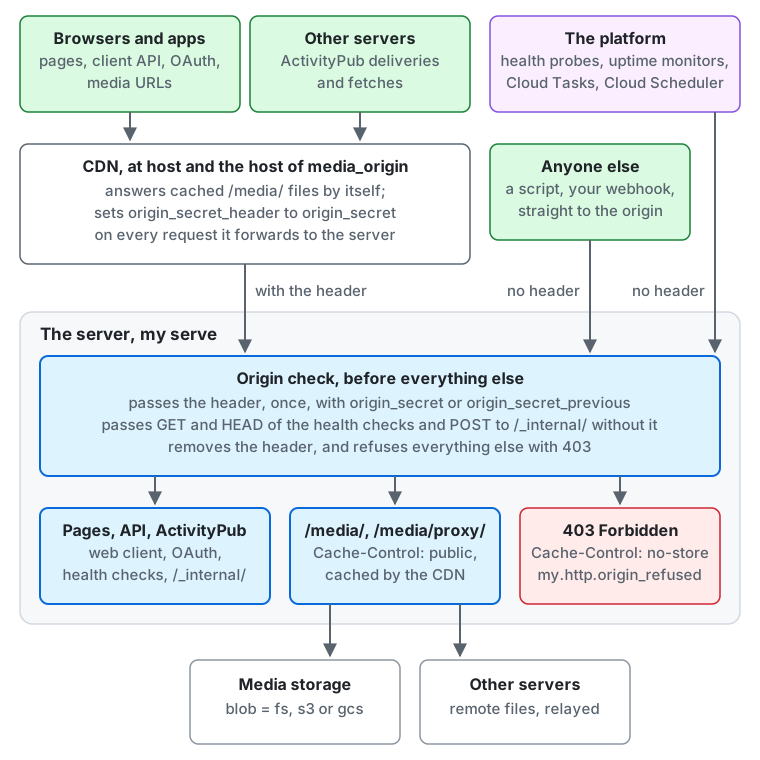
- Browsers and apps (pages, the client API, OAuth and media URLs) and other servers (ActivityPub deliveries and fetches)
reach the CDN at
hostand at the host ofmedia_origin. The CDN answers cached/media/files by itself, and setsorigin_secret_headertoorigin_secreton every request it forwards to the server. - The platform (health probes, uptime monitors, Cloud Tasks and Cloud Scheduler) and anyone else, such as a script or a webhook of your own, reach the server’s own address straight, without the header.
- The origin check runs first in the server. It passes a request that carries the header once with
origin_secretororigin_secret_previous, and, without the header, onlyGETandHEADof the health checks andPOSTto/_internal/. It removes the header from every request and refuses the rest with403. - A request that passes reaches the web client, the client API, OAuth, ActivityPub, the health checks or
/_internal/, or/media/and/media/proxy/, which read the media storage (blob = fs,s3orgcs) or relay the file of another server. A refused request gets403withCache-Control: no-storeand adds tomy.http.origin_refused.
Use it when the server has a public address that the platform cannot close to everything but the CDN. You do not need it when a firewall or the platform already limits who can connect, for example a server that listens only on a private network behind your load balancer.
Nor when that load balancer checks the CDN’s header itself and admits only the CDN’s addresses, as an AWS Application Load Balancer behind CloudFront can with a listener rule and the managed prefix list com.amazonaws.global.cloudfront.origin-facing. Then list both the load balancer’s and the CDN’s addresses in trusted_proxies, since each appends to X-Forwarded-For.
It cannot help when the platform’s own feature forwards the traffic and adds no header you control, such as a Cloud Run domain mapping. Only a CDN or load balancer that can add a request header does.
| Setting | What it holds |
|---|---|
origin_secret (MY_ORIGIN_SECRET) |
The value, at least 32 bytes of visible ASCII. A secret, read from the environment or MY_ORIGIN_SECRET_FILE |
origin_secret_header (MY_ORIGIN_SECRET_HEADER) |
The name of the header, your own. Required with origin_secret. Names that a CDN refuses to set or that the server or a proxy reads, such as those starting cf- or x-cf-, are invalid |
origin_secret_previous (MY_ORIGIN_SECRET_PREVIOUS) |
A second accepted value, only during a rotation |
With none of them set, nothing is checked and the server behaves as if this section did not exist.
What passes without the header
Section titled “What passes without the header”| Request | Why |
|---|---|
GET or HEAD of /healthz, /readyz, /health/live, /health/ready, /api/v1/instance/health |
The platform’s probes and uptime monitors call them directly |
POST to /_internal/ paths |
Cloud Tasks and Cloud Scheduler call them on the server’s own URL. They carry their own signed token |
Everything else needs the header, in the maintenance mode too: the web client and its assets, /media/, the client API, OAuth, and ActivityPub, including the deliveries of other servers.
So anything that calls the server directly by its own address, instead of through the CDN, is refused: a webhook of your own, a voice media server, a script. Point it at the CDN’s host name.
The metrics port (metrics_listen) is a separate listener that is not public and is not checked.
A request that does not carry the secret has no say in the rest of the handling, even when it passes: its client IP is the connection’s peer, whatever X-Forwarded-For says, and its traceparent and X-Request-Id are ignored.
Set it up
Section titled “Set it up”Every host name that the CDN forwards to the server needs the header: host, the host of media_origin, and a separate account_domain if the CDN serves it. A media host fronted by the same CDN sets it too, since /media/ is refused like everything else.
-
Generate the value, and choose a name that nothing else uses:
Terminal window openssl rand -hex 32 -
Set the header at the CDN first. The server ignores a header it does not know, so this step changes nothing yet.
- Cloudflare: a request header transform rule (Rules, then Transform Rules, then Modify Request Header), on every plan. Match all incoming requests of the zone, and choose Set static with your name and value. It replaces a value a client sent. A rule for only some host names leaves the others locked out.
- Amazon CloudFront: an origin custom header on the origin of each distribution. It also replaces a viewer’s value.
- Google Cloud load balancers: a custom request header on the backend service.
- Any other CDN or proxy: the header must be set, not appended, on every request to the server.
-
Set
MY_ORIGIN_SECRETandMY_ORIGIN_SECRET_HEADERand deploy.my config checkvalidates them and repeats what is checked, but it cannot see the CDN. -
Check from outside, with the address of the origin itself:
Terminal window curl -s -o /dev/null -w '%{http_code}\n' https://<host>/ # 200: through the CDNcurl -s -o /dev/null -w '%{http_code}\n' https://<origin address>/ # 403: directlycurl -s -o /dev/null -w '%{http_code}\n' https://<origin address>/health/live # 200: a health check
Also list the CDN’s addresses in trusted_proxies, or the server sees one client and every request shares the CDN’s rate limits; my config check warns about this.
A refused request gets the same 403 problem document as any other forbidden request, with Cache-Control: no-store, whichever way the header was wrong. Nothing in the answer names the header.
When everyone is locked out
Section titled “When everyone is locked out”A wrong setup refuses every request while the health checks stay 200, so the platform sees a healthy server and an uptime monitor of /health/live sees nothing. The signs are:
403for every page through the CDN.- The metric
my.http.origin_refusedrising while the requests ofhttp.server.request.durationstop. http requestlines in the log with the status403and nohttp.route. The log and the traces never hold the header, its name, or its value. A refused request creates no trace span.
To recover, deploy without the check: unset MY_ORIGIN_SECRET and MY_ORIGIN_SECRET_HEADER. Other servers retry their deliveries, but people could not reach the server meanwhile.
Then compare the name and the value at the CDN with the settings, check that the rule covers every host name, and set them again.
Rotate the value
Section titled “Rotate the value”The CDN and the server cannot change at the same moment, and every replica of the server restarts at its own pace, so with one accepted value a change would refuse the traffic for as long as they differ. The server therefore accepts two values during a rotation:
- Set
MY_ORIGIN_SECRETto the new value andMY_ORIGIN_SECRET_PREVIOUSto the old one, and deploy. Both values pass. - Change the value at the CDN, and wait for the change to reach all its locations.
- Unset
MY_ORIGIN_SECRET_PREVIOUSand deploy.my config checkwarns while it is set.
The name of the header does not rotate this way. To change it, repeat the setup with the server’s check off for a moment, or set the new name at the CDN alongside the old one before you deploy it.
For LLMs and coding agents:this page as Markdown, llms.txt,llms-full.txt, llms-small.txt