

Getting a token
How a third-party app gets an access token: a client, bot, integration, or command-line tool that uses the client API
(/api/v1) of an instance on behalf of its users. The operations of the API are in its OpenAPI document
(see Stability of the API).
The flow at a glance
Section titled “The flow at a glance”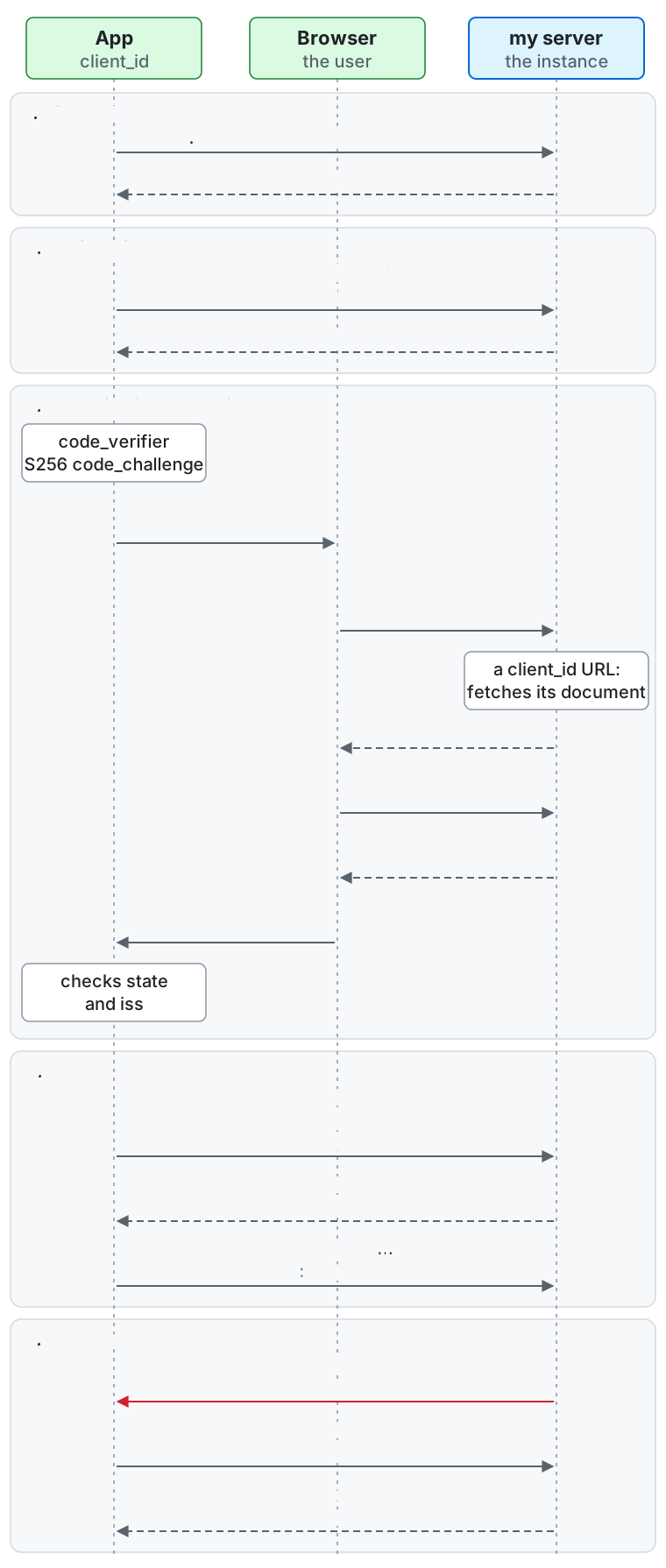
From the top of the diagram down, between the app, the user’s browser, and the server:
- Discovery. The app fetches
GET /.well-known/oauth-authorization-serverand learns the endpoints,scopes_supported, and the code challenge methodS256(Discovery). - Registration. The app gets a
client_id:POST /oauth/registeranswers201with one, or the app uses aclient_idURL, or an app a user registered (Registering an app). - Authorization code with PKCE. The app makes a
code_verifierand itsS256code_challenge, and opens the authorize URL in the browser. The browser sendsGET /oauth/authorizewithclient_id,redirect_uri,code_challengeandstate; for aclient_idURL, the server fetches its document. The server shows the sign-in and consent screen, the user approves (POST /oauth/authorize), and the server redirects with303toredirect_uriwithcode,stateandiss. The browser brings them to the app, which checksstateandiss(Authorization). - Token. The app sends
POST /oauth/tokenwithgrant_type=authorization_code, thecodeand thecode_verifier, gets anaccess_tokenfor 1 hour and arefresh_tokenfor 30 days, and calls/api/v1withAuthorization: Bearer <access_token>. - Refresh. When the access token has expired, the API answers
401witherror="invalid_token". The app sendsPOST /oauth/tokenwithgrant_type=refresh_tokenand gets a new access token and a new refresh token; the old ones stop working (Tokens).
Mastodon client libraries do not work as they are
Section titled “Mastodon client libraries do not work as they are”The client API is this project’s own. It is not the Mastodon client API:
- There is no
POST /api/v1/apps, and no other Mastodon endpoint. A client library for Mastodon, or for a server that copies its API, cannot register itself, authorize, or call this server. - An app gets a
client_idin one of three ways (below). Dynamic client registration is RFC 7591 atPOST /oauth/register. - Federation with Mastodon, Misskey and Pleroma servers is unaffected: this concerns only the API that apps call.
Any OAuth 2.0 client library that supports the authorization code grant with PKCE can authorize against the server.
Discovery
Section titled “Discovery”An instance publishes two documents, anonymous and cacheable for 5 minutes, so that a generic client can configure itself from the instance’s origin:
| URL | Document |
|---|---|
/.well-known/oauth-authorization-server |
Authorization server metadata (RFC 8414): the endpoints, scopes_supported (the scopes a third party may hold), code_challenge_methods_supported: ["S256"], grant_types_supported, and the supported client authentication methods. registration_endpoint is present only while dynamic registration is on, and client_id_metadata_document_supported only while metadata document clients are on. |
/.well-known/oauth-protected-resource |
Protected resource metadata (RFC 9728) of /api/v1. The WWW-Authenticate header of a 401 from the API carries its URL as resource_metadata. |
OpenID Connect is not offered: there are no ID tokens and no /.well-known/openid-configuration.
Registering an app
Section titled “Registering an app”There are three ways to get a client_id. An administrator can turn each of them off, so an instance may offer fewer
(the metadata shows which are on). Prefer them in this order.
1. Client ID Metadata Document (preferred)
Section titled “1. Client ID Metadata Document (preferred)”Use this for apps you distribute: a mobile app, a CLI, a web client. There is nothing to register. The client_id is an https URL
that serves a JSON document describing the app, and the server fetches it when the app starts an authorization.
It works on every instance that has the feature on, with no per-instance setup.
This is an IETF working-group draft
(draft-ietf-oauth-client-id-metadata-document), not an RFC.
{ "client_id": "https://app.example/oauth/client.json", "client_name": "Example", "client_uri": "https://app.example/", "logo_uri": "https://app.example/logo.png", "redirect_uris": ["https://app.example/oauth/callback", "com.example.app:/oauth/callback", "http://127.0.0.1/callback"], "scope": "read write:statuses"}client_idmust equal the URL of the document exactly. The URL ishttps, has a path, and has no fragment, userinfo, or./..segment; at most 2048 bytes.redirect_urisis required: 1 to 20 URIs, each of a form allowed by Redirect URIs.client_name(at most 200 characters; the host of theclient_idwhen absent),client_uriandlogo_uri(used only whenhttps) are shown on the consent screen.scopeis the most the app may ask for. Unknown scopes and first-party-only scopes are dropped. When absent, it is every scope a third party may hold.grant_types,response_typesandtoken_endpoint_auth_method, when present, must allow the authorization code grant andnone. The document must not containclient_secret: these clients are public and use PKCE.- Serve the document with a successful response and without redirects (the server does not follow them), at most 5 KB, with ordinary HTTP caching headers. The server reuses it for what the response allows (an hour when it says nothing, and at most 24 hours), does not cache failures, and fetches through an SSRF-guarded client. A fetch that fails makes the authorization request fail as an unknown client.
- An administrator can deny a host; a denied host’s documents are no longer fetched and the tokens of its clients stop working.
2. Registration by a user
Section titled “2. Registration by a user”Use this for a bot, an integration, or a script that you run yourself. A signed-in user registers the app in Settings → Apps → Your apps
(or with POST /api/v1/oauth_apps, scope write:accounts): a name, the site URL, redirect URIs, the most scope the app may ask for, and the type.
- A public app has no secret. A confidential app gets a
client_secret, shown once, when the app is registered or its secret reissued (POST /api/v1/oauth_apps/{id}/rotate_secret); reissuing invalidates the old secret at once. Only a hash is stored. - A confidential client authenticates at the token endpoint with
client_secret_basicorclient_secret_post. PKCE is required for it too. - The owner can edit and delete the app. A user keeps at most 25 apps, and registering is rate limited.
- Tokens for yourself: a registered app can issue an access token and a refresh token for its owner’s own account from the settings page (
POST /api/v1/oauth_apps/{id}/tokens), with no redirect and no consent screen. Choose the scopes there. They are ordinary tokens with the lifetimes below. A bot stores the rotated refresh token each time it refreshes. Only these tokens may hold a permission scope, which lets a service outside the server call the administration operations of one permission. - An instance can turn off registration by users (the setting
user_app_registration); apps already registered keep working.
3. Dynamic client registration (RFC 7591)
Section titled “3. Dynamic client registration (RFC 7591)”Use this for a generic tool that cannot publish a metadata document. POST /oauth/register takes no authentication and a JSON body:
curl -X POST https://my.example/oauth/register \ -H 'Content-Type: application/json' \ -d '{"client_name":"Example","redirect_uris":["http://127.0.0.1/callback"],"scope":"read"}'- The body is a single JSON object of at most 16 KiB; anything after the object, or a larger body, is rejected with
invalid_client_metadata. - Only public clients.
token_endpoint_auth_methoddefaults tonone; any other value is rejected withinvalid_client_metadata. - Accepted metadata:
client_name,client_uri,logo_uri,redirect_uris,scope,grant_types,response_types. Asoftware_statementis not accepted.scopeis narrowed to what a third party may hold; the response states the scope that was granted. - The answer is
201withclient_id,client_id_issued_atand the registered metadata. There is noclient_secretand no registration access token: RFC 7592 (reading, updating, deleting a registration) is not supported. To change an app, register again. - CORS allows any origin, because the endpoint takes no credentials. It answers
403(access_denied) when registration is turned off. - A client that never exchanges an authorization code within a day (by default), or has had no usable token and no use for 90 days (by default), is deleted by a periodic job.
Register again if your
client_idstops working (dynamic_client_unredeemed_retentionanddynamic_client_idle_retentionin the configuration reference).
Authorization
Section titled “Authorization”The server supports the authorization code grant (RFC 6749 §4.1) and the refresh token grant.
There is no client_credentials (every operation is done as a user; authorize a bot as the user of its bot account), no password, implicit, or device grant.
- Generate a
code_verifierand itsS256code_challenge(RFC 7636). PKCE withS256is required for every client.plainis refused. - Send the user’s browser to
GET /oauth/authorizewithresponse_type=code,client_id,redirect_uri,code_challenge,code_challenge_method=S256,scope(space-separated) andstate.redirect_uriis required and must match one of the app’s registered URIs exactly (a loopback URI ignores the port). Scopes beyond the app’s, a first-party-only scope, or a permission scope, are refused withinvalid_scoperather than dropped. Withoutscope, the request asks for the app’s scopes without its permission scopes. - The user signs in if needed and sees the consent screen. It is shown on every authorization; consent is not remembered.
It names the app, where it comes from, the site, the scopes in words, and the host of the redirect URI.
Every third-party app is labelled as one the server has not verified: the name and logo are the app’s own claim; only the host of a
client_idURL or the registering user is verified. An app that redirects to a private-use scheme or loopback address gets an extra warning, because another app could claim the same address. - The browser is redirected (
303) toredirect_uriwithcode,stateandiss(the server’s origin, RFC 9207: check it). The code is single use and valid for 60 seconds. POST /oauth/token(form-encoded) withgrant_type=authorization_code,code,redirect_uri,client_id,code_verifier(and the client secret for a confidential client) returnsaccess_token,refresh_token,token_type: Bearer,expires_inandscope.- Call the API with
Authorization: Bearer <access_token>. Cookies and query strings never authenticate.
Tokens
Section titled “Tokens”| Lifetime | Notes | |
|---|---|---|
| Authorization code | 60 seconds | Single use. |
Access token (my_at_...) |
1 hour | |
Refresh token (my_rt_...) |
30 days | Rotated on every use: each refresh_token grant returns a new access token and a new refresh token, and the old ones stop working. |
- Always store the newest refresh token. Presenting a refresh token that was already used (or revoked) revokes the whole token family, so serialize refreshes and do not send two at once; the user has to authorize again.
POST /oauth/revoke(RFC 7009) revokes a token and its whole family.- A user can list and revoke authorized apps in the settings of the first-party web client. An administrator can disable an app (and deny a metadata document host): its tokens stop working at once and the app cannot be authorized.
- A
401carriesWWW-Authenticate: Bearerwitherror="invalid_token"when the token is not valid; refresh it, or authorize again when that fails.
Redirect URIs and native apps
Section titled “Redirect URIs and native apps”Redirect URIs follow RFC 8252 and are matched exactly against the registered ones. Allowed:
| Form | Example | Notes |
|---|---|---|
Claimed https (Universal Links / App Links) |
https://app.example/oauth/callback |
Recommended: the OS verifies that the app owns the domain, so no other app can take the redirect. |
| Private-use URI scheme | com.example.app:/oauth/callback |
The scheme must be in reverse domain notation. Common web schemes (http, javascript, data, file, …) are refused. The OS does not verify who owns a scheme. |
| Loopback | http://127.0.0.1/callback, http://[::1]/callback |
The port is ignored when matching, so a CLI can listen on any free port. localhost is not accepted; use the IP literal. |
urn:ietf:wg:oauth:2.0:oob, fragments, and userinfo are refused.
For apps with a client_id URL or a dynamic registration, a private-use scheme or loopback address cannot prove who the app is,
so the consent screen warns the user about it. Prefer a claimed https redirect for an app that has one.
Scopes
Section titled “Scopes”Scopes are the same as the first-party web client’s, in two levels: broad scopes (read, write, follow, push) that grant the fine-grained ones under them
(read:statuses, write:statuses, …). Each operation in the OpenAPI document lists the scopes it needs; an app may ask for either level.
The list the instance offers is scopes_supported in the authorization server metadata.
A request without enough scope gets 403 with WWW-Authenticate: Bearer error="insufficient_scope".
- Direct messages: reading posts of the
directvisibility needsread:direct(the broadreadincludes it). A token with onlyread:statusesnever receives adirectpost in a timeline, thread, notification, bookmark or favourite list, post source, or list of quotes, the user’s own posts included. Sending a direct post needs onlywrite:statuses. A token withoutread:directcannot favourite, bookmark, boost, react to, or vote on adirectpost: it gets404and nothing changes. It can still take back what the user already had on one, such as a favourite: that takes effect and the answer is the same404, which shows nothing of the post. - Voice chat rooms: opening a room with a start post (
post) publishes a post, so it needswrite:statusesbesideswrite:voice; without it the request gets403/api/v1/problems/insufficient-scope. - Reading through a write scope: a write scope reads the post it acts on, because the response to an action on a post (favouriting it with
write:favourites, for example) is the whole post, followers-only content included. - First-party-only scopes:
admin,admin:read,admin:writeandwrite:supportersare never granted to a third-party app, not even throughwrite. Asking for one at the authorization endpoint is aninvalid_scopeerror. Administration is done from the first-party web client, or with a permission scope on a token that the user issues to themselves. - First-party-only operations: the operations below are marked
x-first-party-onlyin the OpenAPI document and answer a third-party token with403/api/v1/problems/first-party-only, whatever its scopes.- Account security: password, two-factor authentication, passkeys, deleting the account, the list of signed-in browsers, and the list of authorized apps.
- Data exports, including the CSV exports, and data imports. Read the posts and lists an app needs through their own scopes instead.
- Changing and previewing the automatic deletion of posts. Reading the policy stays under
read:accounts. - Adding and removing aliases, which consent to another account moving its followers here. Reading them stays under
read:accounts. - Listing, creating, and revoking the user’s own invites (
listOwnInvites,createOwnInvite,revokeOwnInvite). The staff’s invites are administration operations. - The user’s list of moderation actions, and appeals.
- Moderator notifications: a third-party token never gets the moderator notifications (
admin_report,admin_appeal,admin_sign_up, and the like), whatever the user’s roles. They are left out of the notification list, the stream, and the unread count of the marker, and they are dropped from the alerts of the app’s Web Push subscription. - Relationships: a
Relationshipholds only the fields of the lists the token’s scopes cover, and the others are absent.following,requested,followed_by,requested_by,show_boosts, andnotifyneedread:followsorwrite:follows;blockingneedsread:blocksorwrite:blocks;mutingandmuting_notificationsneedread:mutesorwrite:mutes. An absent field says nothing about the state, so do not read it as false.
Permission scopes
Section titled “Permission scopes”A permission scope is admin: and the name of a permission of the user’s roles: admin:manage_invites, admin:manage_finance, and so on.
It lets a service outside the server, such as one that hands out invites or records costs, call the administration operations of that permission and nothing else.
- Which operations: each administration operation names the permission it needs with
x-permissionin the OpenAPI document. A token with that permission’s scope may call it in place ofadmin:readoradmin:write. An operation withoutx-permission, or one that needs another permission, answers403/api/v1/problems/insufficient-scope. A webhook such a token sets up may subscribe only to the events that its permission scopes show. - The roles still decide: every call needs the permission on the user’s roles, as for the web client. A token whose user loses the permission gets
403/api/v1/problems/missing-permission. - Only for yourself: only a token you issue to yourself may hold a permission scope, and only for a permission your roles hold when you issue it. Add the scope to the app’s scopes first. No authorization request may ask for one, so a consent screen never asks a staff member for administration.
- Which permissions: every moderation and server administration permission has one, except
manage_roles,manage_oauth_apps,manage_login_recovery,manage_login_providers, andmanage_service_closure. The member permissions have none.scopes_supporteddoes not list them, because no authorization request may ask for them. - Give a service its own account: sign up an account for the service, give it a role with only the permissions the service needs, register an app with that account, and issue the token from it. The service then refreshes the token and stores the new refresh token each time, since the access token lasts one hour.
Next: paging, errors, rate limits, and the event stream. To skip the plumbing, use the client libraries.
For LLMs and coding agents:this page as Markdown, llms.txt,llms-full.txt, llms-small.txt